
Subclip
Subclip is an AI video editor that effortlessly adds subtitles, edits, and dubs in multiple languages, streamlining your creative process.
Visit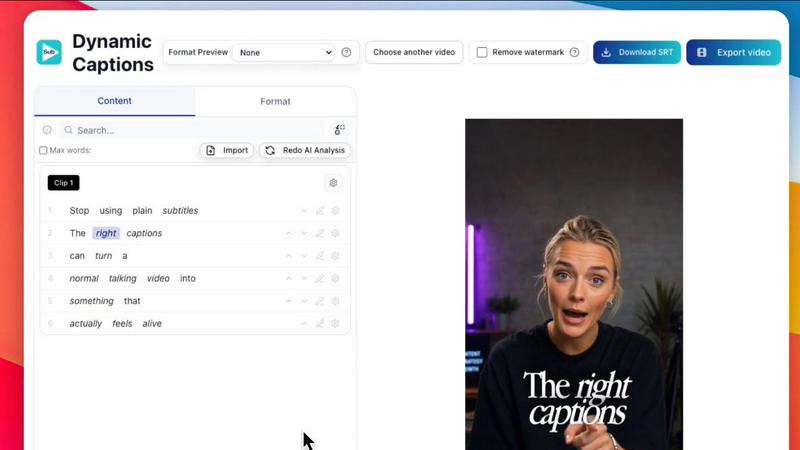
About Subclip
Subclip is an innovative AI-powered video editing tool designed for creators, marketers, and educators who demand speed and efficiency in their video production processes. This platform revolutionizes the traditional video editing workflow by allowing users to edit videos as simply as they would a text document. With features such as easy transcript dragging, voice cloning, and one-click removal of silences and filler words, Subclip significantly streamlines the editing process. It supports a variety of functionalities including transcription, subtitle generation, and multi-language dubbing, making it a perfect fit for YouTubers, podcasters, course creators, and content teams. By simplifying complex editing tasks through intuitive, AI-driven features, Subclip not only saves time but also enhances productivity, enabling users to focus more on creativity and less on technical hurdles. With freemium pricing and affordable paid plans, it offers accessibility for all levels of creators.
Features of Subclip
AI Clipping
Subclip's AI Clipping feature automatically identifies high-energy segments and viral clips within your footage. This intelligent engine scans for punchlines and key emotional shifts, selecting the best moments for you. This means you can turn lengthy videos into concise, engaging clips in minutes, saving you both time and effort.
Voice Cloning
With Subclip's voice cloning technology, you can effortlessly re-record parts of your video using your own voice. This feature allows you to maintain your original tone and emotion while dubbing your content into over 21 languages. The result is a seamless and authentic multilingual experience for your audience.
One-Click Unlimited Captions
Say goodbye to tedious manual captioning with Subclip's one-click unlimited captions feature. Generate subtitles in over 48 languages instantly, allowing you to cater to a global audience. You can also customize the text and formatting of your captions, ensuring they align perfectly with your brand's style.
Enhanced Audio Processing
Subclip enhances your audio quality by automatically removing background noise, cleaning up echo, and improving vocal clarity with just one click. This feature is essential for podcasters and video creators who want their audio to sound studio-ready, ensuring a professional finish to every project.
Use Cases of Subclip
For Creators & Podcasters
Subclip empowers creators and podcasters to clip long-form videos effortlessly, enabling them to maximize viewership with minimal effort. By transforming lengthy footage into shorter, engaging clips, content creators can attract more viewers and keep their audience engaged.
For Coaches
Coaches can utilize Subclip to dub their recorded videos or courses into over 20 languages using their own voice. This feature not only broadens their reach but also enhances the learning experience for their diverse audience, allowing them to connect on a more personal level.
For Vloggers
Vloggers can streamline their editing process with Subclip by adding captions, B-Roll, and audio enhancements in just a few clicks. This allows them to create polished content without the usual complexity associated with traditional video editing tools.
For Agencies & Freelancers
Agencies and freelancers can leverage Subclip's unlimited transcription and export capabilities to increase their output significantly. With streamlined collaboration features, teams can work together more effectively, reducing the time spent on editing and allowing for more projects to be completed in less time.
Frequently Asked Questions
How does Subclip handle transcription?
Subclip automatically generates accurate transcriptions in over 48 languages, allowing you to create captions and subtitles effortlessly. This feature eliminates the need for manual transcription, saving you valuable time.
Can I collaborate with my team using Subclip?
Yes, Subclip is designed for collaboration. You can share projects with your team, collect feedback, and work together in a single workspace, enhancing productivity and ensuring everyone is aligned throughout the editing process.
Is it easy to export my videos from Subclip?
Absolutely. With Subclip, you can instantly export your edited videos to various platforms, including YouTube and X (Twitter), without the hassle of uploading and downloading files multiple times.
What makes Subclip different from traditional video editors?
Subclip combines AI-driven features with a user-friendly interface, allowing you to edit videos more intuitively than traditional tools. This results in faster editing times, reduced complexity, and a streamlined workflow that enhances your overall productivity.
Similar to Subclip

Oravaa
Oravaa is the elite enterprise Voice AI platform that autonomously handles phone tasks with human-like conversations, replacing your manual workflows.

Hush Touch | Voice-to-Text for MacOS
Hush Touch delivers intelligent offline voice-to-text dictation for Mac, learning your vocabulary for flawless.

Glossa
Glossa delivers real-time AI translation of sermons in 100+ languages, bridging language gaps for your international.

Bantr: Offline & Unlimited TTS for Mac
Bantr delivers unlimited, private text-to-speech entirely on your Mac.

KaiCalls
KaiCalls is your 24/7 AI voice agent that effortlessly captures and qualifies leads, ensuring instant customer.

Vowen
Vowen transforms your voice into a private AI command center for dictation and seamless workflow automation.

Bargou One
Bargou One elevates your creativity by seamlessly creating, translating, and transcribing across diverse media.