
EditTextImage
EditTextImage seamlessly replaces text in any image online preserving font, color, and perspective in seconds without Photoshop.
Visit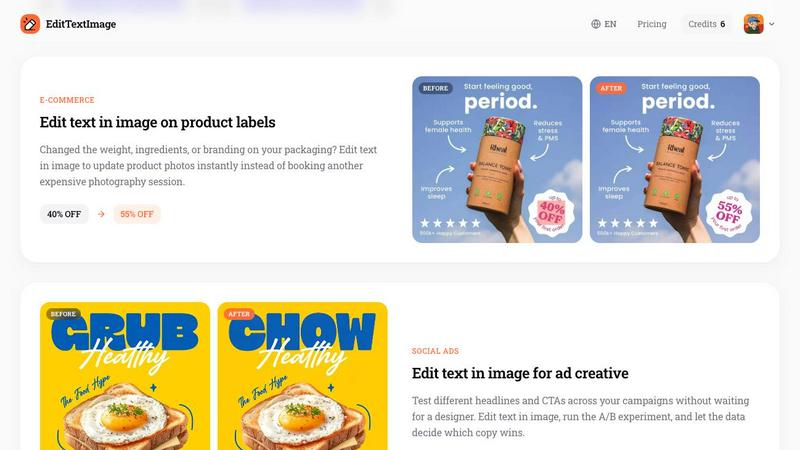
About EditTextImage
EditTextImage is a premium AI-powered online tool engineered for professionals who demand pixel-perfect text replacement in images without the need for traditional design software. This elite solution allows users to edit text in any image file, whether a poster, screenshot, product label, or document, while flawlessly preserving the original font, color, size, perspective, drop shadow, and background layout. Built for marketers, designers, content creators, e-commerce managers, and localization specialists, EditTextImage eliminates the frustration of lost source design files. Instead of reinventing the wheel with expensive software subscriptions or waiting for a designer, users simply upload an image, input the original text and the replacement text, and the advanced AI samples the typography directly from the pixels. This means even premium paid fonts, hand-lettered scripts, and complex lighting effects are replicated with surgical precision. The tool delivers 2K-resolution results in approximately ten seconds, making it the fastest and most reliable text editing solution available. With a generous free credit to start and no credit card required, EditTextImage offers an exclusive, no-commitment entry point into a workflow that saves hundreds of dollars per project. It is the definitive choice for anyone who values speed, accuracy, and professional-grade output without the overhead of complex design ecosystems.
Features of EditTextImage
AI-Powered Font Sampling from Pixels
The core technology behind EditTextImage is its sophisticated AI that analyzes the existing text pixels within your image to sample the exact typeface, weight, and styling. Unlike conventional tools that require you to have the font file installed or that resort to generic replacements, this feature extracts every nuance of the typography, including serifs, kerning, and stroke thickness. It then applies the same characteristics to the new text, ensuring that the replacement blends seamlessly into the original design. This capability is especially critical for paid or proprietary fonts that cannot be legally or practically sourced, as well as for handwritten or custom lettering that no standard library can replicate.
Pixel-Perfect Preservation of Layout and Effects
EditTextImage goes beyond simple font matching by maintaining the entire visual context around the text. The AI intelligently reconstructs the background, lighting, drop shadows, gradients, and perspective distortions that were originally present. When you edit text in an image, every pixel surrounding the changed area remains exactly where it should be, with no smearing, warping, or color bleeding. This ensures that the final output looks as if the original design file was reopened and edited natively, making it indistinguishable from a professionally retouched asset.
Lightning-Fast Processing with 2K Output
Time is a premium commodity, and EditTextImage respects that by delivering results in an average of just twelve seconds. The entire process from upload to download is streamlined for maximum efficiency. Despite the speed, the output resolution is a crisp 2K, suitable for high-resolution displays, print materials, and professional presentations. This combination of rapid turnaround and high fidelity makes the tool indispensable for urgent revisions, last-minute changes, and high-volume production workflows where every second counts.
No Software Installation or Subscription Required
EditTextImage operates entirely in the cloud through a web browser, eliminating the need for any downloads, installations, or bulky software suites. There are no recurring subscription fees, no hidden costs, and no complex licensing agreements. Users simply purchase a one-time credit pack for a flat fee, and credits never expire. This model provides unparalleled flexibility for freelancers, small businesses, and large enterprises alike, allowing them to pay only for what they use without being locked into a monthly commitment. The first edit is free, offering a risk-free evaluation of the tool's elite capabilities.
Use Cases of EditTextImage
Document Fixes and Corrections
Professionals frequently encounter scenarios where a scanned document or a screenshot of a contract contains a typo, an incorrect date, or an outdated invoice number, but the original source file is lost. EditTextImage solves this problem instantly. Users can upload the document image, specify the erroneous text, and input the corrected version. The AI seamlessly replaces the text while preserving the exact font, color, and layout of the document. This is invaluable for legal professionals, accountants, and administrative staff who need to maintain the integrity of official paperwork without the ability to modify the original digital file.
Posters and Flyer Updates for Events
Event organizers often face last-minute changes, such as a venue relocation, a speaker cancellation, or a date shift, after promotional materials have already been printed or distributed digitally. Instead of incurring the cost and delay of redesigning the entire flyer, EditTextImage allows for a quick, targeted edit directly on the finished poster. The tool ensures that the new text matches the original design perfectly, so the updated material looks professionally produced. This saves hundreds of dollars in design fees and eliminates the stress of tight deadlines for galas, conferences, and community events.
App Store Screenshot Localization
For mobile app developers and marketers, localizing App Store screenshots into multiple languages is a critical but labor-intensive task. Rebuilding each UI mockup for every language is impractical and expensive. EditTextImage streamlines this process by allowing users to swap text on existing screenshots instantly. The AI preserves the exact UI layout, button styles, and system fonts, ensuring that the localized screenshots appear native and polished. This accelerates the go-to-market strategy for international launches and ensures consistent branding across all regional App Store listings.
E-Commerce Product Label and Packaging Updates
E-commerce businesses frequently need to update product labels due to changes in weight, ingredients, pricing, or branding. Booking a new photography session for every minor update is cost-prohibitive. EditTextImage enables merchants to edit text directly on product photos, updating promotional stickers, ingredient lists, or price tags with pixel-perfect accuracy. This capability allows for rapid A/B testing of headlines and offers on social ads, as well as quick revisions for seasonal campaigns, all without waiting for a designer or scheduling a reshoot.
Frequently Asked Questions
What file formats does EditTextImage support?
EditTextImage accepts PNG, JPEG, and WebP image files up to a maximum size of 10 MB. These formats cover the vast majority of use cases for posters, screenshots, product photos, and documents. For optimal results, upload images with clear, legible text and sufficient resolution. The tool processes the image and outputs a high-quality 2K result in the same format.
How does the AI handle complex text effects like shadows and gradients?
The AI in EditTextImage is specifically trained to analyze and replicate complex visual effects surrounding the original text. It samples the drop shadow parameters, gradient angles, lighting highlights, and perspective distortions from the pixels. When the replacement text is generated, these effects are applied with mathematical precision, ensuring that the new text inherits the same visual treatment. This allows for seamless integration even on heavily styled designs like movie posters or branded packaging.
Is there a limit on the number of edits I can perform?
EditTextImage offers a flexible credit-based system. You receive one free credit upon signing in with Google, with no credit card required. After that, you can purchase a one-time pack of 30 credits for a flat fee of $9.90. Credits never expire, so you can use them at your own pace. There are no recurring subscription fees, and you are never locked into a monthly plan. This pay-as-you-go model is ideal for both sporadic users and high-volume professionals.
Can I use EditTextImage for commercial projects?
Yes, commercial use is included with every edit. Whether you are updating product labels for an e-commerce store, localizing screenshots for an app launch, or creating ad creative for a marketing campaign, you have full rights to use the edited images for commercial purposes. However, you must confirm that you own or are licensed to edit the original image, and the edit must not be intended to deceive a third party. Violations of the acceptable use policy, such as tampering with official documents or IDs, will result in account termination.
Pricing of EditTextImage
EditTextImage operates on a simple, transparent pricing model designed for professionals who value efficiency without recurring costs. New users receive one free credit immediately upon signing in with Google, with no credit card required. This allows you to experience the full capability of the tool risk-free. For ongoing use, a one-time purchase of 30 credits is available for a flat fee of $9.90. There are no subscription fees, no hidden charges, and no expiration dates on credits. This pricing structure makes EditTextImage an exceptionally cost-effective solution compared to monthly subscriptions for design software, which can cost hundreds of dollars per year. Whether you need a single edit or a batch of updates, you pay only for what you use, with the assurance that your credits will remain valid indefinitely.
Similar to EditTextImage
Sprite Sheet Maker
A free browser-based toolkit for creating, cutting, converting, and previewing sprite sheet animations.
AIEnhancer
Enhance photos, create images, and generate videos with flexible AI workflows, creative effects, production-tested models, and a shared asset library.


Flux Lora
Explore Flux LoRA workflows online, with a roadmap for model discovery, generation, and guided training.
Vynzo
AI image and video studio. Generate from a prompt, animate stills, swap faces, restyle clips and edit — one credit pool, no subscription.

ProfileLoom
ProfileLoom turns one photo into platform-ready AI portraits for professional, social, and creator profiles, with presets and built-in editing.
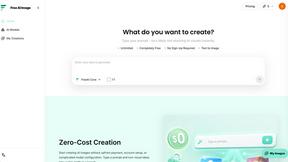
Free AI Image
Free AI Image is a free text-to-image AI generator for creating clean visual drafts from prompts with no sign-up required.
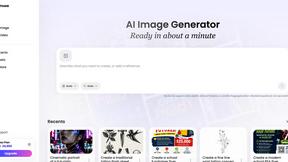
Vismuse
Create polished AI images and videos from prompts or references for social posts, ads, flyers, album covers, and campaigns.