
Easymotion - AI Motion Graphic Generator
Easymotion transforms static images, data, and ideas into professional motion graphics and map animations in minutes through simple AI-powered chat.
VisitPublished on:
June 15, 2026
Pricing:
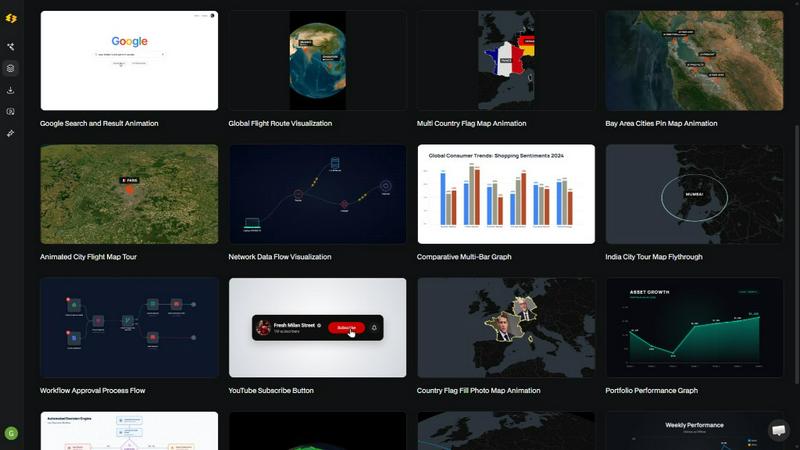
About Easymotion - AI Motion Graphic Generator
Easymotion is a premier AI-powered motion graphics generator and map animation platform, meticulously engineered for discerning content creators, video editors, founders, and marketing professionals who demand exceptional visual storytelling without the burden of complex, time-intensive editing software. This elite tool transforms raw ideas, static files, and mundane data into polished, professional animated videos through an intuitive, conversational interface. By eliminating the steep learning curve and tedious keyframe manipulation associated with industry-standard tools like After Effects, Easymotion empowers users to produce high-caliber motion graphics in under five minutes. The platform excels at generating a diverse array of content, including SaaS product promos, dynamic flowcharts, animated data charts, UI explainers, interactive quizzes, and compelling geographic narratives through its specialized map animation capabilities. Whether starting from a simple text prompt, an uploaded image, a spreadsheet, or a PDF, Easymotion intelligently converts these inputs into animation-ready scenes. After generation, users retain complete creative control, refining every aspect from color palettes and pacing to labels and layout through simple chat commands. A premium template library provides a foundation of proven motion graphics layouts, allowing for rapid customization to align with specific brand guidelines, campaign objectives, or client requirements. Final exports are available in MP4 or MOV formats, including videos with transparent alpha channels for seamless integration into any professional editing workflow, making it the definitive solution for creating reusable, high-impact video assets directly within a browser. Easymotion is built for those who value speed, quality, and efficiency, serving over 10,000 creators who have transformed their video production process.
Features of Easymotion - AI Motion Graphic Generator
AI-Powered Conversational Creation
Easymotion redefines the creative process by allowing users to generate sophisticated motion graphics through simple, natural language prompts. Instead of navigating complex timelines and effect panels, you simply describe your vision, such as "Design a social media promo video for my coffee shop," and the AI interprets your request, constructing a complete animated sequence with appropriate pacing, transitions, and visual elements. This feature dramatically reduces the time from concept to finished video, enabling rapid ideation and iteration. The AI understands context and can generate a wide variety of styles, from corporate explainers to vibrant social media clips, making professional-grade animation accessible to anyone, regardless of their technical background in motion design.
Static Image to Dynamic Animation
This feature breathes life into static visuals, transforming a single uploaded image into a captivating animated scene with fluid motion. Users can upload logos, product shots, infographics, or any other static design, and Easymotion's AI intelligently analyzes the composition to apply subtle yet powerful animations. Elements can be made to float, pan, zoom, or fade, creating a sense of depth and engagement that static images cannot achieve. This capability is ideal for repurposing existing brand assets into dynamic video content for social media, presentations, and websites, effectively turning a library of static graphics into a portfolio of animated assets without any manual keyframing.
Data-to-Video Conversion
Easymotion eliminates the drudgery of manually animating data by allowing users to upload CSV or XLSX files and instantly receive beautifully animated charts and graphs. The AI automatically parses the data, selects the most appropriate visualization format, such as bar charts, line graphs, or pie charts, and generates a polished, animated sequence. Users can then customize the colors, labels, and pacing to match their brand or narrative. This feature is a game-changer for data storytellers, analysts, and marketers who need to present complex information in an engaging, easy-to-understand format that stops the scroll and drives higher engagement on platforms like LinkedIn, YouTube, and Instagram.
Specialized Map Animation Engine
Easymotion features a dedicated engine for creating stunning geographic animations, including flight routes, location pins, flag fill highlights, and comprehensive geographic storytelling sequences. Users can generate globe fly-throughs, multi-stop travel route maps, and global data visualizations with a simple prompt or by uploading geographic data. The engine handles the complex rendering of map tiles, path animations, and transitions, producing professional-quality map videos that are perfect for travel content, logistics presentations, and news segments. This specialized capability sets Easymotion apart as the premier tool for creators who need to visualize spatial information with cinematic flair.
Use Cases of Easymotion - AI Motion Graphic Generator
Accelerated Social Media Content Creation
For social media managers and content creators, Easymotion is an indispensable tool for rapidly producing high-quality, platform-optimized videos. By simply describing a concept, users can generate animated promos, product teasers, and engaging stories in the exact dimensions required for YouTube (16:9), TikTok and Instagram Reels (9:16), square posts (1:1), and feed-friendly vertical formats (4:5). The ability to iterate on designs and export with transparent backgrounds allows for seamless integration into existing content calendars and editing workflows, enabling teams to increase their posting frequency and maintain a consistent, professional aesthetic without bottlenecking on design resources.
Dynamic Data Storytelling for Business Intelligence
Analysts, consultants, and data scientists can leverage Easymotion to transform static quarterly reports and complex datasets into compelling animated narratives. Instead of presenting static charts in a slide deck, users can upload their data and generate a dynamic video that walks viewers through key trends, comparisons, and insights. Animated bar charts, line graphs, and pie charts make data more memorable and impactful, leading to a reported 5x increase in engagement over static images. This use case is particularly powerful for executive presentations, investor pitches, and thought leadership content on platforms like LinkedIn, where visual storytelling can significantly enhance message retention.
Streamlined Workflow for Video Editors and Agencies
Professional video editors and creative agencies can integrate Easymotion into their production pipeline to dramatically accelerate their workflow. The platform serves as a rapid prototyping tool for motion graphics, allowing editors to generate complex animations, such as animated logos, lower thirds, and map sequences, in minutes. The ability to export with an alpha channel (transparent background) means these assets can be dropped directly into Premiere Pro, Final Cut Pro, or DaVinci Resolve without any additional rendering or keying. This capability allows editors to take on more projects, deliver faster turnaround times, and focus their creative energy on higher-level storytelling, resulting in a reported 3x increase in project output.
Branded Campaigns for Marketing Teams
Marketing teams can use Easymotion to take full ownership of their video production, bypassing the lengthy back-and-forth with external designers or internal bottlenecks. From creating animated explainer videos for a new product launch to generating a series of branded social media ads, the platform enables marketers to create, iterate, and ship campaigns on the same day. The premium template library provides a starting point that can be customized with brand colors, logos, and messaging, ensuring consistency across all assets. This self-service capability empowers marketing teams to be more agile, test different creative concepts quickly, and respond to market trends with unprecedented speed.
Frequently Asked Questions
What is Easymotion and how does it work?
Easymotion is an AI-powered motion graphics generator that allows you to create professional animated videos simply by chatting. It works in three steps: first, you describe the animation you want in plain English or upload a file like an image or spreadsheet. Second, the AI generates the animation, and you can refine it using chat commands to adjust colors, timing, map styles, or assets. Finally, you export your completed video as an MP4 or with a transparent background for use in other editing software. The AI handles all the complex keyframes and animation curves, making professional motion graphics accessible to everyone.
What types of videos can I create with Easymotion?
You can create a wide variety of motion graphics, including SaaS product promos, animated flowcharts, data visualizations like bar charts and line graphs, UI explainers, and interactive quizzes. The platform also specializes in map animations, such as flight routes, location pins, flag fill highlights, and globe fly-throughs. Additionally, you can animate static images, turn spreadsheets into dynamic visuals, and create optimized videos for social media platforms like YouTube, TikTok, and Instagram in various aspect ratios. The platform's versatility makes it suitable for almost any visual storytelling need.
How is Easymotion different from using After Effects?
The primary difference is speed and accessibility. After Effects is a powerful but complex tool that requires significant time and expertise to learn, involving manual keyframing, expressions, and a steep learning curve. Easymotion uses AI to automate this entire process. You can generate a polished animation in under five minutes by simply describing what you want, whereas the same task in After Effects could take hours or even days. Easymotion is designed for users who need professional results quickly without becoming motion graphics experts, making it ideal for fast-paced marketing teams, solo creators, and busy professionals.
Can I customize the animations generated by Easymotion?
Yes, extensive customization is a core feature of Easymotion. After the AI generates your initial animation, you can edit it by chatting with the AI to refine colors, pacing, labels, layout, and overall visual style. You can also upload your own logos and assets to ensure brand consistency. The platform includes a premium template library that can be fully customized to match your specific campaign or client needs. This level of control ensures that while the AI does the heavy lifting, you retain complete creative ownership over the final product, allowing you to create unique, on-brand videos every time.
Similar to Easymotion - AI Motion Graphic Generator
ImageAgent
Create and edit AI images through conversation, using text or reference images and refining results in chat.

CloneWebsite
Clone any webpage pixel-perfect, export HTML/CSS/ZIP or React/Vue components.

GenX
All-in-one AI workspace to generate images, videos, and audio with multiple leading AI models.

AiAgeFilter
Free AI age filter: upload an adult portrait, add 10-40 years, meet your older self. No app needed.

AppIconGenerator
Generate iOS and Android app icons from any image and export all platform sizes for free.

picttool
Create and edit images with a collection of easy-to-use AI tools

Bloom
An adaptive AI tutor that turns topics or your materials into courses, lessons, and answers tailored to how you learn.

YIX
AI image and video generation, photo editing, restoration and free prompt tools in one browser studio.