
UseSkill
UseSkill automates your work with elite, pre-built AI workflows seamlessly integrating over 100 essential business.
Visit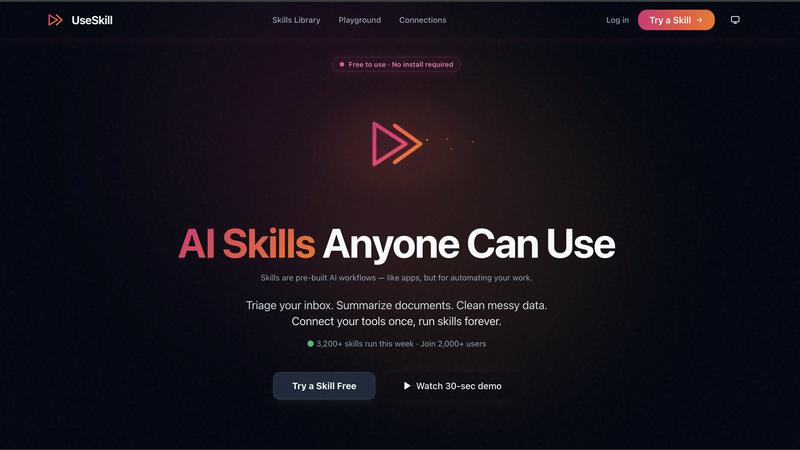
About UseSkill
UseSkill is the definitive AI skills library meticulously designed for elite professionals who demand precision, speed, and seamless integration in their workflows. Unlike generic AI chatbots, UseSkill offers a curated suite of pre-built, expert-tested workflows that connect directly to essential business tools, making it an indispensable asset for teams across Sales, Support, Engineering, Data, and Marketing. This platform addresses the inefficiencies of manual prompting, inconsistent AI outputs, and the tedious copy-paste cycle that many professionals face daily. UseSkill’s core value proposition lies in its ability to deliver radical operational efficiency, enabling users to generate consistent, high-quality results in just 30 seconds rather than the traditional 30 minutes required for repetitive explanations. By securely linking your CRM, productivity suites, DevOps platforms, and data warehouses via OAuth 2.0, you unlock a permanent library of automation. With over 100 enterprise-grade integrations, including Salesforce, HubSpot, Gmail, Slack, Snowflake, and Jira, UseSkill acts as the intelligent connective tissue of your tech stack, executing complex cross-application tasks with a single click. Trusted by thousands of users who run tens of thousands of skills weekly, it signifies the next evolution of work, where AI is not merely a conversational novelty but a reliable and integrated execution engine.
Features of UseSkill
Comprehensive Skills Library
UseSkill boasts a robust library of pre-built AI workflows that are expertly crafted to cater to various business functions. This extensive collection allows users to automate tasks efficiently, ensuring that they can focus on strategic initiatives rather than mundane activities.
Seamless Integrations
With over 100 integrations, UseSkill connects effortlessly with essential business applications such as Salesforce, HubSpot, Slack, and Jira. This feature streamlines the workflow process, enabling users to execute complex operations across multiple platforms without the need for extensive technical setup.
Rapid Execution
One of the standout features of UseSkill is its ability to deliver results in approximately 30 seconds. Users can select a skill, connect their tools, and receive organized outputs almost instantaneously, transforming the way they approach routine tasks and decision-making.
Enterprise-Ready Security
UseSkill employs OAuth 2.0 security protocols to ensure that user data remains private and secure. By authenticating directly with applications, it guarantees that sensitive information is never stored or misused, reinforcing trust among its user base.
Use Cases of UseSkill
Enhanced Sales Efficiency
Sales teams can leverage UseSkill to enrich leads from various sources, synchronize CRM data effortlessly, and automate outreach efforts. This integrated approach reduces the time spent on administrative tasks, allowing sales professionals to focus on closing deals faster.
Streamlined Support Operations
Customer support teams can utilize UseSkill to triage incoming requests, manage ticketing systems, and automate responses. This capability enhances response times and improves customer satisfaction by ensuring that inquiries are addressed promptly.
Optimized Data Management
Data teams can benefit from UseSkill's ability to clean and organize messy datasets, automate reporting processes, and sync data across different platforms. This functionality streamlines data workflows, enabling teams to make informed decisions based on accurate information.
Efficient Marketing Campaigns
Marketing teams can harness UseSkill to automate campaign management tasks, analyze engagement metrics, and generate personalized content. By automating these processes, marketing professionals can enhance their strategies and drive better engagement with their target audiences.
Frequently Asked Questions
How does UseSkill ensure data security?
UseSkill employs OAuth 2.0 for secure authentication, ensuring that user passwords are never shared with the platform. Furthermore, data is processed in real time but not stored, maintaining the privacy and integrity of user information.
What types of integrations does UseSkill support?
UseSkill supports over 100 integrations with major business tools, including Salesforce, HubSpot, Gmail, Slack, Snowflake, and Jira. This extensive range ensures that users can connect their existing tech stack seamlessly.
Can UseSkill be customized for specific business needs?
While UseSkill offers a library of pre-built workflows, organizations can tailor their usage to fit unique requirements by selecting and combining various skills, ensuring that the platform meets specific operational demands.
Is there a limit to the number of skills I can run?
No, there is no limit to the number of skills you can run with UseSkill. Users can execute multiple skills as needed, providing the flexibility to manage a variety of tasks and workflows efficiently.
Explore more in this category:
Similar to UseSkill

@fuck.it - email with attitude
Private email. Pure. Secure. Exclusive. No ads, no tracking, no data selling. GDPR compliant, EU-hosted.
Nijia
Understand your Mac's disk usage, find large files, and reclaim space. Try all Nijia features free for 7 days.

Novastart
Apps and files on an infinite canvas where people and AI agents work together.

Panzoe
Panzoe is an all-in-one AI platform for personal productivity, business automation, AI assistants, content creation, and custom AI solutions.

AI Email Filter
AI Email Filter sorts incoming mail into folders using plain-language prompts you write. Works with any IMAP mailbox; bring your own LLM if you want.
