
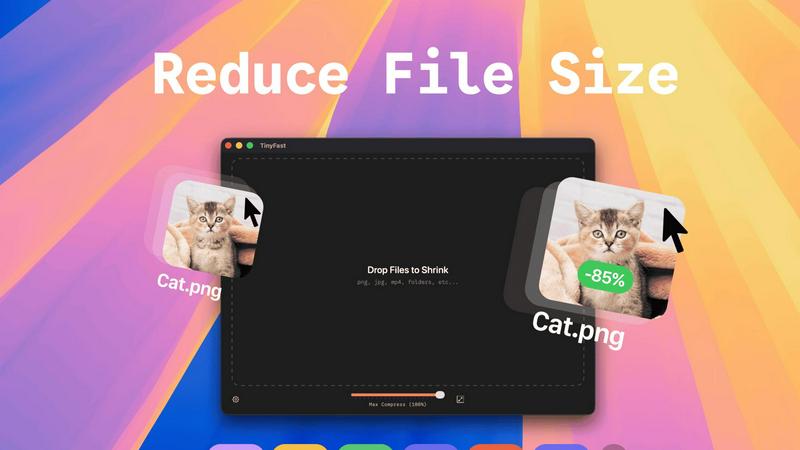
About TinyFast
TinyFast is the definitive, elite-grade file compression solution engineered exclusively for macOS. It transcends the limitations of common online tools by executing all compression processes locally on your machine. This application is meticulously crafted for discerning professionals—developers, designers, content creators, and corporate users—who refuse to compromise on speed, security, or workflow integrity. By eliminating the need to upload sensitive files to external servers, TinyFast guarantees absolute privacy and confidentiality, ensuring your proprietary assets, from design mockups and source code to confidential documents and client media, never leave the sanctity of your device. Its core value proposition is uncompromising efficiency: a drag-and-drop interface that delivers blazing-fast, batch compression for a vast array of formats including images (PNG, JPEG, WebP, SVG), videos (MP4, MOV), documents (PDF), and code files (JS, CSS, JSON). For over 500 elite Mac users, TinyFast is not merely a tool; it is an essential pillar of a streamlined, secure, and superior creative and technical workflow.
Features of TinyFast
100% Local & Private Compression
TinyFast operates with a paramount commitment to privacy. Every compression task is executed entirely on your Mac's hardware. Your files are never uploaded to the cloud, transmitted over the internet, or stored on unknown third-party servers. This architecture is designed for professionals handling NDAs, confidential client work, or proprietary assets, providing total peace of mind and security by design.
Blazing-Fast Batch Processing
Experience unparalleled efficiency with batch compression capabilities. Simply drag and drop entire folders filled with images, videos, or documents, and TinyFast will process them all in a single, swift operation. This feature saves hours of manual labor, allowing you to optimize large project libraries or client deliveries in seconds, not minutes, leveraging optimized native engines built for raw speed.
Universal File Format Support
TinyFast is engineered as a universal shrinking tool, supporting an extensive range of professional file types. This includes modern image formats like WebP and HEIC, standard videos such as MP4 and MOV, essential documents like PDFs, and even development assets including JavaScript, CSS, and JSON files. It consolidates multiple niche tools into one powerful, always-available application on your desktop.
Intelligent Resolution Resizing
Beyond simple compression, TinyFast offers granular control over your media's dimensions. You can automatically resize the resolution of your images and videos during the compression process. This is ideal for preparing assets for web publication, email attachments, or client previews where specific dimension requirements are as critical as file size reduction.
Use Cases of TinyFast
Securing Confidential Client Deliverables
Agencies and freelancers can compress final project files—such as high-resolution design proofs, edited video reels, or architectural PDFs—without ever risking a data breach. By keeping everything local, TinyFast ensures sensitive client assets remain completely confidential throughout the final optimization stage before secure delivery.
Optimizing Web Application Assets
Developers can rapidly shrink entire directories of website assets, including PNG icons, JPEG images, CSS, and JavaScript files, directly on their development machine. This streamlines the build process, reduces page load times for testing and deployment, and maintains the integrity of the codebase without using external web services.
Preparing Mass Media for Digital Publication
Content creators, marketers, and social media managers can batch-process hundreds of photos and videos from a campaign shoot. TinyFast allows them to quickly reduce file sizes for faster uploading to CMS platforms or social networks while optionally resizing resolutions to meet specific platform guidelines, all while preserving original quality.
Streamlining Archival and Storage Workflows
Professionals managing large digital archives, such as photographers, videographers, or researchers, can use TinyFast to compress legacy projects and backups. This significantly frees up valuable local and cloud storage space by reducing file sizes en masse, making archives more manageable without the latency and security concerns of online tools.
Frequently Asked Questions
How does TinyFast ensure my files are private?
TinyFast is built on a fundamental principle of local-first processing. The application runs entirely on your Mac. When you drag a file into TinyFast, all compression algorithms are executed using your computer's processor and memory. No data is ever sent over the internet to an external server. Your files, including highly confidential ones, physically never leave your device, ensuring maximum privacy.
What file formats does TinyFast support?
TinyFast supports a comprehensive suite of professional formats. For images, it handles PNG, JPG/JPEG, TIFF, HEIC, WebP, GIF, BMP, and SVG. For video, it compresses MP4, MOV, and M4V files. It also processes documents like PDF and DOCX, code files including JS, CSS, and JSON, and audio files like MP3. This makes it a universal tool for most compression needs.
Can I compress multiple files at once?
Absolutely. TinyFast features powerful batch processing. You can drag and drop not just individual files, but entire folders containing multiple files and even mixed formats. The application will automatically detect and compress all supported files within the folder in one go, outputting the optimized versions efficiently, which is a massive time-saver for large projects.
Is there a free version available?
Yes, TinyFast offers a Free Forever plan that allows you to compress up to five files per day with access to all core features. This is perfect for testing the application or for users with light, intermittent needs. For unlimited usage, you can upgrade to a one-time Lifetime purchase or a flexible monthly subscription, both of which remove the daily file limit.
Pricing of TinyFast
TinyFast offers straightforward, tiered pricing to suit different user needs. The Free plan allows compression of up to 5 files per day with full feature access, ideal for trial or light use. For professionals requiring unlimited power, the Lifetime Plan is available for a single payment of €17.99, granting unlimited local compressions, lifetime updates, and support for future development. Alternatively, the Monthly Subscription is €2.99 per month (after a 3-day trial) and also provides unlimited compressions and feature access. All paid plans ensure your workflow remains fast, private, and unhindered.
Explore more in this category:
Similar to TinyFast

DebutPin
Indie product playground — ship, and collect pins

Egmatic
No-code 2D game editor: visual node logic, drag-and-drop scenes, live preview. Exports to Windows, macOS, Linux, Android, iOS, Web.

Kody Tools
Free collection of online developer utilities, code formatters, and digital converters designed to streamline your daily workflow.

Tally Counter
Online tally counter for tracking attendance, workouts, inventory, visitors, sports scores, habits, and everyday counting tasks.

Sprite Sheet Maker
A free browser-based toolkit for creating, cutting, converting, and previewing sprite sheet animations.
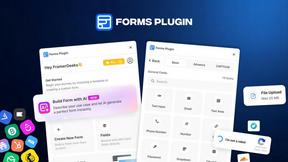
Forms Plugin
The #1 Native Form Builder Plugin for Framer - No Code, No Embeds, No External Platforms.

AIEnhancer
Enhance photos, create images, and generate videos with flexible AI workflows, creative effects, production-tested models, and a shared asset library.

Product Launch Checklist
A free launch checklist for SaaS, apps, AI tools and more. Every step says why it matters and when you can skip it.