
qtrl
qtrl gives QA teams one place to manage test cases and run plain-language browser checks with AI agents under human review.
Visit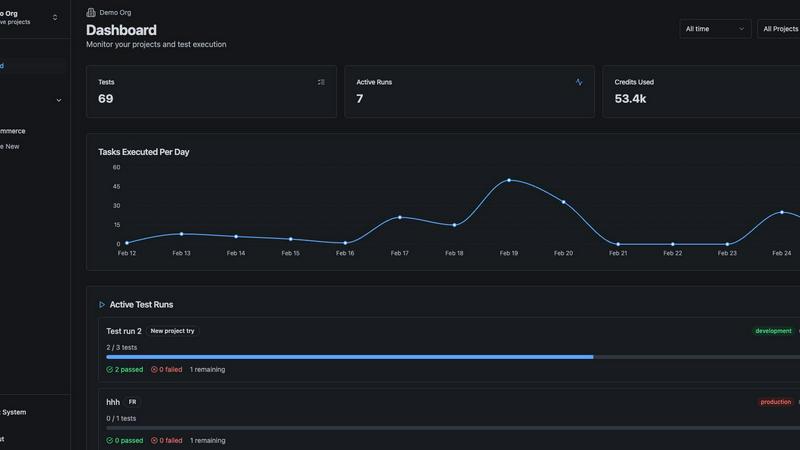
About qtrl
For teams whose test cases are scattered across documents or tools, qtrl provides folders, versions, runs, and history in a shared test management workflow. Tests can be manual or agent-run. To automate a case, a tester writes the expected flow in ordinary language; qtrl opens a real browser in the selected environment and records what it does.
Reviewers can inspect screenshots, video, and step-by-step logs before accepting results or suggested tests. This keeps automation observable, although the review stage means teams still need people to decide what counts as an approved test. qtrl can build knowledge of an application from exploration, prior runs, and issues, and use that context to help write tests or answer questions. Teams can connect tests to Jira, trigger runs from a pipeline, or use the REST API to script workflows.
Features of qtrl
- Manual and automated tests managed together
- Folders, versions, run reports, and change history
- Browser execution guided by plain-language instructions
- Human approval for results and AI-generated suggestions
Use Cases of qtrl
- Give a QA team a structured home for test cases and run history
- Convert trusted manual checks into browser-based agent runs
- Inspect why a test passed or failed using captured run evidence
- Coordinate test work with Jira and CI/CD pipelines
Frequently Asked Questions
Can manual and automated cases share a suite?
Yes. qtrl says manual and automated tests live side by side with history on changes.
How are agent runs reviewed?
Runs include screenshots, video, and logs, and results or suggestions wait for approval.
Can qtrl use application context when drafting tests?
It builds a knowledge base from app exploration, test runs, and issues to help write tests.
Explore more in this category:
Similar to qtrl
AI Sandbox Hunt
Research AI agent sandboxes and related compute with provider filters, dated pricing, workload estimates, and a published scoring method.

RemoveObjectFromPhoto
A browser-based AI photo eraser for removing distractions with a brush selection and reviewing the reconstructed area before download.

StackLedge
StackLedge is a curated directory for discovering reviewed AI, SaaS and automation tools, with dedicated categories for n8n workflows and services.

Leadmatically
Leadmatically identifies potential buyers in social discussions and helps businesses reach out through connected accounts or email.

GigUp
GigUp tracks Upwork searches for freelancers, scoring new jobs against public profiles and sending alerts for jobs worth reviewing.

Phantom Blade Zero Saves
Use verified Phantom Blade Zero PC save downloads and a browser editor, with guides to the game's Steam save files.


Memorable Contact
AI-powered personal CRM that remembers where you met people and what you talked about. Save, scan, and recall contacts instantly.