
Online Keyboard Shortcuts
Master every essential keyboard shortcut across Windows, macOS, and Linux with OnlineShortcuts.com for elite, effortless productivity.
Visit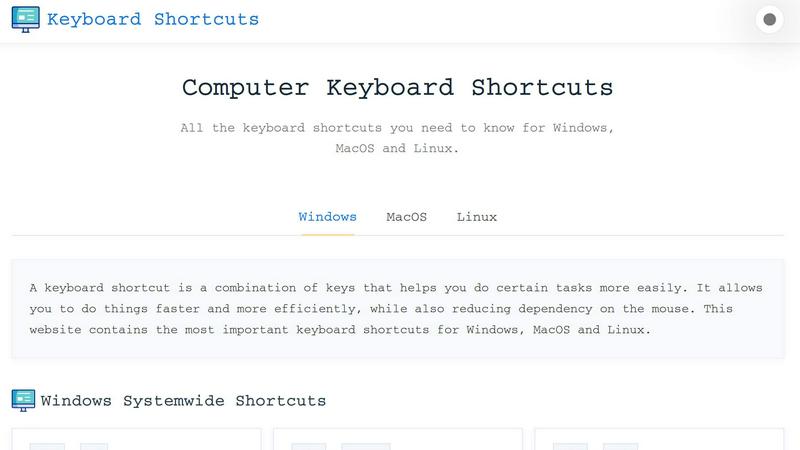
About Online Keyboard Shortcuts
Online Keyboard Shortcuts is the definitive, elite resource for mastering keyboard shortcuts across Windows, MacOS, and Linux operating systems. Hosted at OnlineShortcuts.com, this premium platform curates the most essential and powerful key combinations that transform how users interact with their computers. The product is designed for professionals, power users, developers, and anyone who demands peak efficiency from their digital workflow. By eliminating dependency on mouse navigation, Online Keyboard Shortcuts empowers users to execute commands, navigate applications, and manage system functions with lightning speed and precision. The value proposition is clear: reduce repetitive strain, accelerate task completion, and unlock a level of productivity that casual computer users never experience. The platform covers system-wide shortcuts, operating system-specific key combinations like Windows Key shortcuts, and application-specific hotkeys for Command Prompt, File Explorer, text editing, virtual desktops, and web browsers. Each shortcut is meticulously organized and clearly presented, ensuring users can quickly locate the exact command they need. Whether you are a software engineer, data analyst, graphic designer, or executive, mastering these shortcuts elevates your computing fluency. Online Keyboard Shortcuts also offers downloadable cheat sheets in PDF and PNG formats, allowing users to keep their most vital shortcuts accessible offline. This is not merely a list of keys; it is a comprehensive system for reclaiming control over your digital environment.
Features of Online Keyboard Shortcuts
Comprehensive Cross-Platform Coverage
Online Keyboard Shortcuts delivers an exhaustive collection of shortcuts for Windows, MacOS, and Linux, ensuring no user is left behind. The platform systematically categorizes shortcuts by operating system, making it effortless to find the exact command for your environment. From basic window management like Alt + F4 to advanced virtual desktop controls like Win + Ctrl + D, every essential combination is documented with crystal clarity. This feature eliminates the need to memorize fragmented lists from multiple sources, providing a single, authoritative reference for all major platforms.
Categorized Shortcut Organization
The platform elevates usability by grouping shortcuts into logical, intuitive categories such as Systemwide Shortcuts, Windows Key Shortcuts, Application Specific Shortcuts, and more. This structure allows users to navigate directly to the relevant section without sifting through irrelevant commands. For example, text editing shortcuts like Ctrl + B for bold and Ctrl + I for italicize are grouped together, while web browser shortcuts like Ctrl + T for new tabs and Ctrl + Shift + T for reopening closed tabs are in their own dedicated section. This thoughtful organization saves time and reduces cognitive load.
Downloadable Cheat Sheets in Multiple Formats
Understanding that memorization requires reinforcement, Online Keyboard Shortcuts offers premium downloadable resources. Users can instantly download a complete PDF cheat sheet or high-resolution PNG images in both dark and light themes. These files are designed for quick reference, whether printed and taped to a monitor, saved to a mobile device, or embedded in a digital workspace. This feature transforms the website from a temporary resource into a permanent productivity tool that users can access offline at any moment.
Application-Specific Shortcut Libraries
Beyond general operating system commands, the platform dives deep into application-specific shortcuts for critical tools. Users gain access to specialized lists for Command Prompt, File Explorer, text editing programs, virtual desktop management, and major web browsers. Each application section is curated to include only the most impactful shortcuts, such as F7 for command history in Command Prompt or Win + Z for Snap Layouts in Windows. This targeted approach ensures users can optimize their workflow within the specific software they use daily.
Use Cases of Online Keyboard Shortcuts
Accelerating Professional Workflows
Professionals in fast-paced environments like software development, financial analysis, and content creation can dramatically reduce task completion times by mastering keyboard shortcuts. Instead of reaching for a mouse to open Task Manager with Ctrl + Shift + Esc or switching between applications with Alt + Tab, users execute these actions in milliseconds. Over the course of a workday, these micro-efficiencies compound into significant time savings, allowing professionals to focus on high-value tasks rather than repetitive navigation. The platform serves as both a learning tool and a continuous reference for optimizing daily routines.
Reducing Physical Strain and Ergonomic Risk
For individuals who spend extended hours at a computer, repetitive mouse use can lead to strain injuries like carpal tunnel syndrome or tendonitis. Online Keyboard Shortcuts provides a practical solution by enabling users to minimize mouse dependency. Shortcuts like Win + D to show the desktop, Win + E to open File Explorer, and Ctrl + Shift + N to create a new folder keep hands on the keyboard, reducing repetitive reaching and clicking. This ergonomic benefit is especially critical for remote workers, programmers, and designers who log long hours and need to protect their physical health.
Enhancing Multitasking and Desktop Management
Power users who juggle multiple applications, virtual desktops, and numerous browser tabs will find immense value in the platform's virtual desktop and window management shortcuts. Commands like Win + Ctrl + D to create a new desktop, Win + Ctrl + Left/Right to switch between them, and Win + Left/Right to snap windows enable seamless organization of complex workflows. This use case is ideal for project managers coordinating multiple tools, researchers comparing documents side by side, or developers running separate environments for coding, testing, and documentation.
Streamlining Training and Onboarding
Organizations can leverage Online Keyboard Shortcuts as a standardized training resource for new employees. Instead of relying on informal knowledge transfer, companies can direct team members to the platform to learn essential shortcuts for Windows, MacOS, or Linux. The downloadable cheat sheets serve as ready-made onboarding materials that can be distributed during orientation. This ensures all team members start with a baseline of efficiency, reducing the learning curve and fostering a culture of productivity from day one.
Frequently Asked Questions
What is Online Keyboard Shortcuts?
Online Keyboard Shortcuts is a comprehensive, curated guide to the most important keyboard shortcuts for Windows, MacOS, and Linux operating systems. Hosted at OnlineShortcuts.com, it provides an organized reference for system-wide commands, operating system-specific keys, and application-specific shortcuts for tools like Command Prompt, File Explorer, and web browsers. The platform is designed to help users work faster, reduce mouse dependency, and improve overall computing efficiency.
How do I use Online Keyboard Shortcuts?
Simply browse the website and navigate to the operating system or application category that matches your needs. Each shortcut is presented with its key combination and a clear description of its function. You can also download the complete shortcut list as a PDF or PNG image for offline reference. The platform is intuitive and requires no special setup, making it accessible to beginners and power users alike.
Are the shortcuts updated regularly?
The shortcuts are curated to be as accurate as possible for the specified software versions. However, software updates from Microsoft, Apple, and Linux distributions can occasionally change hotkeys. It is always good practice to verify shortcuts with the specific version of the operating system or application you are running. The platform strives to maintain accuracy but cannot guarantee real-time updates for every software iteration.
Can I request a new application or shortcut to be added?
Yes, users are encouraged to think of a keyboard shortcut really hard, and the team will mentally receive your message. More practically, the platform is continuously evolving based on user feedback and emerging software trends. While there is no formal submission form, the curated lists are designed to cover the most widely used and impactful shortcuts across all major platforms and applications.
Explore more in this category:
Similar to Online Keyboard Shortcuts

Product Launch Checklist
A free launch checklist for SaaS, apps, AI tools and more. Every step says why it matters and when you can skip it.

HomeAnswerBook
Practical, independent guides to home repairs, maintenance, costs, troubleshooting, and everyday fixes.

BlazePDF
Highlight faster. Study in flow with custom shortcuts and a workflow built around you. Print smarter, or turn any page into a tiled poster.
JsonTranslate
Translate JSON, Markdown, and TXT files while preserving keys, nested paths, and project structure.

Build Mode for Mac
Build Mode is a Mac app that turns focused sessions into visible progress, so you can see the work adding up before the results arrive.


