
MeetingMind
MeetingMind seamlessly records, transcribes, and summarizes your Zoom meetings, ensuring you never miss a detail again.
Visit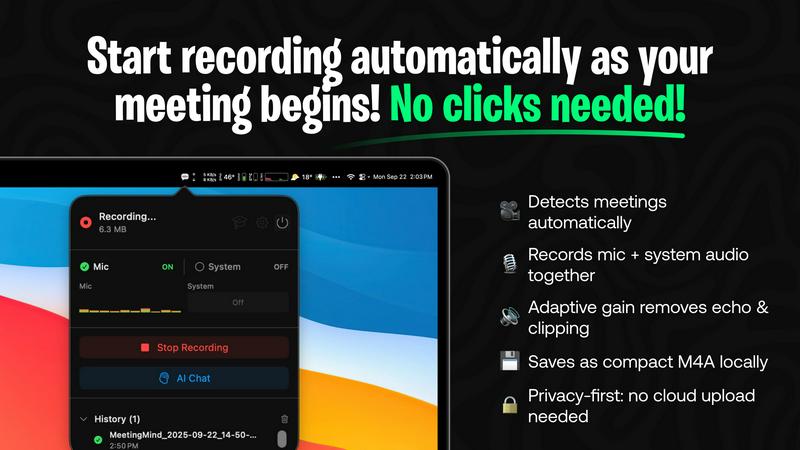
About MeetingMind
MeetingMind is a revolutionary intelligent meeting assistant tailored to enhance productivity and optimize the documentation process during meetings. Designed with the modern professional in mind, this sophisticated tool automatically detects and records every Zoom meeting you participate in without any need for manual clicks. It seamlessly transforms spoken conversations into searchable, interactive notes, ensuring that no vital detail is overlooked. With a single click, users can initiate recordings that capture both microphone and system audio while generating real-time, speaker-attributed transcripts in a clean markdown format. MeetingMind is particularly beneficial for professionals who prioritize efficiency, accuracy, and privacy. It caters to teams of all sizes, making it an invaluable resource for anyone who wishes to remain engaged in discussions while allowing advanced AI to manage note-taking, action item tracking, and key takeaway highlighting. By leveraging on-device AI, users can enjoy a secure and private experience, as all processing occurs locally on their Mac, ensuring their meetings stay confidential. With options for local processing through Ollama models or cloud-based processing via OpenRouter, MeetingMind is the ultimate companion for navigating the complexities of modern meetings.
Features of MeetingMind
Automatic Detection
MeetingMind excels in its ability to automatically detect Zoom meetings, eliminating the need for any manual intervention. This feature allows users to focus entirely on the discussions at hand, as the tool quietly initiates recording the moment a meeting starts.
AI Assistant
Users can choose their preferred AI processing method, selecting between local Ollama models or the cloud-based OpenRouter. This flexibility allows for tailored experiences, ensuring that the AI-generated summaries and insights meet individual user needs and preferences.
Markdown Export
After each meeting, MeetingMind provides AI-generated transcripts and summaries that are saved in a clean markdown format. This feature not only facilitates easy access and sharing of notes but also enhances usability, allowing users to integrate their notes seamlessly into various applications.
100% Private
Privacy is a cornerstone of MeetingMind's design. All processing occurs locally on the user's Mac, ensuring that sensitive meeting information remains confidential and never leaves the device. This commitment to privacy empowers users to record their discussions with peace of mind.
Use Cases of MeetingMind
Team Meetings
In team settings, MeetingMind is invaluable for capturing discussions, brainstorming sessions, and decision-making processes. The AI-generated notes ensure that all team members have access to accurate records, fostering accountability and transparency.
Client Consultations
During client consultations, MeetingMind helps professionals maintain focus on the conversation without the distraction of manual note-taking. Users can trust that every detail is captured and documented, allowing them to provide better service and follow-ups.
Project Kickoffs
For project kickoffs, MeetingMind aids in recording initial discussions around goals, timelines, and responsibilities. The ability to quickly retrieve key takeaways and action items helps teams stay aligned and organized from the outset.
Educational Workshops
In educational settings, instructors can utilize MeetingMind to capture lectures, workshops, or training sessions. The generated transcripts and summaries serve as valuable resources for students and attendees to revisit complex topics and enhance their learning experience.
Frequently Asked Questions
How does MeetingMind ensure privacy during meetings?
MeetingMind processes all data locally on your Mac, meaning that your meeting recordings and notes never leave your device. This design prioritizes user privacy and security.
Can I use MeetingMind for meetings other than Zoom?
Currently, MeetingMind is specifically designed for Zoom meetings. However, users can look forward to potential integrations with other platforms in future updates.
What happens if I exceed the 60 minutes of free recording?
If you exceed the 60 minutes of recording per day provided in the free version, you will need to upgrade to the Unlimited plan to continue recording without restrictions.
How can I purchase MeetingMind?
MeetingMind is available for secure purchase through the Mac App Store. It is a one-time purchase that does not require a subscription, making it a cost-effective solution for professionals seeking reliable meeting documentation.
Explore more in this category:
Similar to MeetingMind

Panzoe
Panzoe is an all-in-one AI platform for personal productivity, business automation, AI assistants, content creation, and custom AI solutions.

screenRIG
Signage and kiosk infrastructure for AI agents. Your agent publishes images, video, streams, web pages and apps to screens via one plugin.screenRIG is

Visemory
Search your local media library with natural language
Honer AI
Android AI assistant with chat, web search, photo and document analysis, and voice input.
AI Email Filter
AI Email Filter sorts incoming mail into folders using plain-language prompts you write. Works with any IMAP mailbox; bring your own LLM if you want.
DebutPin
Indie product playground — ship, and collect pins
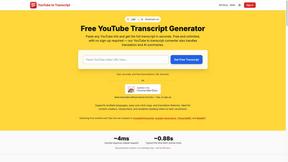
GetYouTubeTranscript
Free YouTube transcripts on the web, a Chrome extension, and an API + MCP server so AI assistants can read YouTube.
Egmatic
No-code 2D game editor: visual node logic, drag-and-drop scenes, live preview. Exports to Windows, macOS, Linux, Android, iOS, Web.