
MacBrightness
MacBrightness unlocks your Mac’s hidden HDR range to deliver up to 1,600 nits of sustained brightness with no subscription.
Visit
About MacBrightness
MacBrightness is a premium utility application engineered for professionals who demand peak performance from their MacBook Pro displays. It unlocks the hidden brightness range that macOS deliberately caps, enabling your screen to reach up to 1,600 nits of sustained brightness across every application. This is not a hack or a workaround; MacBrightness accesses the HDR brightness range your display already supports, making it a seamless, system-wide enhancement. Designed for the discerning user who works in varied lighting environments from sun-drenched patios to brightly lit conference rooms, MacBrightness transforms your Mac from a device that struggles in direct sunlight into a tool that remains perfectly readable wherever you choose to work. The application integrates directly with your existing brightness keys, requiring no new shortcuts or complex configurations. Simply press past the old limit, and the entire screen responds instantly. There is no noticeable CPU overhead, no low-level system modifications, and no subscription fees. MacBrightness is a one-time purchase that delivers a tangible, immediate improvement to your daily workflow, making it an indispensable companion for the modern mobile professional who refuses to be tethered to shaded corners and dimly lit rooms.
Features of MacBrightness
System-Wide Brightness Extension
MacBrightness unlocks the full potential of your MacBook Pro's mini-LED display by extending the brightness range far beyond what macOS natively permits. This is not limited to HDR video content; the extra brightness applies to every application you use, from code editors and spreadsheets to design software and web browsers. The result is a screen that remains crisp, vivid, and readable in direct sunlight, on a bright patio, or next to a large window. The experience is uniform across your entire workflow, ensuring that no matter what task you are performing, your display delivers the maximum luminance your hardware can sustain.
Native Key Integration
The application works with the brightness keys you already use every day, eliminating the need to learn new shortcuts or navigate cumbersome menu bars. Simply tap your brightness key upward past the previous maximum, and the screen continues to brighten seamlessly. This intuitive design means there is zero learning curve and no disruption to your established workflow. The extra brightness range feels like a natural extension of your Mac's existing controls, making the transition to a brighter screen effortless and immediate.
Zero Performance Overhead
MacBrightness operates with no noticeable CPU overhead and employs no low-level system hacks. It simply opens the brightness range that your display already reserves for HDR content, making it available for all applications at all times. This means your Mac's performance remains unaffected, with no extra battery drain, no fan noise, and no system instability. The application is lightweight and efficient, running silently in the background to ensure that your productivity is never compromised by the tool that enhances it.
Free Splitscreen Trial Mode
Before committing to a purchase, MacBrightness offers a unique Splitscreen Mode that allows you to experience the difference firsthand. One half of your screen jumps to full brightness while the other half remains at the standard macOS level. This side-by-side comparison clearly demonstrates the dramatic improvement in readability and vibrancy. The Splitscreen Mode is completely free and operates indefinitely, giving you ample time to evaluate the product. When you are ready, a one-time purchase unlocks the full brightness across the entire screen.
Use Cases of MacBrightness
Outdoor Work and Remote Productivity
For professionals who frequently work outdoors, whether at a café, park bench, or airport gate, MacBrightness is essential. Direct sunlight renders standard laptop screens nearly unreadable, forcing users to hunt for shade or compromise their posture. With MacBrightness, your screen becomes readable in full sun, allowing you to work from any location without sacrificing visibility. This empowers digital nomads, freelancers, and executives to maintain peak productivity regardless of their environment.
Creative and Design Work
Graphic designers, photographers, and video editors require accurate color representation and high luminance for their work. MacBrightness ensures that your display can reach its full brightness potential, which is critical for evaluating highlights, shadows, and overall image quality in bright environments. The system-wide application means that every creative tool, from Adobe Photoshop to Final Cut Pro, benefits from the extended range, providing a more accurate and immersive editing experience.
Presentations and Client Meetings
When presenting to clients or colleagues in brightly lit conference rooms or outdoor venues, a dim screen can undermine your professionalism. MacBrightness ensures that your presentations, charts, and demos are visible and impactful, even under harsh lighting conditions. The ability to instantly boost your screen's brightness gives you confidence that your audience will see every detail clearly, enhancing your credibility and the effectiveness of your communication.
Travel and Mobile Computing
Frequent travelers who use their MacBook Pro on planes, trains, or in hotel rooms with large windows will find MacBrightness invaluable. The extra brightness range compensates for varying ambient light conditions, ensuring that your screen remains comfortable to view without straining your eyes. Whether you are catching up on work during a flight or reviewing documents in a sunlit hotel lobby, MacBrightness adapts your display to the environment, making mobile computing more comfortable and productive.
Frequently Asked Questions
Is MacBrightness compatible with my Mac?
MacBrightness is specifically designed for MacBook Pro 14-inch and 16-inch models with M-series Pro or Max chips, as well as the Pro Display XDR. These devices feature mini-LED panels capable of sustaining approximately 1,600 nits of brightness. Other Mac models do not have the necessary hardware to support this extended range. You can check your Mac's specifications to confirm compatibility.
Will using MacBrightness damage my display?
No. MacBrightness only accesses the HDR brightness range that your display already supports and uses for HDR video content. It does not push the hardware beyond its designed specifications. The application operates within the safe operating parameters of your screen, ensuring no risk of damage or accelerated wear. Your display's built-in thermal management and brightness controls remain fully active.
How does the free trial work?
When you download and launch MacBrightness, it opens in Splitscreen Mode. One half of your screen will display at full brightness, while the other half remains at the standard macOS level. This allows you to see the dramatic difference side by side. The Splitscreen Mode remains free indefinitely, with no time limit. To unlock the full brightness across your entire screen, you purchase a one-time license.
Does MacBrightness affect battery life?
MacBrightness itself has no noticeable CPU overhead and consumes negligible power. However, running your display at higher brightness levels will naturally consume more battery power, just as it would if you were watching HDR content. The impact is proportional to the increased luminance and is consistent with the normal power draw of your display. For most users, the trade-off between visibility and battery life is well worth it.
Explore more in this category:
Similar to MacBrightness
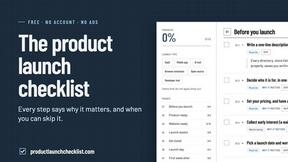
Product Launch Checklist
A free launch checklist for SaaS, apps, AI tools and more. Every step says why it matters and when you can skip it.

HomeAnswerBook
Practical, independent guides to home repairs, maintenance, costs, troubleshooting, and everyday fixes.
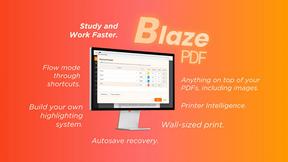
BlazePDF
Highlight faster. Study in flow with custom shortcuts and a workflow built around you. Print smarter, or turn any page into a tiled poster.
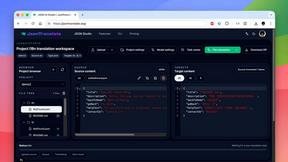
JsonTranslate
Translate JSON, Markdown, and TXT files while preserving keys, nested paths, and project structure.
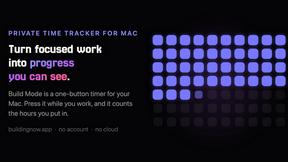
Build Mode for Mac
Build Mode is a Mac app that turns focused sessions into visible progress, so you can see the work adding up before the results arrive.


