
CustomTattoo AI
Generate custom tattoo designs, preview them on your own skin, and arrive at your appointment with a clear vision.
Visit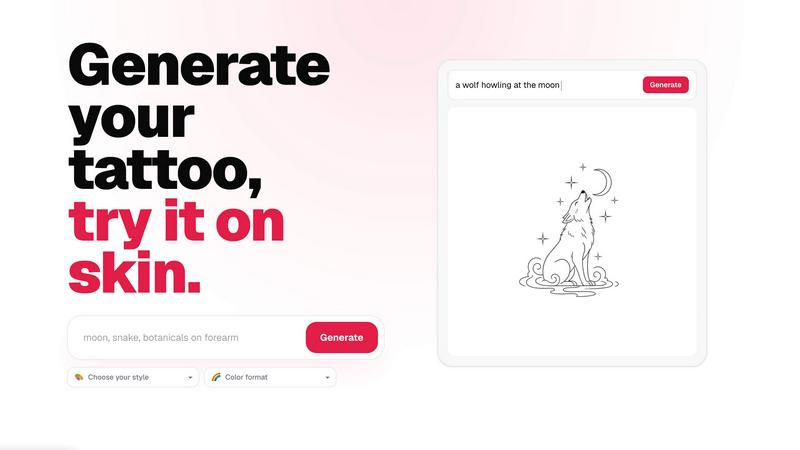
About CustomTattoo AI
CustomTattoo AI is a premium, AI-powered tattoo design and try-on platform engineered for individuals who demand clarity and confidence before committing to permanent ink. This sophisticated tool transforms a simple descriptive idea into a curated collection of custom tattoo concepts, allowing users to explore an extensive range of artistic styles, color formats, and placements with unparalleled precision. The platform is meticulously designed for first-time tattoo clients who may feel overwhelmed by the permanence of the decision, seasoned tattoo enthusiasts seeking fresh inspiration, and anyone who values a refined, artist-ready visual direction. By bridging the gap between abstract imagination and tangible visualization, CustomTattoo AI empowers users to generate multiple design iterations, save their favorite concepts to a personal library, and critically, preview those designs directly on their own skin using an advanced try-on feature. This eliminates the guesswork and anxiety often associated with the tattoo process, ensuring that the final result is obvious and satisfying before a single needle touches the skin. The platform positions itself as an elite preparatory tool, enabling users to arrive at their tattoo studio with a clear, high-quality reference that streamlines collaboration with the artist. With a user-friendly interface that guides individuals from brief to final concept, CustomTattoo AI is the definitive solution for those who seek a top-tier, exclusive experience in the world of custom tattoo design.
Features of CustomTattoo AI
AI-Powered Tattoo Generator
Describe your tattoo idea in natural language, specifying the subject, placement, and desired mood. The advanced AI engine interprets your brief and generates unique, high-fidelity tattoo concepts across a vast spectrum of styles, from traditional and neo-traditional to geometric, watercolor, gothic blackwork, and beyond. This feature provides a rich starting point for exploration.
On-Skin Preview Technology
Utilize the revolutionary try-on feature to visualize any generated design directly on a photo of your own skin. This tool provides a hyper-realistic preview of how the tattoo will look on your specific body part, accounting for curvature and skin tone. It is the ultimate tool for testing placement and size, ensuring complete confidence before booking.
Personal Design Library
Save all your generated concepts, favorite iterations, and style variations into a secure, personal library. This organized collection allows you to compare different directions side-by-side, refine your visual preferences over time, and easily share your top selections with your tattoo artist for a collaborative and efficient consultation.
Style and Color Customization
Take full control over the aesthetic direction of your tattoo by selecting from a curated list of artistic styles and color formats. Whether you desire a vibrant, full-color piece or a subtle black-and-grey composition, the platform allows you to filter and regenerate concepts until you find the perfect visual language for your idea.
Use Cases of CustomTattoo AI
First-Time Tattoo Planning
For individuals getting their first tattoo, the process can be intimidating. CustomTattoo AI provides a risk-free environment to explore ideas, test different styles, and preview the design on their own body. This builds immense confidence and ensures the chosen design is truly desired before making a permanent commitment.
Refining a Vague Concept
Many people have a general idea for a tattoo but struggle to articulate it visually. By describing a loose concept like a crescent moon with botanicals, the AI generates multiple concrete interpretations. This helps users identify what they truly like and provides a clear, visual direction to discuss with their artist.
Comparing Multiple Design Directions
Tattoo enthusiasts often want to see a single idea executed in different styles. CustomTattoo AI allows users to generate the same subject in, for example, traditional, watercolor, and geometric styles. This side-by-side comparison is invaluable for selecting the aesthetic that best resonates with the user’s personal taste.
Preparing for Artist Consultation
Arriving at a tattoo studio with a vague description can lead to miscommunication. With CustomTattoo AI, users can bring a curated selection of artist-ready, high-quality design references. This facilitates a more productive consultation, allowing the artist to immediately understand the client’s vision and focus on technical execution.
Frequently Asked Questions
Is CustomTattoo AI free to try?
Yes, CustomTattoo AI offers a free trial to new users. Upon signing up, you receive 3 free credits with no credit card required. This allows you to test the generator, explore the features, and preview your first tattoo idea before deciding to purchase additional credits or a subscription.
How does the on-skin preview work?
The on-skin preview feature uses advanced image processing technology. After generating a design, you can upload a photo of the body part where you want the tattoo. The AI then intelligently maps the design onto your skin, creating a realistic preview that shows how the tattoo will look in terms of size, placement, and curvature.
Will there be hidden subscriptions?
No, CustomTattoo AI is transparent about its pricing. There are no hidden subscriptions or surprise charges. The platform operates on a credit-based system, and you are only charged for the credits you choose to purchase. You can use your 3 free credits and decide if you want to buy more, with no ongoing commitment.
Can I take the design to my tattoo artist?
Absolutely. The designs generated by CustomTattoo AI are intended to be used as a visual reference. You can save your favorite concepts and share them with your tattoo artist. This provides a clear direction for the artist to work from, ensuring the final tattoo aligns perfectly with your vision.
Similar to CustomTattoo AI
WatermarkPilot
Private browser-based watermark tools for photos and PDFs, with eleven free workflows and local media processing.
Presentation Intelligence
AI-native presentation and visual content platform that turns prompts, documents, images, videos, and data into polished, shareable decks.

ProfileLoom
ProfileLoom turns one photo into platform-ready AI portraits for professional, social, and creator profiles, with presets and built-in editing.
Free AI Image
Free AI Image is a free text-to-image AI generator for creating clean visual drafts from prompts with no sign-up required.

Text Logo
Create custom text, wordmark, and typography logos with flexible SVG, PNG, WebP, or ICO exports.

