
Sketch To
Effortlessly transform images into stunning sketches with Sketch To's advanced AI technology for any creative project.
Visit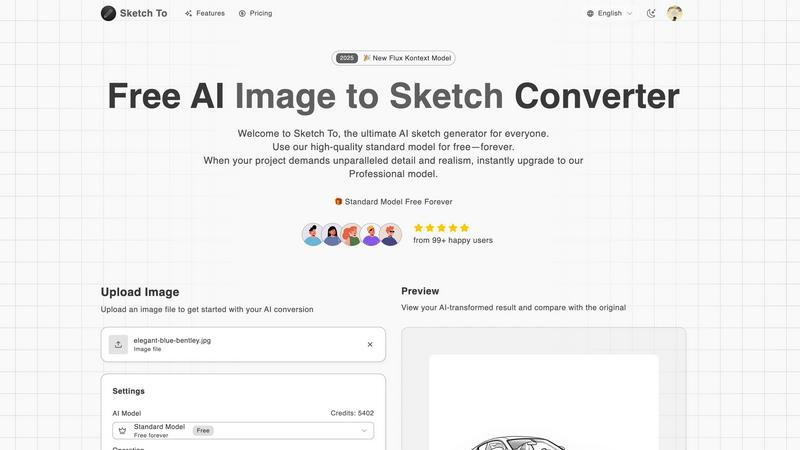
About Sketch To
Sketch To is an avant-garde AI-powered tool that revolutionizes the creative process by seamlessly converting images into sketches and sketches into photorealistic images. Catering to both casual creators and seasoned professionals, this sophisticated software harnesses cutting-edge artificial intelligence technology to produce artistic transformations with exceptional precision and detail. Ideal for hobbyists seeking to elevate their social media aesthetics or designers in need of high-quality visuals for commercial projects, Sketch To offers an unparalleled solution. Users benefit from an intuitive interface that requires no software installation, allowing them to effortlessly upload images, select from a variety of artistic styles, and generate high-resolution outputs in mere seconds. The platform introduces a free standard model with trial credits, making it accessible for everyone to explore its capabilities. For those pursuing superior quality in their artwork, the professional model unlocks an extraordinary realm of realism and detail, catering to the highest creative demands.
Features of Sketch To
Image to Sketch Conversion
Sketch To excels at transforming photographs into exquisite pencil sketches using its advanced AI technology. This feature is perfect for artists and designers who wish to create beautiful and artistic representations of their photographs, making it a valuable tool for creative expression.
Sketch to Image AI
The ability to convert sketches into realistic images is a standout feature of Sketch To. Utilizing the Professional model, users can achieve incredible detail and accuracy, breathing life into their sketches and enabling them to create photorealistic artworks that are both captivating and immersive.
Instant Processing
Sketch To offers instant processing capabilities, ensuring that users receive their transformed images or sketches in seconds. This powerful cloud-based AI processing infrastructure allows for seamless and efficient creative workflows, enabling users to focus on their artistry without unnecessary delays.
High Resolution Output
Users can download their creations in high resolution, making them suitable for both print and professional use. This feature ensures that the quality of the artwork remains uncompromised, allowing artists and designers to present their work in the best possible light.
Use Cases of Sketch To
Social Media Enhancement
For hobbyists and casual creators, Sketch To provides an excellent opportunity to enhance social media posts with visually appealing sketches. Users can convert everyday photographs into artistic representations, making their profiles more engaging and distinctive.
Professional Design Projects
Designers can leverage Sketch To for high-quality visuals needed in commercial projects. The Professional model allows for the creation of stunning, photorealistic images that can be used in marketing materials, branding, and presentations, ensuring a professional touch in all creative endeavors.
Educational Projects
Students and educators can utilize Sketch To for various academic projects, transforming images into sketches for presentations, reports, or artistic assignments. The tool makes learning more interactive and visually appealing, helping to capture the attention of audiences.
Artistic Exploration
Artists looking to explore different styles and techniques can benefit from the diverse range of artistic styles offered by Sketch To. Whether experimenting with pencil sketches or watercolor effects, the platform encourages creativity and innovation in art-making.
Frequently Asked Questions
How does Sketch To work?
Sketch To utilizes advanced AI algorithms to analyze images and convert them into sketches or vice versa. Users simply upload their files, select a style, and the AI processes the conversion in seconds, providing high-quality results.
Can I use Sketch To for commercial purposes?
Yes, Sketch To offers a Professional model that is specifically designed for commercial use. This plan unlocks superior detail and realism, making it an excellent choice for professional designers and artists.
What types of images can I upload?
Sketch To supports multiple image formats, allowing users to upload various file types for conversion. The maximum file size for uploads is 5MB, ensuring that users can easily work with their images.
Is there a free trial available?
Absolutely! New users are offered trial credits to explore the capabilities of Sketch To. The free standard model allows users to experience the tool's features before deciding to upgrade to the Professional model for enhanced quality.
Similar to Sketch To
GetYouTubeTranscript
Free YouTube transcripts on the web, a Chrome extension, and an API + MCP server so AI assistants can read YouTube.
layahost
Moderation, routing, intent and scoring for any text over one Jev-compatible API, hosted in the EU.

Motion Control AI
Create motion-controlled character videos by transferring dance, gestures, timing, and camera movement from a reference video.

amaze.directory
A directory of AI tools where every listing was opened and used by a person first. Search by job, filter by price, get the link.