
Picture Enhancer
Picture Enhancer is an elite AI tool that deblurs, upscales, and restores photos instantly in your browser with three free guest tries.
Visit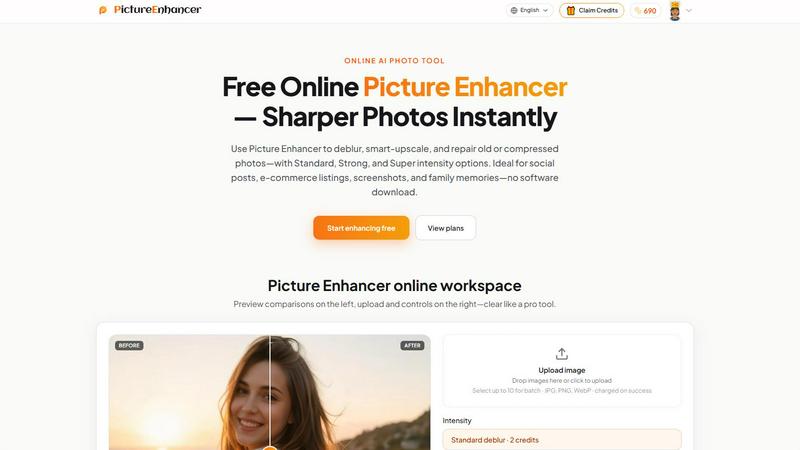
About Picture Enhancer
Picture Enhancer is a premier online AI photo enhancement platform designed for discerning creators, e-commerce sellers, and everyday users who demand exceptional image clarity without the complexity of traditional software. This sophisticated tool leverages advanced artificial intelligence to transform ordinary, blurry, or damaged photographs into sharp, high-resolution masterpieces with unprecedented ease. The platform supports JPG, PNG, and WebP formats, offering three core enhancement modes: Deblur, Upscale, and Restore, each available in Standard, Strong, and Super intensity tiers. Picture Enhancer is engineered for those who value both quality and efficiency, delivering watermark-free results in seconds through a streamlined three-step workflow. Whether you are a professional photographer refining portfolio images, an online retailer showcasing product details, or someone preserving cherished family memories, Picture Enhancer provides an elite solution that elevates every photo to its highest potential. The platform prioritizes user privacy with secure processing, ensures credits are charged only on successful enhancements, and offers a generous free trial for new users. With its intuitive interface, powerful AI capabilities, and flexible pricing options, Picture Enhancer stands as the definitive choice for anyone seeking top-tier photo enhancement in a fast, reliable, and accessible online environment.
Features of Picture Enhancer
AI Deblur Technology
Picture Enhancer employs cutting-edge artificial intelligence to meticulously rebuild edges and restore texture from camera shake, soft focus, and mild motion blur. This feature offers three distinct intensity levels: Standard for quick fixes, Strong for more pronounced blur reduction, and Super for maximum clarity restoration. The AI analyzes each image pixel by pixel, ensuring that faces become recognizable, text becomes readable, and fine details emerge from previously unusable photographs. This sophisticated deblurring capability transforms even the most challenging images into crisp, professional-quality assets suitable for any application.
Smart Upscale Enlargement
The Smart Upscale feature provides 2x and 4x enlargement capabilities that intelligently add detail rather than simply stretching pixels. This advanced functionality is perfect for transforming small source files into large, print-ready images for social media covers, product hero shots, or presentation materials. The AI analyzes the original image content and generates new, realistic detail that seamlessly integrates with existing elements, preventing the blocky artifacts and loss of quality typically associated with traditional upscaling methods. Users can confidently enlarge images knowing the result will maintain exceptional sharpness and visual integrity.
Old Photo and Damage Restoration
Picture Enhancer includes a dedicated Restore mode that addresses the unique challenges of aging and damaged photographs. This feature effectively reduces scratches, fade, compression artifacts, and other imperfections that accumulate over time. The Strong and Super restore intensity tiers are specifically designed to handle heavier damage on scanned family prints, historical documents, and vintage images. The AI intelligently fills in missing or deteriorated areas while preserving the original character and authenticity of the photograph, making it an invaluable tool for preserving personal and historical visual records.
Batch Processing and Intensity Tiers
For paid users, Picture Enhancer offers the powerful ability to batch enhance up to ten images simultaneously, dramatically improving workflow efficiency for professionals managing multiple assets. The three intensity tiers (Standard, Strong, and Super) provide granular control over the enhancement process, allowing users to match the processing power to the specific needs of each image. Standard tier uses 2 credits for basic improvements, Strong uses 4 credits for more aggressive enhancement, and Super uses 6 credits for maximum transformation. This tiered system ensures users never pay for more processing power than they need while having access to premium capabilities when required.
Use Cases of Picture Enhancer
Professional Portraits and Everyday Photography
Picture Enhancer excels at refining personal and professional portraits by reducing mild blur and enhancing facial features for cleaner, more striking results. Whether you are updating your LinkedIn profile, creating content for social media feeds, or building a professional portfolio, this tool ensures every image presents you or your subjects in the best possible light. The AI deblur and restore capabilities work together to eliminate softness caused by camera movement or poor lighting, resulting in photographs that command attention and convey professionalism. Even casual snapshots from family gatherings or travel adventures can be elevated to gallery-quality standards with minimal effort.
E-Commerce Product Photography and Listings
Online sellers and e-commerce professionals will find Picture Enhancer indispensable for creating compelling product images that drive sales. The Smart Upscale feature is particularly valuable for enlarging small product photos while maintaining crisp detail, ensuring every texture, label, and feature is clearly visible to potential customers. The Deblur mode eliminates the softness that often plagues product shots taken in less-than-ideal conditions, while the Restore function removes compression artifacts from images that have been resized and reuploaded multiple times. These enhancements help product listings stand out in crowded marketplaces, build customer trust through visual clarity, and ultimately increase conversion rates.
Screenshot and UI Capture Enhancement
For technical writers, support professionals, and content creators who frequently work with screenshots, Picture Enhancer provides the tools needed to produce crystal-clear instructional materials. The AI deblurring technology sharpens text edges and interface elements that often become soft or pixelated during capture, making tutorials, support threads, and documentation archives more readable and professional. This feature is particularly valuable for creating high-quality software demonstrations, user guides, and troubleshooting resources where every pixel of information matters. The result is visually polished content that enhances user comprehension and reflects positively on the brand or organization producing it.
Family Photo Preservation and Restoration
Picture Enhancer serves as a powerful tool for preserving and restoring precious family memories captured in old photographs. The dedicated Restore mode intelligently reduces scratches, fade, and other signs of age while maintaining the emotional authenticity of the original image. Users can transform scanned prints from decades past into vibrant, shareable digital files ready for social media, digital albums, or professional printing. This capability is invaluable for family historians, genealogists, and anyone looking to breathe new life into treasured photographs that have deteriorated over time. The before-and-after results are often dramatic, revealing details and colors that were previously hidden beneath years of damage.
Frequently Asked Questions
What is Picture Enhancer?
Picture Enhancer is a free online AI-powered photo enhancement platform that enables users to deblur, upscale, and restore images quickly and easily. It supports JPG, PNG, and WebP formats and offers three enhancement modes with three intensity tiers each. The platform is designed for creators, sellers, and everyday users who need sharper, higher-quality images without downloading software. Guests receive three free lifetime tries per IP address with no signup required, and signed-in users can purchase credits or subscriptions for continued access.
Can I try Picture Enhancer without signing in?
Yes, guests can use Picture Enhancer without signing in and receive three free lifetime tries per IP address. These guest tries allow users to upload an image, select any mode and intensity level, and download a watermark-free result. This generous trial period lets potential users experience the full power of the platform before committing to a paid plan. Once the three guest tries are exhausted, users must sign in and use credits to continue enhancing images.
How does billing work after sign-in?
After signing in, new accounts receive starter credits to begin enhancing immediately. Credits are charged only when an enhancement job succeeds, ensuring users never pay for failed attempts. The credit costs are: Standard intensity uses 2 credits, Strong uses 4 credits, and Super uses 6 credits. Users can purchase monthly subscription plans that grant credits each billing cycle or permanent credit packs that never expire. Paid subscribers also unlock Super intensity tiers and the ability to batch enhance up to ten images simultaneously.
Are my photos safe when using Picture Enhancer?
Yes, Picture Enhancer prioritizes user privacy and security. All uploaded images are processed privately and used only to complete the enhancement request. The platform does not share or store images beyond what is necessary for processing, and users can download their enhanced results immediately. For signed-in users, completed enhancements are available in the My Assets section for future access. The platform employs industry-standard security measures to protect user data throughout the enhancement process.
Similar to Picture Enhancer

ColorBestie
AI color previews and marker color suggestions for coloring pages.

nanobanana 21
A fast image studio for creating and editing high-quality images with accurate details, readable text, and consistent characters.
ImageGenerator
Create and edit AI images online with multiple models, text-to-image, image-to-image, background removal, and upscaling.
AIPetGen
AIPetGen turns a photo of your dog, cat, or other pet, or a written description, into a new picture or a short animation.
ideogram-45
AI image generation and editing with sharp typography, native 2K output, and localized edits.

ImageGPT
ImageGPT is an all-in-one AI creative platform for generating, editing and transforming images and videos using AI.

Qwen Image 2.1
AI image creation and editing with detailed prompts, multiple references, portrait and typography refinement, and transparent RGBA output.

AI Album Cover Maker
Create release-ready album covers from a prompt or photo. Generate, refine, and export art for singles, EPs, mixtapes, and playlists.