ComicsMaker
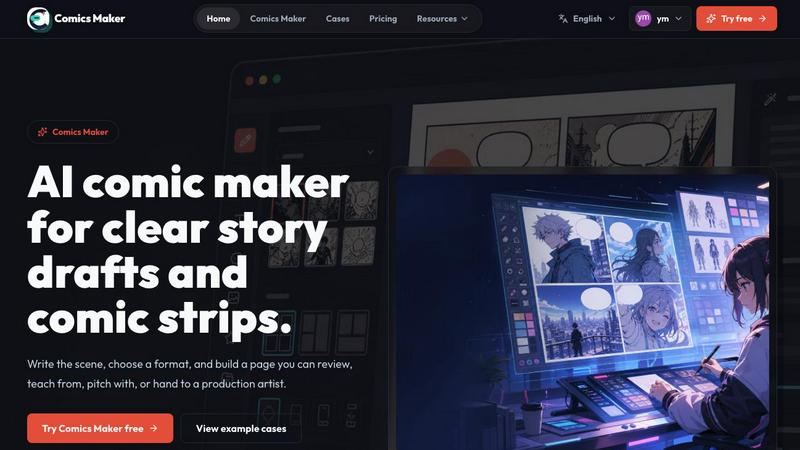
ComicsMaker transforms your scene prompts into structured comic panels with dialogue, layout, and export-ready drafts directly in your browser.
VisitPublished on:
July 7, 2026
Pricing:
About ComicsMaker
ComicsMaker is a premium AI comic maker and comic strip maker designed exclusively for creators, educators, marketers, and professional teams who demand visual storytelling without compromise. This elite tool transforms simple text prompts into fully realized comic panels, manga-style drafts, storyboards, and social-ready comic pages with unparalleled control over layout, tone, reading flow, and artistic direction. Unlike generic generators, ComicsMaker treats every project as a structured narrative, moving from a raw idea through beat planning to a polished, editable draft. The workspace empowers users to draft AI comic strips, prompt-to-panel scenes, character moments, explainer comics, classroom visuals, product storyboards, and campaign concepts. Every session begins with a single scene description, then expands into a coherent sequence of panels where dialogue, captions, and visual style remain tightly integrated. The platform eliminates the blank canvas problem by providing a structured environment where pacing, shot types, and reading order are visible before any image generation occurs. Whether you are a solo creator exploring a new story or a marketing team producing brand comics at scale, ComicsMaker delivers a top-tier workflow that respects both creative vision and production efficiency. The result is a comic draft that any artist, teammate, or stakeholder can understand, review, and build upon.
Features of ComicsMaker
Scene to Panel Planning
The core workflow begins with a single scene brief where users name the character, setting, visible action, and change. This structured input feeds directly into an intelligent planning engine that generates beat sequences, ensuring each panel has one clear narrative job. The system supports single panel, three panel, 2x2 page, and vertical flow formats, all while keeping pacing and reading order visible before any image is rendered. This feature eliminates guesswork and ensures every comic page has a solid narrative foundation.
Style and Visual Direction Lock
ComicsMaker provides sophisticated controls for maintaining consistent visual identity across an entire project. Users can lock style notes, character details, environment descriptions, and reference language so every generated panel belongs to the same cohesive world. The platform supports mood selection, tone direction, and production notes that guide the AI toward a unified artistic vision. This feature is essential for teams producing brand comics or serialized content where visual continuity is nonnegotiable.
Interactive Dialogue and Caption Management
After generating panels, the workspace allows precise placement and editing of dialogue, captions, and speech bubbles directly within the browser. Users can adjust text content, positioning, and reading flow without leaving the editor. This interactive layer transforms raw image drafts into complete, reviewable comic pages where narrative pacing and visual storytelling work in harmony. The dialogue system supports multiple characters and narrative voices, making complex conversations easy to manage.
Project Export and Collaboration Data
ComicsMaker exports complete project data including prompts, style notes, panel descriptions, and the final comic layout as structured JSON files. This export format is designed for handoff to artists, teammates, or downstream production pipelines. The platform treats every draft as project data rather than a finished image, enabling iterative refinement and collaborative review. Users can check story clarity, panel order, dialogue space, and visual direction before investing in longer production passes.
Use Cases of ComicsMaker
Professional Storyboarding for Marketing Campaigns
Marketing teams use ComicsMaker to rapidly prototype product storyboards and campaign concepts. By starting with a single scene brief, teams can generate multiple visual sequences that explore different narrative approaches, shot compositions, and emotional tones. The structured planning ensures each panel communicates a specific product benefit or brand message, while the style lock feature maintains brand consistency across all visual assets. This workflow dramatically reduces the time from concept to reviewable storyboard.
Educational Comics for Classroom Engagement
Educators and instructional designers leverage ComicsMaker to create explainer comics that make complex topics accessible and engaging. The platform enables teachers to draft classroom visuals that break down scientific processes, historical events, or literary themes into clear, sequential panels. The dialogue and caption tools allow precise control over vocabulary and reading level, while the export feature provides structured project data that can be shared with students or adapted for different learning objectives.
Independent Comic and Manga Creation
Solo creators and indie comic artists use ComicsMaker to move from rough ideas to structured drafts without the intimidation of a blank canvas. The scene to panel planning engine helps writers explore pacing and beat structure, while the style direction tools allow experimentation with different artistic moods and genres, from shonen manga to dramatic noir. The platform serves as a rapid prototyping tool that preserves creative momentum, enabling artists to generate, review, and refine comic pages efficiently.
Social Media Content Production
Content creators and social media managers use ComicsMaker to produce engaging comic strips and visual stories optimized for social platforms. The 2x2 page and vertical flow formats are ideal for Instagram, Twitter, and other feed-based platforms where visual storytelling drives engagement. The ability to lock visual direction and quickly generate multiple panels allows creators to maintain a consistent aesthetic across their social presence while producing fresh, narrative-driven content on a regular schedule.
Frequently Asked Questions
What types of comic formats does ComicsMaker support?
ComicsMaker supports single panel, three panel strip, 2x2 page, and vertical flow formats. The platform automatically adapts the planning engine to the selected format, ensuring optimal pacing and reading order for each layout type. Users can choose the format that best suits their narrative goals and intended distribution channel.
How does the scene to panel planning process work?
Users begin by writing a scene in plain language, naming the character, setting, visible action, and change. The platform then generates a beat sequence that structures the scene into individual panels, each with a clear narrative purpose. This planning phase ensures that every panel contributes meaningfully to the story before any image generation occurs.
Can I maintain consistent visual style across multiple panels?
Yes, ComicsMaker includes powerful style direction controls that allow users to lock visual references, character details, environment descriptions, and mood settings. These settings persist across all panels in a project, ensuring that every generated image belongs to the same cohesive world. Users can also add production notes to guide the AI toward specific artistic choices.
What export options are available for my comic projects?
ComicsMaker exports complete project data as structured JSON files that include prompts, style notes, panel descriptions, dialogue, and layout information. This export format is designed for handoff to artists, teammates, or downstream production pipelines. The platform treats every draft as project data, enabling iterative refinement and collaborative review.
Pricing of ComicsMaker
ComicsMaker offers three pricing tiers designed to match different usage levels and professional needs. The Free plan provides 10 starter credits for testing image generation and exploring the workspace. The Creator plan costs 15 dollars per month and is built for creators making comic strips, lessons, and social campaigns every week, with increased monthly credits. The Studio plan costs 39 dollars per month and is designed for teams producing brand comics, campaigns, and classroom content at scale. All plans share the same core editor workflow and JSON project export capabilities, with differences primarily in monthly credit allocations. Users can start with the free plan and upgrade when their workflow becomes real and consistent.
Similar to ComicsMaker

Bulin AI
Upload one portrait. Bulin AI puts you in the official Bulin 47 freestyle. The source video guides the moves and camera. No prompt.

nanobanana 21
A fast image studio for creating and editing high-quality images with accurate details, readable text, and consistent characters.

AppScreen
Panorama screenshot editor for App Store listings on iPhone and iPad.

ImageGenerator
Create and edit AI images online with multiple models, text-to-image, image-to-image, background removal, and upscaling.
AIPetGen
AIPetGen turns a photo of your dog, cat, or other pet, or a written description, into a new picture or a short animation.

ideogram-45
AI image generation and editing with sharp typography, native 2K output, and localized edits.

AI Object Remover
Remove unwanted objects, people, text and watermarks from photos with AI