ButterKit
ButterKit is the elite tool for developers to effortlessly craft stunning, localized App Store screenshots and metadata that drive conversions.
Visit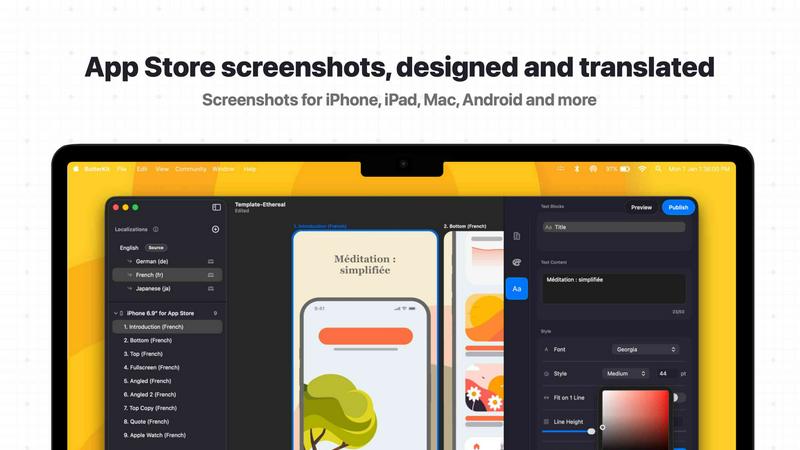
About ButterKit
ButterKit is a premier native macOS application engineered exclusively for Apple developers who demand precision and efficiency in their App Store publishing workflow. This sophisticated tool transforms the arduous process of creating, localizing, and uploading App Store assets into a seamless, automated experience. Designed for solo developers, design studios, and marketing agencies, ButterKit addresses the critical need for polished, localized App Store presentations that drive conversion rates and expand global reach. At its core, ButterKit enables users to capture screenshots directly from the Xcode Simulator, place them into photorealistic 3D device frames, and apply professional-grade design templates with effortless precision. The application leverages advanced AI models to translate app metadata into all 50 App Store Connect languages, eliminating the traditional friction of localization. ButterKit integrates deeply with the App Store Connect API, allowing one-click uploads of perfected screenshots and metadata. Its architecture supports folder-based input and output, making it a natural fit for CI/CD pipelines and Fastlane workflows. Built by a solo developer who understands the developer experience intimately, ButterKit represents the pinnacle of efficiency for anyone serious about maintaining a compelling, globally accessible App Store presence. The tool is not merely a utility; it is a strategic asset for developers who recognize that first impressions in the App Store are paramount to success.
Features of ButterKit
Capture Tool for Xcode Simulator
ButterKit integrates directly with Xcode and the Simulator environment, enabling developers to capture screenshots without leaving their development workflow. Unlike web-based tools that require cumbersome file transfers, this native integration allows for rapid iteration and immediate visual feedback. Users can capture exactly the right frame from their running app, adjust device orientation, and see results instantly on 3D device mockups. This direct capture capability saves significant time during the design phase, allowing developers to fine-tune their visual presentation until it achieves the desired impact.
Real 3D Device Rendering
ButterKit employs a powerful 3D rendering engine built on Apple's Metal framework, delivering smooth performance at up to 120 frames per second. The application includes a library of high-resolution, photorealistic 3D device frames that accept screenshots with perfect perspective and lighting. Users can easily adjust the angle, rotation, and positioning of devices to create compelling visual narratives. This feature transforms ordinary screenshots into marketing assets that convey professionalism and attention to detail, directly influencing user perception and download decisions.
AI-Powered Translation Engine
The advanced AI translation system within ButterKit processes app metadata and screenshot text across all 50 App Store Connect localizations in seconds. Designs remain perfectly synced across languages, ensuring visual consistency while expanding global reach. This feature eliminates the tedious manual process of creating separate assets for each market, reducing localization time from days to minutes. Developers can confidently present their apps to international audiences with native-quality translations that maintain the original design intent and brand voice.
Seamless App Store Connect Integration
ButterKit connects directly to the App Store Connect API, enabling batch export and one-click upload of finalized screenshots and metadata. The system automatically arranges assets in the correct order required by Apple, eliminating the common frustration of manual sorting and reordering. This integration extends to folder-based workflows, allowing developers to link entire directories of images generated by Fastlane or Xcode UI tests. The result is a publishing pipeline that operates with minimal manual intervention, reducing the potential for errors and accelerating release cycles.
Use Cases of ButterKit
Streamlined App Store Launch for Indie Developers
Independent developers launching their first app or a major update can leverage ButterKit to create professional-grade App Store assets without hiring a designer. The combination of 3D device frames, templates, and AI translation allows a single developer to produce polished screenshots and localized metadata that compete with larger studios. This capability is critical for indie developers who need to maximize their limited resources while making a strong first impression in a crowded marketplace.
Automated Localization for Global App Releases
Development teams targeting multiple international markets can use ButterKit to automate the localization of both visual assets and metadata. The AI translation engine handles all 50 App Store languages, while the synchronized design system ensures that each localized version maintains brand consistency. Marketing managers can review and approve translations in minutes rather than weeks, enabling faster time-to-market for global campaigns and seasonal promotions.
CI/CD Pipeline Integration for Enterprise Teams
Enterprise development teams can integrate ButterKit into their continuous integration and deployment pipelines by linking folders of screenshots generated through automated UI testing. This setup allows for the automatic generation of App Store assets with every build, ensuring that marketing materials always reflect the latest app version. The folder-based input and output system works seamlessly with Fastlane and other automation tools, reducing manual overhead and maintaining consistency across multiple app variants.
Design Agency Asset Production for Client Apps
Design agencies managing multiple client apps can use ButterKit to rapidly produce high-quality App Store assets at scale. The template marketplace and pro editing tools enable designers to create custom looks for each client while maintaining efficient production workflows. Agencies can batch process screenshots for different devices and languages, then upload directly to each client's App Store Connect account, significantly reducing the time spent on repetitive asset creation tasks.
Frequently Asked Questions
How does ButterKit capture screenshots from the Xcode Simulator?
ButterKit integrates natively with Xcode and the Simulator application on macOS. When you have a simulator running with your app, you can use the Capture Tool within ButterKit to take a screenshot directly. The tool communicates with the simulator to capture the exact frame you need, which is then automatically placed onto a 3D device mockup. This process eliminates the need for manual screenshotting and file management, allowing for rapid iteration and immediate visual feedback.
Can ButterKit work with automated screenshot generation tools like Fastlane?
Yes, ButterKit is designed to integrate seamlessly with Fastlane and other CI/CD tools. You can link an entire folder of images generated by Fastlane or Xcode UI tests as input. ButterKit will process all images in the folder, apply your chosen device frames and designs, and prepare them for export or upload. This makes it an ideal component in automated publishing pipelines where screenshots are generated programmatically.
What languages does the AI translation feature support?
The AI translation engine in ButterKit supports all 50 App Store Connect localizations, including major languages like English, Spanish, French, German, Japanese, Chinese, Korean, Arabic, and many more. The system translates both app metadata and text within screenshots, ensuring that your entire App Store presentation is localized. Designs remain synchronized across all languages, so any visual adjustments you make are automatically applied to every localized version.
Is ButterKit compatible with Apple Silicon and Intel Macs?
ButterKit is a native macOS application built on Metal, Apple's graphics framework. It runs natively on both Apple Silicon (M1, M2, M3 series) and Intel-based Macs, taking full advantage of the hardware capabilities on each platform. The application is optimized for high performance, delivering smooth 3D rendering at up to 120fps on supported hardware. You can download the latest version from the official ButterKit website, which will automatically provide the correct build for your Mac architecture.
Similar to ButterKit

layahost
Moderation, routing, intent and scoring for any text over one Jev-compatible API, hosted in the EU.
laya.tools
A free directory of 950+ projects built on Laya, the open-source decision model. Updated daily.
Sprite Sheet Maker
A free browser-based toolkit for creating, cutting, converting, and previewing sprite sheet animations.
Forms Plugin
The #1 Native Form Builder Plugin for Framer - No Code, No Embeds, No External Platforms.


JsonTranslate
Translate JSON, Markdown, and TXT files while preserving keys, nested paths, and project structure.