
Browser Notes
Browser Notes stores your notes, boards, and mind maps locally in your browser with no signup or cloud required.
Visit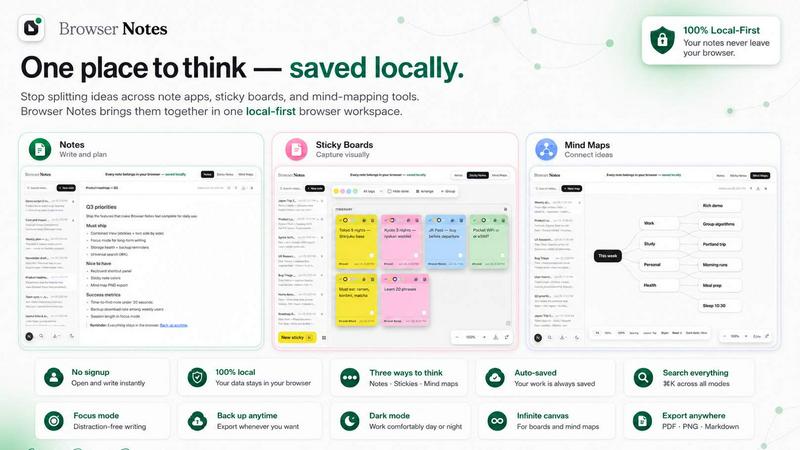
About Browser Notes
Browser Notes redefines the paradigm of personal knowledge management by establishing your browser as the sovereign center of your digital workspace. In an era where your most private thoughts are routinely harvested by cloud-based applications, Browser Notes offers a sanctuary of privacy and control. It is a unified, local-first workspace that consolidates three essential cognitive tools—rich text notes, freeform sticky notes, and dynamic mind maps—into a single, seamless interface that operates entirely within your Chrome browser. This product is meticulously designed for the discerning professional, the privacy-conscious creator, and the strategic thinker who refuses to compromise on data sovereignty. With Browser Notes, there are no accounts to create, no tracking scripts to monitor your activity, and no forced synchronization to external servers. Every piece of information you capture is stored locally in your browser’s native storage, ensuring that your ideas remain exclusively yours. The platform works flawlessly offline, eliminating any dependency on internet connectivity for productivity. Furthermore, you retain absolute control over your data through a robust backup system, allowing you to export and import your entire workspace at your discretion. Browser Notes is not merely an application; it is a declaration of independence from the invasive, subscription-based models that dominate the market. It empowers you to think, organize, and create with unparalleled focus and security, all within the familiar environment of your web browser.
Features of Browser Notes
Local-First Architecture with Zero Account Requirements
Browser Notes operates on a foundational principle of absolute privacy and user autonomy. There is no requirement to create an account, log in, or provide any personal information. The entire application and all your data reside within your browser’s local storage. This architecture ensures that your notes, sticky boards, and mind maps are never transmitted over the internet, viewed by third parties, or stored on remote servers. This feature is the cornerstone of the product’s value, providing an elite level of data security that is simply unavailable from cloud-dependent alternatives. You can work with complete peace of mind, knowing your intellectual property is protected from breaches, data mining, and corporate surveillance.
Three Integrated Cognitive Tools
The application provides three distinct yet interconnected modes for capturing and structuring information. The Notes module offers a full-featured markdown editor, perfect for drafting detailed documents, meeting minutes, or technical specifications with rich formatting. The Sticky Notes module transforms your screen into a freeform canvas, ideal for brainstorming sessions, visual planning, and rapid idea clustering without the constraints of linear text. The Mind Maps module allows you to create hierarchical, branching diagrams from a central idea, facilitating complex problem-solving and strategic thinking. This trifecta of tools eliminates the need to switch between disparate applications, creating a singular, fluid workflow that adapts to any cognitive task.
Full Offline Functionality
Browser Notes is engineered for uninterrupted productivity, regardless of your internet connection. Because all data is stored locally, the application functions completely offline. This is a critical feature for professionals who travel frequently, work in areas with unreliable connectivity, or simply prefer to disconnect from the network to achieve deep focus. You can create, edit, and organize your entire knowledge base without a single byte being sent to the cloud. This offline capability ensures that your creative and analytical processes are never halted by technical dependencies, reinforcing the product’s positioning as a reliable, always-available tool for the elite user.
Complete Data Portability with Manual Backup
True ownership of your data requires the ability to control its lifecycle. Browser Notes provides a transparent and user-controlled backup system. You can export your entire workspace—including all notes, sticky notes, and mind maps—as a single backup file at any time. This file can be stored on your local hard drive, an external SSD, or a private cloud service of your choice. Should you ever need to restore your workspace, the import function allows for a seamless recovery. This feature ensures that your data is never locked into a proprietary system, giving you the ultimate freedom to migrate, archive, or duplicate your work as you see fit, without any vendor lock-in.
Use Cases of Browser Notes
Strategic Project Planning for Executives
For a C-suite executive or project lead, the ability to rapidly synthesize high-level strategy with granular task management is paramount. Using Browser Notes, an executive can start a Mind Map to outline the core pillars of a new initiative, branching out into key objectives, resource allocation, and risk factors. Simultaneously, they can use the Notes module to draft a detailed project charter using markdown, linking directly to the mind map for context. Sticky notes can be used on a free canvas to brainstorm team roles and critical deadlines. This integrated approach, all stored locally, provides a single source of truth for the most sensitive strategic initiatives, free from the prying eyes of cloud-based project management tools.
Academic Research and Thesis Development
Graduate students and researchers deal with vast amounts of fragmented information. Browser Notes becomes the central repository for this intellectual work. The Notes module is ideal for writing literature review summaries and annotated bibliographies in markdown. The Mind Maps feature excels at mapping the connections between different theories, authors, and experimental results, revealing the structure of a complex argument. Sticky notes can be used to capture fleeting insights or to visually organize the chapters of a thesis on a digital board. The local-first nature is crucial here, protecting unpublished research and proprietary data from any potential cloud exposure.
Personal Knowledge Management for Privacy Advocates
For individuals who are deeply concerned about digital privacy and data commodification, Browser Notes offers a perfect solution. A privacy advocate can use the application to manage their entire personal knowledge base—from journaling and habit tracking to storing sensitive financial plans and personal development goals. They can write private reflections in the Notes module, use mind maps to plan long-term life goals, and use sticky notes to create a vision board. The guarantee of no tracking, no account, and no cloud sync means their most intimate thoughts and plans remain completely private, stored only on their own device, under their sole control.
Creative Brainstorming and Content Creation
Writers, designers, and content creators often need a flexible space to capture raw ideas before they are refined. Browser Notes provides the perfect environment for this creative chaos. A content creator can open a Sticky Notes board to visually map out the flow of a video script or article, moving ideas around like physical Post-its. They can then use the Mind Map feature to explore the different angles and sub-topics of a story. Finally, the Notes module serves as the drafting space, where the brainstormed ideas are transformed into polished, formatted text. The offline capability ensures that inspiration is never lost due to a poor internet connection.
Frequently Asked Questions
How does Browser Notes ensure my data is private?
Browser Notes is built on a local-first architecture. This means that all your notes, sticky notes, and mind maps are stored exclusively in your browser's local storage. The application does not create an account for you, does not track your usage, and does not sync your data to any external server. Your information never leaves your device unless you explicitly choose to export a backup file. This design guarantees that your data is immune to server-side breaches, corporate data mining, and third-party surveillance.
Can I use Browser Notes without an internet connection?
Yes, absolutely. Because all data processing and storage occur locally within your browser, Browser Notes functions completely offline. You can create, edit, and organize your entire workspace without any internet connectivity. This makes it an ideal tool for use on airplanes, in remote locations, or in any environment where a stable internet connection is not available. Your productivity is never dependent on network access.
How do I back up my data in Browser Notes?
Browser Notes provides a straightforward, user-controlled backup system. You can export your entire workspace as a single backup file at any time by using the "Export backup" option. This file is downloaded to your computer and can be stored anywhere you choose. To restore your data, you simply use the "Import backup" function and select your saved file. This process allows you to maintain full control over your data's lifecycle and ensures you never lose your work.
What types of content can I create with the three tools?
The application offers three distinct content creation modes. The Notes module is a full markdown editor, allowing you to write formatted text with headers, lists, bold, italics, and code blocks. The Sticky Notes module provides a freeform canvas where you can place and move individual notes, perfect for visual brainstorming. The Mind Maps module lets you create hierarchical diagrams where you start with a central idea and branch out into related concepts, ideal for structuring complex thoughts and planning projects. You can use any or all of these tools within a single workspace.
Explore more in this category:
Similar to Browser Notes

Panzoe
Panzoe is an all-in-one AI platform for personal productivity, business automation, AI assistants, content creation, and custom AI solutions.
DebutPin
Indie product playground — ship, and collect pins
Egmatic
No-code 2D game editor: visual node logic, drag-and-drop scenes, live preview. Exports to Windows, macOS, Linux, Android, iOS, Web.
Kody Tools
Free collection of online developer utilities, code formatters, and digital converters designed to streamline your daily workflow.
Tally Counter
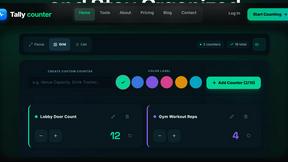
Online tally counter for tracking attendance, workouts, inventory, visitors, sports scores, habits, and everyday counting tasks.
Forms Plugin
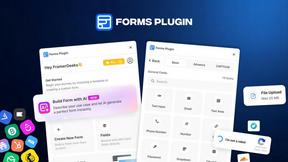
The #1 Native Form Builder Plugin for Framer - No Code, No Embeds, No External Platforms.

Product Launch Checklist
A free launch checklist for SaaS, apps, AI tools and more. Every step says why it matters and when you can skip it.

HomeAnswerBook
Practical, independent guides to home repairs, maintenance, costs, troubleshooting, and everyday fixes.