
DigitalMagicWand vs Sketch To
Side-by-side comparison to help you choose the right tool.

DigitalMagicWand
DigitalMagicWand delivers elite AI-powered creation and analysis for visuals, audio, video, and text.
Last updated: March 18, 2026
Sketch To
Effortlessly transform images into stunning sketches with Sketch To's advanced AI technology for any creative project.
Last updated: March 1, 2026
Visual Comparison
DigitalMagicWand

Sketch To
Feature Comparison
DigitalMagicWand
Comprehensive AI Text Analysis & Humanization
This feature suite provides two powerful, complementary tools. The Accurate AI Detector delivers instant, confidence-scored analysis to definitively identify machine-generated text from models like ChatGPT and Gemini. Its counterpart, the Undetectable AI Text Humanizer, employs proprietary linguistic algorithms to seamlessly convert AI text into natural, authentic human writing, eliminating all statistical patterns that trigger detectors while preserving the original message's intent and quality for academic, professional, and creative use.
Studio-Grade Audio Stem Separation & MIDI Conversion
Catering to audio professionals and musicians, this feature set includes the industry-respected Digital Ear™ for precise piano-to-MIDI transcription and the powerful UnMixIt™ Pro. UnMixIt™ Pro delivers studio-quality isolation of vocals, drums, bass, and instruments, providing clean stems for remixing, sampling, and restoration. A simplified version, UnMixIt™, allows anyone to instantly create karaoke tracks or isolate vocals from any song with a single click, democratizing advanced audio editing.
Advanced Text-to-Image & Vector Generation
Move beyond basic image creation with a dual-focus generative engine. Describe any concept to generate stunning, photorealistic or artistic images with flawless detail and no telltale AI artifacts. Simultaneously, transform text descriptions directly into crisp, scalable vector (.svg) artwork, perfect for logos, illustrations, and designs that require infinite resolution without quality loss, all achieved without any graphic design expertise.
Intelligent Context-Aware Image Editing
This is not mere photo editing; it is semantic visual manipulation. The AI Image Editor allows you to command complex edits through simple text prompts. Effortlessly swap backgrounds, remove unwanted objects or people, restore old photos, and perform flawless face swaps. It is complemented by a dedicated, precision tool for Instant Background Removal, using smart algorithms to deliver clean, professional cutouts automatically, streamlining workflows for e-commerce and marketing.
Sketch To
Image to Sketch Conversion
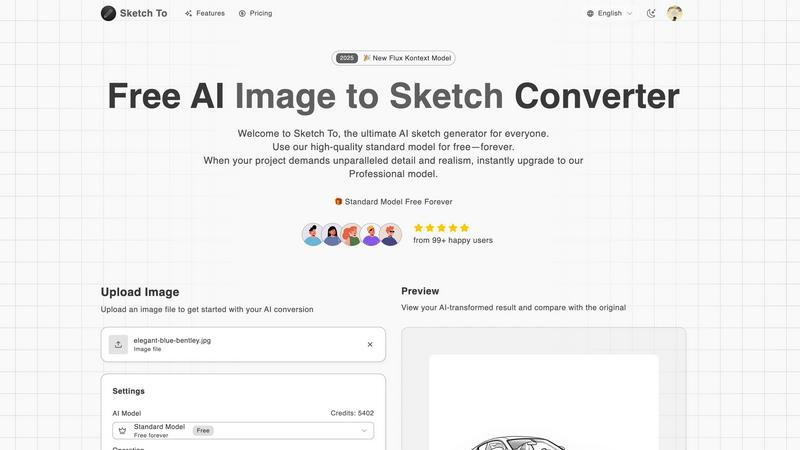
Sketch To excels at transforming photographs into exquisite pencil sketches using its advanced AI technology. This feature is perfect for artists and designers who wish to create beautiful and artistic representations of their photographs, making it a valuable tool for creative expression.
Sketch to Image AI
The ability to convert sketches into realistic images is a standout feature of Sketch To. Utilizing the Professional model, users can achieve incredible detail and accuracy, breathing life into their sketches and enabling them to create photorealistic artworks that are both captivating and immersive.
Instant Processing
Sketch To offers instant processing capabilities, ensuring that users receive their transformed images or sketches in seconds. This powerful cloud-based AI processing infrastructure allows for seamless and efficient creative workflows, enabling users to focus on their artistry without unnecessary delays.
High Resolution Output
Users can download their creations in high resolution, making them suitable for both print and professional use. This feature ensures that the quality of the artwork remains uncompromised, allowing artists and designers to present their work in the best possible light.
Use Cases
DigitalMagicWand
Content Authenticity Verification and Refinement
Ideal for educators, publishers, and corporate compliance teams, the platform is used to audit content for AI origin, ensuring integrity and originality. Writers and marketers then leverage the humanizer to refine AI-assisted drafts into polished, undetectable copy that resonates with a human touch, safeguarding brand voice and bypassing detection software for seamless content publication.
Professional Music Production and DJing
Music producers and audio engineers utilize UnMixIt™ Pro to deconstruct tracks into isolated stems for high-quality remixes, samples, and audio restoration. DJs create custom acapellas and mashups, while musicians use Digital Ear™ to transcribe complex piano performances into editable MIDI files for scoring, arrangement, or further digital manipulation, accelerating the creative workflow.
Scalable Graphic Design and Asset Creation
Graphic designers, marketers, and small business owners generate unique, royalty-free visual content on demand. They create marketing imagery, social media graphics, and product mockups from text prompts. Furthermore, they produce professional, resolution-independent vector logos, icons, and illustrations instantly, dramatically reducing dependency on stock assets and freelance designers.
Efficient E-commerce and Photo Post-Production
Online retailers and photographers automate tedious editing tasks. They use Instant Background Removal to quickly create clean, white-background product shots for catalogs. The AI Image Editor is employed to seamlessly place products into lifestyle scenes, remove imperfections, or swap models, enabling the creation of vast, high-quality visual catalogs without the cost and time of traditional photoshoots.
Sketch To
Social Media Enhancement
For hobbyists and casual creators, Sketch To provides an excellent opportunity to enhance social media posts with visually appealing sketches. Users can convert everyday photographs into artistic representations, making their profiles more engaging and distinctive.
Professional Design Projects
Designers can leverage Sketch To for high-quality visuals needed in commercial projects. The Professional model allows for the creation of stunning, photorealistic images that can be used in marketing materials, branding, and presentations, ensuring a professional touch in all creative endeavors.
Educational Projects
Students and educators can utilize Sketch To for various academic projects, transforming images into sketches for presentations, reports, or artistic assignments. The tool makes learning more interactive and visually appealing, helping to capture the attention of audiences.
Artistic Exploration
Artists looking to explore different styles and techniques can benefit from the diverse range of artistic styles offered by Sketch To. Whether experimenting with pencil sketches or watercolor effects, the platform encourages creativity and innovation in art-making.
Overview
About DigitalMagicWand
DigitalMagicWand™ is the definitive, all-in-one creative suite for the modern professional, powered by a sophisticated ecosystem of artificial intelligence. It transcends the limitations of single-purpose tools by offering a comprehensive, integrated platform for mastering image, audio, video, and text content. Designed for creators, marketers, musicians, writers, and businesses who demand excellence, it provides elite-grade AI capabilities that transform complex creative tasks into simple, intuitive processes. The core value proposition is unparalleled creative sovereignty: the ability to enhance, generate, and manipulate digital media with precision and ease, all within a single, cohesive environment. From detecting AI-authored text with forensic accuracy to generating breathtaking vector art from a simple description, DigitalMagicWand empowers you to execute visionary projects without technical barriers, ensuring your output is not only professional but truly exceptional.
About Sketch To
Sketch To is an avant-garde AI-powered tool that revolutionizes the creative process by seamlessly converting images into sketches and sketches into photorealistic images. Catering to both casual creators and seasoned professionals, this sophisticated software harnesses cutting-edge artificial intelligence technology to produce artistic transformations with exceptional precision and detail. Ideal for hobbyists seeking to elevate their social media aesthetics or designers in need of high-quality visuals for commercial projects, Sketch To offers an unparalleled solution. Users benefit from an intuitive interface that requires no software installation, allowing them to effortlessly upload images, select from a variety of artistic styles, and generate high-resolution outputs in mere seconds. The platform introduces a free standard model with trial credits, making it accessible for everyone to explore its capabilities. For those pursuing superior quality in their artwork, the professional model unlocks an extraordinary realm of realism and detail, catering to the highest creative demands.
Frequently Asked Questions
DigitalMagicWand FAQ
What makes your AI Text Humanizer different from others?
Our humanizer utilizes proprietary linguistic algorithms engineered to identify and reconstruct the underlying statistical patterns inherent in AI-generated text. It doesn't just paraphrase; it fundamentally rewrites content to mimic the nuanced flow, variance, and idiosyncrasies of authentic human writing. This ensures it passes even the most advanced detectors while fully preserving the original meaning, tone, and informational value, making it the most reliable solution for critical applications.
Can UnMixIt™ Pro truly separate instruments with studio quality?
Yes. UnMixIt™ Pro is built on cutting-edge AI models trained on vast, high-fidelity music libraries to recognize and isolate distinct instrumental components with remarkable precision. While perfection depends on the original mix's complexity, it delivers separation quality previously only achievable in professional studios, providing clean, usable stems for remixing, sampling, and professional audio production with minimal artifacts.
Do I need design skills to create vector images?
Absolutely not. Our vector generation tool is designed for users of all skill levels. You simply provide a text description of the image you envision—such as "a minimalist logo of a mountain and sun" or "a cartoon rocket in flat design." Our AI interprets your description and generates a fully scalable, editable SVG file automatically, eliminating the need for manual drawing or complex vector software expertise.
How does the AI Image Editor understand what I want to change?
The editor combines advanced computer vision with natural language processing. When you highlight an area and type a command (e.g., "remove the trash can," "replace the sky with a sunset"), the AI analyzes the visual context of the selected region and semantically interprets your text prompt. It then generates new pixel data that contextually matches the surrounding image, allowing for intelligent, realistic edits that follow your specific instructions.
Sketch To FAQ
How does Sketch To work?
Sketch To utilizes advanced AI algorithms to analyze images and convert them into sketches or vice versa. Users simply upload their files, select a style, and the AI processes the conversion in seconds, providing high-quality results.
Can I use Sketch To for commercial purposes?
Yes, Sketch To offers a Professional model that is specifically designed for commercial use. This plan unlocks superior detail and realism, making it an excellent choice for professional designers and artists.
What types of images can I upload?
Sketch To supports multiple image formats, allowing users to upload various file types for conversion. The maximum file size for uploads is 5MB, ensuring that users can easily work with their images.
Is there a free trial available?
Absolutely! New users are offered trial credits to explore the capabilities of Sketch To. The free standard model allows users to experience the tool's features before deciding to upgrade to the Professional model for enhanced quality.
Alternatives
DigitalMagicWand Alternatives
DigitalMagicWand™ represents the pinnacle of integrated AI creativity, a premier all-in-one platform for processing visuals, audio, video, and text. It stands as a definitive solution within the elite category of comprehensive AI assistants, engineered for those who demand a singular, powerful suite for multifaceted digital content creation. Even the most sophisticated tools may prompt exploration. Discerning users might seek alternatives to align with specific budgetary frameworks, require a distinct feature emphasis for a specialized workflow, or need a platform tailored to a particular operating environment or collaborative ecosystem. When evaluating other solutions, the astute professional prioritizes seamless integration, uncompromising output quality, and robust data sovereignty. The decision ultimately hinges on finding a platform whose capabilities and ethos resonate with your exclusive creative and operational standards.
Sketch To Alternatives
Sketch To is a cutting-edge AI-powered tool that allows users to transform images into stunning sketches and vice versa, catering to both casual creators and professional artists. As part of the AI Assistants category, it harnesses advanced artificial intelligence technology to deliver high-quality artistic conversions with remarkable detail and accuracy. Users often seek alternatives to Sketch To for various reasons, such as pricing, specific feature sets, or compatibility with different platforms. When choosing an alternative, it is essential to consider factors like the quality of image processing, ease of use, pricing models, and whether the solution aligns with your creative needs and project requirements.