
Playwriter vs Tailride
Side-by-side comparison to help you choose the right tool.

Playwriter
Playwriter lets AI agents control your actual Chrome browser with all your logins and extensions intact.
Last updated: March 18, 2026

Tailride
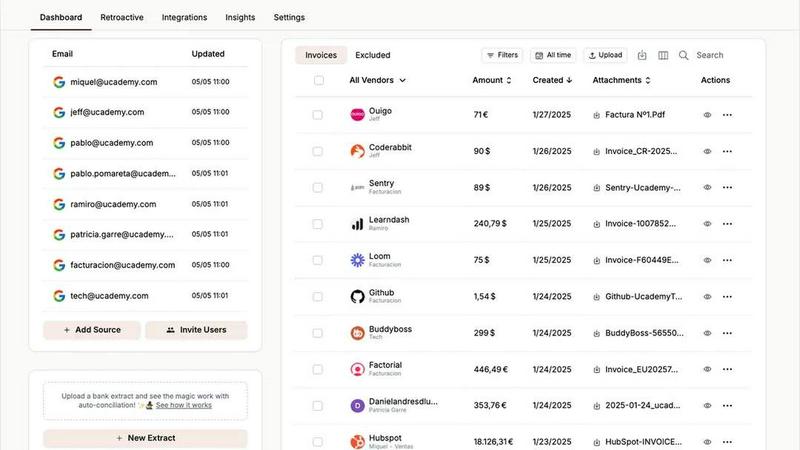
Transform your accounting with Tailride's AI-driven automation for seamless invoice and receipt management from email.
Last updated: February 28, 2026
Visual Comparison
Playwriter

Tailride
Feature Comparison
Playwriter
Your Authentic Browser Session
Playwriter's foundational feature is its ability to let AI agents operate directly within your existing, logged-in Chrome browser. This means every extension, saved password, session cookie, and personalized setting is immediately available to the automation. There is no spawning of a new Chrome process, which avoids doubling memory usage and, critically, bypasses modern bot detection systems that flag fresh, extension-less browser instances. The agent works within your established digital identity, enabling tasks that are impossible with clean sessions, such as interacting with authenticated web apps, using developer tools, or leveraging ad-blockers.
Full Playwright API via a Single Tool
Unlike other solutions that expose a limited, pre-defined set of actions, Playwriter grants agents the complete power of the Playwright automation library through one intelligent execute tool. This elegant design eliminates schema bloat from dozens of individual tool definitions, drastically reducing context window usage. The agent can write and execute any valid Playwright code—from complex selectors and performance profiling to setting breakpoints and handling dialogs—offering limitless flexibility and precision far beyond simple "click" or "type" wrappers.
Advanced Debugging & Live Editing Suite
Playwriter includes a professional-grade debugging environment built for collaboration between human and AI. You can set breakpoints to pause execution, inspect the live state of the DOM, and edit code on-the-fly. This feature transforms troubleshooting from a guessing game into an interactive session. When an agent encounters an unexpected element or fails a step, you can step in, diagnose the issue in real-time, modify the script, and continue execution seamlessly, creating a powerful feedback loop for perfecting automation scripts.
Lightweight Accessibility Snapshots
Instead of relying on bulky, bandwidth-heavy screenshots, Playwriter employs intelligent accessibility snapshots. These structured data representations of the page are typically only 5-20KB, compared to 100KB+ for images. They provide the AI agent with a complete semantic understanding of the page's structure, roles, states, and properties, enabling accurate element targeting without the visual noise. This makes interactions faster, more reliable, and significantly cheaper in terms of AI context token consumption.
Tailride
Inbox Scanning
Tailride’s inbox scanning feature revolutionizes the way you manage invoices by automatically monitoring your email accounts to identify and extract invoices, regardless of their format. This ensures that you never lose track of an important document, allowing you to focus on more strategic tasks while maintaining complete visibility of your incoming invoices.
Online Portals
With Tailride, you can extract invoices from any website effortlessly. This feature eliminates the hassle of manually logging into various online platforms to retrieve invoices. Instead, Tailride automates this process, saving you valuable time and allowing you to focus on core business activities while ensuring that all invoices are accounted for.
AI Processing
Tailride employs advanced AI processing to intelligently categorize and organize invoices and receipts based on customizable rules. This feature not only enhances accuracy but also minimizes the need for manual intervention, allowing you to trust that your financial documents are handled correctly and efficiently.
Reconciliation
The reconciliation feature of Tailride simplifies the matching of transactions with invoices, making it easy to identify any discrepancies or missing documents. This ensures that your financial records are always accurate and up to date, providing peace of mind during audits and financial reviews.
Use Cases
Playwriter
Automated Testing & QA with Real User Data
Quality Assurance engineers can deploy AI agents to perform end-to-end testing within a browser session that contains real user data and configurations. This allows for testing authenticated workflows, extension-dependent features, and personalized user journeys that are impossible to replicate in a clean, headless browser environment. The agent can execute complex test suites, while the human engineer oversees and intervenes for edge cases like CAPTCHAs.
AI-Assisted Research & Data Aggregation
Researchers and analysts can task an AI agent with gathering information from multiple sources that require login, such as private databases, subscription news sites, or social media platforms. The agent navigates using the human's existing credentials, bypassing paywalls and login barriers to collect, synthesize, and summarize data from across the authenticated web, dramatically accelerating the research process.
Repetitive Administrative Task Automation
Professionals burdened with daily web-based chores—filling out forms, generating reports from web dashboards, managing subscriptions, or organizing data across web apps—can offload these tasks to an AI. Since Playwriter uses the actual browser with all logins intact, the agent can reliably perform multi-step administrative workflows across different services without requiring credential re-entry or manual intervention at each step.
Interactive AI Pair-Programming for Web Development
Developers can use Playwriter with AI coding assistants like Cursor to interactively build and debug web applications. The AI can write Playwright scripts to test new features, profile performance, intercept network requests to mock API responses, and visually validate UI components—all within the developer's own browser where the local app is running. This creates a powerful, real-time pair-programming dynamic for front-end and full-stack development.
Tailride
Streamlined Workflow for Accountants
Accountants managing multiple clients can leverage Tailride to automate the extraction and organization of invoices, drastically reducing the time spent on manual entry. This allows them to focus on higher-value tasks, improving overall productivity and client satisfaction.
Efficient Expense Tracking for Businesses
Businesses can utilize Tailride to keep track of employee expenses by allowing team members to upload photos of their receipts via a mobile interface. This ensures that all expenses are documented and categorized, simplifying the reimbursement process and enhancing financial visibility.
Hassle-Free Invoice Management
Tailride offers an unparalleled solution for organizations that struggle with invoice chaos, especially during peak periods like end-of-quarter or tax season. By automating invoice extraction and organization, businesses can eliminate the stress of missing documents and maintain accurate financial reporting.
Enhanced Collaboration Across Teams
With Tailride, teams can invite colleagues to connect their inboxes, ensuring that everyone has access to the same organized financial documents. This collaborative feature helps to streamline communication and reduces the likelihood of lost invoices, fostering a more efficient working environment.
Overview
About Playwriter
Playwriter redefines the paradigm of AI-powered browser automation by granting agents a privileged, seamless connection to your authentic digital environment. It is the definitive solution for developers, engineers, and power users who demand their AI assistants operate with the same context, capabilities, and legitimacy as a human user. The core value proposition is unparalleled authenticity: instead of spawning a sterile, detectable headless instance, Playwriter provides a direct conduit to your live Chrome session, complete with all active logins, cookies, extensions, and user profiles. This eliminates the primary friction points of bot detection, re-authentication, and missing tooling that cripple other automation approaches. Through a sophisticated Chrome extension and a local CLI, it exposes the full, unadulterated Playwright API to any MCP-compatible client like Cursor, Claude Desktop, or VS Code, enabling agents to execute complex, real-world workflows. With advanced capabilities like ultra-compact accessibility snapshots, an integrated debugger, network interception, and video recording, Playwriter transforms your AI from a limited script-kiddie into a proficient, collaborative partner that works within your actual browser, not a simulated sandbox.
About Tailride
Tailride is a cutting-edge AI-powered accounting automation platform designed to streamline the often tedious process of invoice and receipt management. By connecting directly to your email inbox, Tailride intelligently detects, extracts, and processes invoices and receipts from both emails and attachments, significantly reducing the time spent on manual data entry. This innovative tool is perfect for accountants, business owners, and finance teams who manage multiple clients or projects, as it allows for seamless integration with popular systems like QuickBooks, Xero, and Google Drive. With features such as a Chrome extension for one-click invoice extraction from over 20 platforms, customizable AI rules for automatic categorization, and robust bank reconciliation capabilities, Tailride transforms the accounting workflow, making it efficient and stress-free. Say goodbye to the chaos of invoice management and hello to a world where your financial documents are organized and accessible at your fingertips.
Frequently Asked Questions
Playwriter FAQ
How does Playwriter handle security and privacy?
Playwriter is designed with a strict local-first philosophy. All connections are made via a WebSocket relay running on localhost:19988. No browser data, credentials, or automation commands are sent to any remote server. The entire communication loop—between the Chrome extension, the local relay, and your CLI or MCP client—occurs entirely on your machine. It is also open-source under the MIT license, allowing for complete code transparency and auditability.
What happens if the agent encounters a CAPTCHA or consent wall?
This is where Playwriter's collaborative model shines. When the AI agent hits a human verification step like a CAPTCHA, a cookie consent banner, or a two-factor authentication prompt, it will pause. You, the human operator, see this happen in real-time in your browser. You simply solve the CAPTCHA or click "Accept," then re-enable the extension for the tab. The agent will snapshot the new state and continue its workflow seamlessly, effectively teaming human intuition with AI automation.
Can I use Playwriter with multiple browser tabs or agents?
Yes. The local WebSocket relay multiplexes sessions. You can attach the Playwriter extension to multiple tabs in your browser (each indicated by a green icon), and control them independently via different CLI instances or agent sessions. This allows for parallel automation workflows. Conversely, multiple agents or tools can interact with a single attached tab, enabling complex multi-agent collaboration scenarios.
Is Playwriter limited to only Chrome?
The current implementation is built as a Chrome extension, leveraging Chrome's DevTools Protocol (CDP) for deep integration and control. This provides access to the full Chrome ecosystem, including Chromium-based browsers like Edge, Brave, and Opera. Support for other browser engines like Firefox or Safari would require a different architectural approach and is not currently available.
Tailride FAQ
How does Tailride extract invoices from my inbox?
Tailride connects natively to your email account, allowing it to monitor and extract invoices from incoming messages automatically. It can handle various formats, ensuring no invoice goes unnoticed.
Can I use Tailride with any email client?
Yes, Tailride is compatible with all email clients, including Gmail, Outlook, and any service that supports IMAP. This flexibility ensures that you can manage invoices from your preferred platform seamlessly.
What happens if I need to find past invoices?
Tailride allows you to retroactively search for past invoices in your inbox. You can filter searches by custom ranges, such as this month, this quarter, or even all time, making it easy to locate any financial document you need.
Is there a mobile app for Tailride?
While the content provided does not specify a mobile app, Tailride does offer features that allow users to upload physical receipts via messaging platforms like Telegram or WhatsApp, making it convenient for on-the-go expense management.
Alternatives
Playwriter Alternatives
Playwriter is an elite automation tool that grants AI agents direct, authenticated control over your actual Chrome browser session. It operates within the automation and AI agent orchestration category, solving the critical problem of agents working in isolated, sterile browser environments devoid of user context, logins, and extensions. Users may explore alternatives for various reasons, including specific budget constraints, a need for different platform support beyond Chrome, or requirements for particular integration methods not covered by the existing API. Some may seek solutions with different architectural approaches to browser control or security models. When evaluating options, prioritize solutions that offer genuine session persistence, low-resource accessibility data over bulky screenshots, and deep debugging capabilities. The ideal tool should provide seamless integration with your existing AI agent stack through standards like MCP, ensuring your agents can operate with the full context and permissions of a human user.
Tailride Alternatives
Tailride is an advanced AI-powered accounting automation platform that specializes in invoice and receipt management. It seamlessly integrates with your email and web services, extracting financial documents with precision using intelligent document recognition. As businesses increasingly seek efficient solutions to manage their financial workflows, users often explore alternatives to Tailride for various reasons, including pricing structures, feature sets, and compatibility with their existing platforms. When selecting a suitable alternative to Tailride, it is essential to consider the specific needs of your business. Look for solutions that offer robust document extraction capabilities, customizable automation features, and seamless integrations with your existing accounting software. Additionally, ensure that the alternative provides reliable security measures and user-friendly interfaces to enhance your overall experience.