
Octopods vs Playwriter
Side-by-side comparison to help you choose the right tool.

Octopods
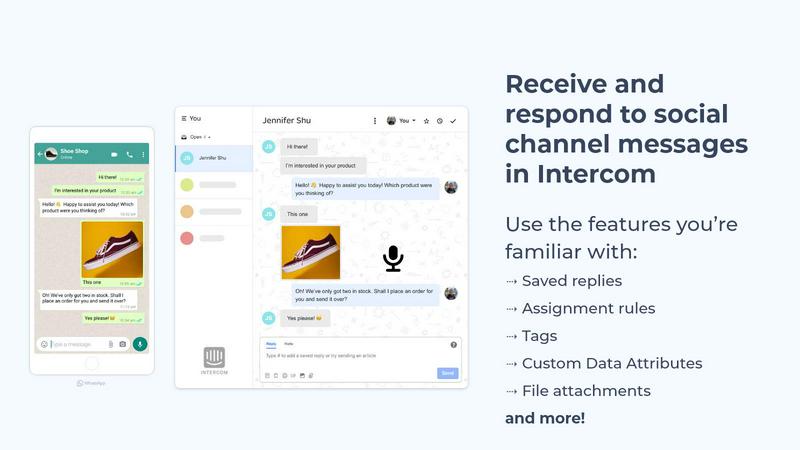
Octopods unifies WhatsApp, Telegram, Instagram, SMS, and more into one inbox for seamless customer communication.
Last updated: February 28, 2026

Playwriter
Playwriter lets AI agents control your actual Chrome browser with all your logins and extensions intact.
Last updated: March 18, 2026
Visual Comparison
Octopods
Playwriter

Feature Comparison
Octopods
Native Conversations
Octopods allows for the creation of native conversations directly within Intercom and HubSpot. This means your team can manage customer interactions without switching between different platforms, maintaining context and continuity throughout the conversation.
Rich Media Support
Enhance customer communication with rich media support that includes images, videos, audio files, documents, and GIFs. This feature allows businesses to provide engaging and informative interactions that resonate with customers, making conversations more dynamic and effective.
Proactive Outbound Messaging
Utilize proactive outbound messaging via customizable templates. This feature enables businesses to reach out to customers with tailored messages, ensuring timely communication that can improve customer retention and satisfaction.
Automatic Contact Matching
Prevent duplicates and streamline your communication process with automatic contact matching. This feature ensures that new contacts are efficiently matched with existing ones, maintaining a clean and organized customer database while reducing confusion.
Playwriter
Your Authentic Browser Session
Playwriter's foundational feature is its ability to let AI agents operate directly within your existing, logged-in Chrome browser. This means every extension, saved password, session cookie, and personalized setting is immediately available to the automation. There is no spawning of a new Chrome process, which avoids doubling memory usage and, critically, bypasses modern bot detection systems that flag fresh, extension-less browser instances. The agent works within your established digital identity, enabling tasks that are impossible with clean sessions, such as interacting with authenticated web apps, using developer tools, or leveraging ad-blockers.
Full Playwright API via a Single Tool
Unlike other solutions that expose a limited, pre-defined set of actions, Playwriter grants agents the complete power of the Playwright automation library through one intelligent execute tool. This elegant design eliminates schema bloat from dozens of individual tool definitions, drastically reducing context window usage. The agent can write and execute any valid Playwright code—from complex selectors and performance profiling to setting breakpoints and handling dialogs—offering limitless flexibility and precision far beyond simple "click" or "type" wrappers.
Advanced Debugging & Live Editing Suite
Playwriter includes a professional-grade debugging environment built for collaboration between human and AI. You can set breakpoints to pause execution, inspect the live state of the DOM, and edit code on-the-fly. This feature transforms troubleshooting from a guessing game into an interactive session. When an agent encounters an unexpected element or fails a step, you can step in, diagnose the issue in real-time, modify the script, and continue execution seamlessly, creating a powerful feedback loop for perfecting automation scripts.
Lightweight Accessibility Snapshots
Instead of relying on bulky, bandwidth-heavy screenshots, Playwriter employs intelligent accessibility snapshots. These structured data representations of the page are typically only 5-20KB, compared to 100KB+ for images. They provide the AI agent with a complete semantic understanding of the page's structure, roles, states, and properties, enabling accurate element targeting without the visual noise. This makes interactions faster, more reliable, and significantly cheaper in terms of AI context token consumption.
Use Cases
Octopods
Customer Support Enhancement
Octopods serves as an invaluable tool for customer support teams. By integrating multiple messaging channels into a single inbox, support agents can respond to inquiries swiftly and efficiently, leading to improved customer satisfaction.
Sales Team Efficiency
Sales teams can leverage Octopods to communicate with prospects across various platforms without losing context. By managing all interactions in one place, sales representatives can ensure that no lead is overlooked, ultimately boosting conversion rates.
Marketing Campaign Execution
Marketing teams can utilize the proactive outbound messaging feature to run campaigns across different messaging platforms. By creating tailored messages for each channel, they can enhance audience engagement and drive better results.
Operational Streamlining
Operational teams can benefit from Octopods by utilizing its tagging, assignment rules, and workflows. This allows for better task management and ensures that all team members are on the same page, leading to more efficient operations.
Playwriter
Automated Testing & QA with Real User Data
Quality Assurance engineers can deploy AI agents to perform end-to-end testing within a browser session that contains real user data and configurations. This allows for testing authenticated workflows, extension-dependent features, and personalized user journeys that are impossible to replicate in a clean, headless browser environment. The agent can execute complex test suites, while the human engineer oversees and intervenes for edge cases like CAPTCHAs.
AI-Assisted Research & Data Aggregation
Researchers and analysts can task an AI agent with gathering information from multiple sources that require login, such as private databases, subscription news sites, or social media platforms. The agent navigates using the human's existing credentials, bypassing paywalls and login barriers to collect, synthesize, and summarize data from across the authenticated web, dramatically accelerating the research process.
Repetitive Administrative Task Automation
Professionals burdened with daily web-based chores—filling out forms, generating reports from web dashboards, managing subscriptions, or organizing data across web apps—can offload these tasks to an AI. Since Playwriter uses the actual browser with all logins intact, the agent can reliably perform multi-step administrative workflows across different services without requiring credential re-entry or manual intervention at each step.
Interactive AI Pair-Programming for Web Development
Developers can use Playwriter with AI coding assistants like Cursor to interactively build and debug web applications. The AI can write Playwright scripts to test new features, profile performance, intercept network requests to mock API responses, and visually validate UI components—all within the developer's own browser where the local app is running. This creates a powerful, real-time pair-programming dynamic for front-end and full-stack development.
Overview
About Octopods
Octopods is an innovative communication integration platform designed to streamline customer interactions across multiple messaging channels, including WhatsApp, Telegram, Instagram, LINE, Viber, SMS, WeChat, and more. By seamlessly connecting these channels to your Intercom or HubSpot inbox, Octopods transforms the way businesses engage with their customers. Unlike basic integrations that often lead to context switching, Octopods facilitates native conversations within Intercom and HubSpot, enabling teams to utilize essential features such as tags, saved replies, assignment rules, workflows, and AI capabilities without disruption. This makes it an ideal solution for support, sales, and operations teams looking to enhance their customer engagement strategies. With a setup process that takes merely minutes and an unwavering commitment to privacy—no conversation data is retained—Octopods ensures that businesses can reach their customers where they are most active.
About Playwriter
Playwriter redefines the paradigm of AI-powered browser automation by granting agents a privileged, seamless connection to your authentic digital environment. It is the definitive solution for developers, engineers, and power users who demand their AI assistants operate with the same context, capabilities, and legitimacy as a human user. The core value proposition is unparalleled authenticity: instead of spawning a sterile, detectable headless instance, Playwriter provides a direct conduit to your live Chrome session, complete with all active logins, cookies, extensions, and user profiles. This eliminates the primary friction points of bot detection, re-authentication, and missing tooling that cripple other automation approaches. Through a sophisticated Chrome extension and a local CLI, it exposes the full, unadulterated Playwright API to any MCP-compatible client like Cursor, Claude Desktop, or VS Code, enabling agents to execute complex, real-world workflows. With advanced capabilities like ultra-compact accessibility snapshots, an integrated debugger, network interception, and video recording, Playwriter transforms your AI from a limited script-kiddie into a proficient, collaborative partner that works within your actual browser, not a simulated sandbox.
Frequently Asked Questions
Octopods FAQ
How does Octopods enhance my existing tools?
Octopods integrates seamlessly with Intercom and HubSpot, allowing you to manage conversations from multiple messaging channels without switching platforms, enhancing your team's efficiency.
Is my data safe with Octopods?
Yes, Octopods prioritizes user privacy by ensuring that no conversation data is retained. Your customer interactions remain secure, allowing you to focus on engagement without concerns about data privacy.
What messaging channels does Octopods support?
Octopods connects with over 18 messaging channels, including WhatsApp, Telegram, Instagram, LINE, Viber, SMS, WeChat, and more, ensuring you can reach customers on their preferred platforms.
How long does it take to set up Octopods?
The setup process for Octopods is designed to be quick and efficient, taking only a few minutes to get your messaging channels integrated into your Intercom or HubSpot inbox.
Playwriter FAQ
How does Playwriter handle security and privacy?
Playwriter is designed with a strict local-first philosophy. All connections are made via a WebSocket relay running on localhost:19988. No browser data, credentials, or automation commands are sent to any remote server. The entire communication loop—between the Chrome extension, the local relay, and your CLI or MCP client—occurs entirely on your machine. It is also open-source under the MIT license, allowing for complete code transparency and auditability.
What happens if the agent encounters a CAPTCHA or consent wall?
This is where Playwriter's collaborative model shines. When the AI agent hits a human verification step like a CAPTCHA, a cookie consent banner, or a two-factor authentication prompt, it will pause. You, the human operator, see this happen in real-time in your browser. You simply solve the CAPTCHA or click "Accept," then re-enable the extension for the tab. The agent will snapshot the new state and continue its workflow seamlessly, effectively teaming human intuition with AI automation.
Can I use Playwriter with multiple browser tabs or agents?
Yes. The local WebSocket relay multiplexes sessions. You can attach the Playwriter extension to multiple tabs in your browser (each indicated by a green icon), and control them independently via different CLI instances or agent sessions. This allows for parallel automation workflows. Conversely, multiple agents or tools can interact with a single attached tab, enabling complex multi-agent collaboration scenarios.
Is Playwriter limited to only Chrome?
The current implementation is built as a Chrome extension, leveraging Chrome's DevTools Protocol (CDP) for deep integration and control. This provides access to the full Chrome ecosystem, including Chromium-based browsers like Edge, Brave, and Opera. Support for other browser engines like Firefox or Safari would require a different architectural approach and is not currently available.
Alternatives
Octopods Alternatives
Octopods is a cutting-edge customer communication solution that seamlessly integrates over 18 messaging channels, including WhatsApp, Telegram, and Instagram, into your Intercom or HubSpot inbox. This innovative platform is designed for support, sales, and operations teams, enabling them to manage customer conversations effortlessly without the need for context switching. Users often seek alternatives due to various reasons such as pricing concerns, specific feature requirements, or compatibility with different platforms. When exploring alternatives to Octopods, it's essential to consider factors like the breadth of messaging channels supported, the ease of integration with existing systems, and the ability to maintain a cohesive workflow. Look for solutions that offer rich media support, robust automation features, and strong data management capabilities to ensure your team can engage customers effectively and efficiently.
Playwriter Alternatives
Playwriter is an elite automation tool that grants AI agents direct, authenticated control over your actual Chrome browser session. It operates within the automation and AI agent orchestration category, solving the critical problem of agents working in isolated, sterile browser environments devoid of user context, logins, and extensions. Users may explore alternatives for various reasons, including specific budget constraints, a need for different platform support beyond Chrome, or requirements for particular integration methods not covered by the existing API. Some may seek solutions with different architectural approaches to browser control or security models. When evaluating options, prioritize solutions that offer genuine session persistence, low-resource accessibility data over bulky screenshots, and deep debugging capabilities. The ideal tool should provide seamless integration with your existing AI agent stack through standards like MCP, ensuring your agents can operate with the full context and permissions of a human user.