
Gleem.AI Studio vs Image3D AI
Side-by-side comparison to help you choose the right tool.

Gleem.AI Studio
Gleem.AI Studio empowers you to effortlessly create, edit, and personalize stunning visuals in one intuitive workspace.
Last updated: February 28, 2026

Image3D AI
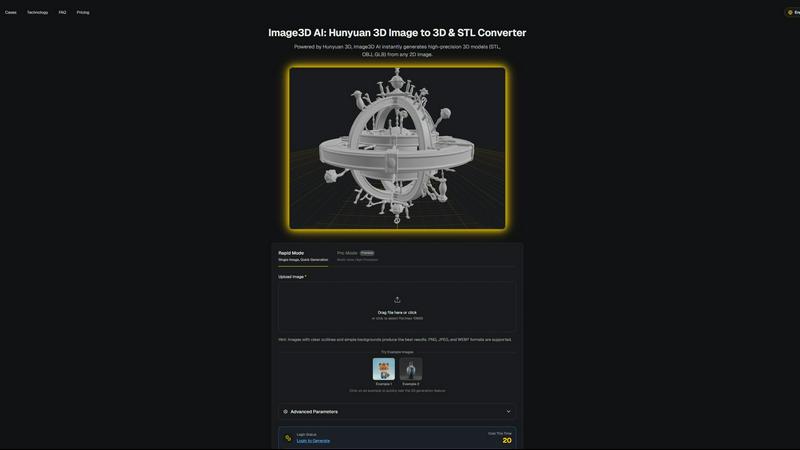
Image3D AI effortlessly converts any 2D image into high-precision 3D models ready for professional use in minutes.
Last updated: March 1, 2026
Visual Comparison
Gleem.AI Studio

Image3D AI
Feature Comparison
Gleem.AI Studio
Text-to-Image Generator
Transform your ideas into stunning visuals effortlessly with the text-to-image generator. Users can specify their desired size and style, while the Prompt Enhance feature refines their input to ensure optimal results, making it accessible for anyone, regardless of technical skill.
AI Image Editing
The AI-driven image editing tool allows for comprehensive modifications within a single platform. Users can add or remove elements, adjust poses, apply filters, and even restore older images, all through a user-friendly interface that prioritizes creative expression.
AI Avatars
Gleem.AI Studio offers the capability to generate and personalize AI avatars that can be integrated into any scene. This feature enables users to appear in various images, adjust their avatar's poses, or explore different outfits without the need for a traditional photoshoot, enhancing versatility in visual content.
Project Organization
Each project in Gleem.AI Studio is housed in its own dedicated space, preserving all prompts, edits, and versions for easy access. This organization fosters a streamlined approach to creative workflows, allowing for simple reuse and iteration of ideas while maintaining a clear version history.
Image3D AI
Rapid Mode
Rapid Mode allows users to generate 3D models quickly from a single image. Ideal for simple projects, this feature is perfect for those who require speed and efficiency without compromising on quality.
Pro Mode
Pro Mode caters to professionals seeking high precision. By utilizing multiple views of an object, this mode enables the creation of intricate, detailed 3D models, ensuring that every nuance is captured accurately.
Multi-Format Support
Image3D AI supports various file formats, including STL, OBJ, and GLB. This versatility ensures that the generated models can be seamlessly integrated into different workflows, whether for 3D printing, gaming, or web applications.
User-Friendly Interface
The platform boasts an intuitive user interface that simplifies the entire process. Users can easily upload images, navigate through settings, and generate models without any prior 3D design experience, making the technology accessible to all.
Use Cases
Gleem.AI Studio
Marketing Asset Creation
Gleem.AI Studio is ideal for marketers seeking to produce engaging visuals for campaigns. The streamlined workflow allows for quick iterations on graphics, ensuring that marketing assets are both appealing and aligned with strategic objectives without the need for extensive design skills.
Social Media Visuals
Content creators can effortlessly generate and edit eye-catching visuals for social media platforms. With the integrated tools, users can create tailored images that resonate with their audience, enhancing their online presence and engagement.
Product Image Generation
E-commerce businesses can utilize Gleem.AI Studio to create high-quality product images that stand out. The platform's AI capabilities facilitate the enhancement of visuals, making it easier to showcase products attractively and effectively to potential customers.
Creative Experimentation
For designers and artists, Gleem.AI Studio provides a space for experimentation with visuals. The ability to generate images from text prompts and edit them in real-time allows creators to explore new ideas and concepts without the constraints of traditional design software.
Image3D AI
Game Development
Game developers can leverage Image3D AI to rapidly produce game-ready assets. The AI-generated models are compatible with popular engines like Unity and Unreal, streamlining the asset creation workflow and significantly reducing development time.
E-commerce Applications
E-commerce businesses can utilize Image3D AI to convert product images into interactive 3D models. This enhancement allows consumers to engage with products virtually, improving the online shopping experience and boosting sales.
3D Printing
For 3D printing enthusiasts, Image3D AI serves as a powerful STL converter. Users can generate high-precision, print-ready files directly from their images, simplifying the transition from concept to tangible product.
Architectural Visualization
Architects and designers can benefit from Image3D AI by quickly generating architectural models. This capability not only saves time but also enhances the visualization process, allowing for more efficient project presentations and client approvals.
Overview
About Gleem.AI Studio
Gleem.AI Studio is a sophisticated, unified AI image workspace designed for creators who prioritize simplicity and creativity over technical complexity. This platform streamlines the processes of image generation, editing, and revision into one cohesive environment, allowing users to evolve their ideas step by step without the hassle of switching between multiple tools. Tailored for marketers, content creators, and small teams, Gleem.AI Studio empowers users to produce consistent, high-quality visuals rapidly. The intuitive design ensures that users can focus on their creative flow without getting bogged down by advanced settings or fragmented workflows. Whether you are crafting marketing materials, social media graphics, or product imagery, Gleem.AI Studio provides a seamless, efficient experience, enabling you to bring your visual concepts to life with ease.
About Image3D AI
Image3D AI is the forefront of automated 3D content creation, designed to revolutionize how designers, developers, and creators approach 3D modeling. This cutting-edge platform leverages Tencent's Hunyuan 3D engine to convert standard 2D images into production-ready 3D models in mere seconds. The primary audience includes those who may not possess extensive 3D modeling skills but still wish to create high-quality assets for various applications, ranging from 3D printing to game development. By eliminating the complexity typically associated with traditional 3D modeling software, Image3D AI democratizes access to high-fidelity 3D asset creation. Its core value proposition lies in its speed and accessibility, allowing users to generate detailed 3D models from single photographs or multi-view images. Whether the aim is to produce a precise mesh for printing or a textured asset for immersive environments, Image3D AI streamlines the entire process, making it an indispensable tool for anyone looking to transform 2D concepts into stunning 3D realities quickly.
Frequently Asked Questions
Gleem.AI Studio FAQ
What types of images can I create with Gleem.AI Studio?
Gleem.AI Studio offers versatile capabilities for creating a wide range of images, including marketing assets, social media graphics, product images, and personal avatars, all tailored to your specific needs.
How does the Prompt Enhance feature work?
The Prompt Enhance feature refines user input by optimizing text prompts for better image generation results. This means you can write naturally, and the platform will adjust your prompts to achieve professional-quality outcomes.
Is it necessary to have design experience to use Gleem.AI Studio?
No, Gleem.AI Studio is designed for users of all skill levels. Its intuitive interface and AI-driven tools allow anyone to create and edit stunning visuals without needing extensive design experience.
How does the project organization feature help users?
The project organization feature allows users to maintain dedicated spaces for each project, preserving all relevant prompts, edits, and version histories. This fosters efficient workflow management and simplifies the creative process, making it easy to revisit and iterate on past work.
Image3D AI FAQ
What types of images work best with Image3D AI?
High-contrast images with clear outlines and simple backgrounds yield the best results. Avoid blurry, low-light, or occluded subjects for optimal conversion quality.
How long does it take to generate a 3D model?
Using the Rapid Mode, a 3D model can be generated in approximately 60 seconds, significantly reducing the time compared to traditional modeling techniques.
What file formats can I export my models in?
Image3D AI allows exports in several formats, including STL for 3D printing, OBJ for general 3D editing, and GLB for web and AR applications, ensuring flexibility for various use cases.
Do I need any prior 3D modeling experience to use Image3D AI?
No prior experience is required. The platform is designed for users of all skill levels, making it easy for anyone to start creating high-quality 3D models from 2D images.
Alternatives
Gleem.AI Studio Alternatives
Gleem.AI Studio is an all-encompassing AI image workspace tailored for those who prioritize creativity over technical hurdles. Positioned within the marketing category, it simplifies the process of generating and editing visuals, ensuring a seamless experience without the need for extensive setup or tool switching. Users often seek alternatives due to various reasons, including pricing, feature sets, or specific platform requirements that may not align with their unique needs. When considering an alternative to Gleem.AI Studio, it's crucial to evaluate aspects such as ease of use, integration capabilities, the breadth of features, and how well the platform supports your creative workflow. The ideal alternative should enhance your creative process while maintaining simplicity and efficiency, ensuring that you remain focused on delivering compelling visual content.
Image3D AI Alternatives
Image3D AI is an advanced platform designed for the swift transformation of 2D images into high-precision 3D models, positioning itself within the elite category of automated 3D content creation tools. Users frequently seek alternatives to Image3D AI due to various factors such as pricing, specific feature sets, or compatibility with their existing workflows and platforms. The decision to explore alternatives often hinges on the need for tailored functionalities, the availability of diverse export formats, or the desire for enhanced customization options. When evaluating alternatives, it is essential to consider factors like the quality of the generated 3D models, the types of output formats offered, ease of integration into existing design pipelines, and the overall user experience. Additionally, the speed of conversion and the sophistication of the AI technology behind the tool are critical aspects that can significantly influence productivity and workflow efficiency.