
FilexHost vs SupaSidebar
Side-by-side comparison to help you choose the right tool.

FilexHost
Effortlessly host and share your files with instant URLs using FilexHost's simple drag-and-drop interface.
Last updated: February 28, 2026

SupaSidebar
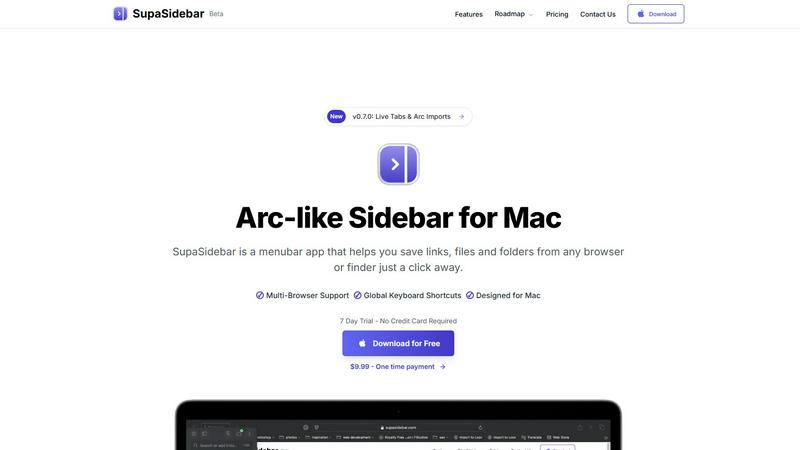
SupaSidebar enhances your Mac by providing instant access to links, files, and folders from any browser with a click.
Last updated: February 28, 2026
Visual Comparison
FilexHost

SupaSidebar
Feature Comparison
FilexHost
Instant Subdomains
FileXHost provides instant subdomains for every uploaded file, allowing users to share links effortlessly. The format (your-file.filex.host) requires zero setup, making it incredibly simple to generate a shareable link in seconds.
Free SSL Encryption
Security is paramount at FileXHost. Every link generated comes with free SSL encryption, ensuring that files are shared securely without the risk of interception or unauthorized access, thus enhancing user trust and peace of mind.
Smart View Modes
FileXHost offers smart view modes that allow users to choose how their files are presented. Whether opting for direct rendering for immediate viewing or a download page for file retrieval, users have the flexibility to format the experience according to their needs.
Optional Password Protection and Expiry Settings
For added security, FileXHost allows users to set optional password protection and configure expiry settings for their files. Users can select expiry durations ranging from 24 hours to indefinite hosting, providing control over who accesses their files and for how long.
SupaSidebar
Arc-Inspired Sidebar
The unique Arc-like sidebar design allows users to access their most important links, files, and folders with simplicity and style. It keeps everything organized in a visually appealing layout, enhancing both aesthetics and functionality.
Global Keyboard Shortcuts
SupaSidebar is built with productivity in mind, featuring global keyboard shortcuts that allow users to save or copy URLs with ease. By pressing CMD CTRL S to save and CMD CTRL C to copy, users can manage their resources without disrupting their workflow.
Recent Activity Tracking
The application includes a Recents feature that tracks every website visited within the last 48 hours. This functionality ensures that users can swiftly locate their recent work, eliminating the hassle of sifting through countless tabs.
Fast Search Capabilities
With the powerful search functionality, users can find any file, folder, website, or app instantly by pressing CMD CTRL K and typing their query. This feature greatly reduces the time spent switching between applications, allowing for a more streamlined workflow.
Use Cases
FilexHost
Professional Document Sharing
FileXHost is ideal for professionals who need to share client reports, presentations, or other documents. The streamlined process ensures that recipients receive files quickly and securely, enhancing communication and collaboration.
Developer Hosting
Developers can leverage FileXHost to host landing pages, mock APIs, or web application files without the hassle of server management. The platform’s instant file hosting means quick iterations and testing without delays, fostering innovation.
Digital Product Distribution
Creators and entrepreneurs can use FileXHost to distribute digital products, such as eBooks or software, directly to customers. The simplicity of generating shareable links allows for efficient sales funnels and customer engagement.
Personal File Backup
Individuals seeking a reliable backup solution for personal files can utilize FileXHost to store and share important documents and media. The user-friendly features ensure that files remain accessible and secure without technical barriers.
SupaSidebar
Efficient Resource Management
For professionals who manage multiple projects, SupaSidebar acts as a central hub for organizing links, documents, and applications. This organization allows users to quickly access everything they need without the clutter of numerous open tabs.
Academic Research
Students can utilize SupaSidebar to save articles, resources, and notes in one accessible location. The ability to track recent activity enables swift reference to materials needed for assignments and presentations.
Creative Workflows
Designers and content creators can benefit from the sidebar by pinning inspiration links and essential tools, allowing for quick access while working on projects. This helps maintain focus and fosters creativity without interruptions.
Streamlined Team Collaboration
SupaSidebar can be a vital tool for teams working on collaborative projects. Members can share links and files easily, ensuring everyone has access to the necessary resources to stay aligned and productive.
Overview
About FilexHost
FileXHost is an innovative file hosting solution designed to streamline the process of sharing files effortlessly and securely. Targeted at professionals, developers, and digital creators, FileXHost transcends traditional file sharing by offering a user-friendly experience that eliminates the complexities typically associated with file hosting. Users can effortlessly upload various file types, ranging from documents and media to complete websites, with a simple drag-and-drop interface. The platform generates instant, secure URLs that can be shared without the need for recipient logins or complicated server configurations. With built-in smart rendering technology, FileXHost ensures that every file is displayed optimally, thus enhancing viewer engagement and interaction. This makes it the go-to solution for anyone seeking frictionless file delivery while maintaining control over accessibility and security.
About SupaSidebar
SupaSidebar is a sophisticated menubar application designed specifically for Mac users, revolutionizing the way individuals manage and navigate their digital workspace. By offering an Arc-inspired sidebar, SupaSidebar enables effortless organization and instant access to links, files, and folders directly from any browser or Finder. This innovative tool is tailored for busy professionals, students, and anyone who regularly juggles multiple applications and tabs, providing a seamless approach to enhance productivity. With its intuitive keyboard shortcuts, users can quickly save or copy URLs, significantly improving their browsing experience. SupaSidebar integrates flawlessly with all major browsers, including Safari, Chrome, Firefox, and Brave, ensuring that your workflow remains uninterrupted. The core value proposition of SupaSidebar lies in its ability to foster organization, maintain focus, and create a distraction-free environment, empowering users to concentrate on what truly matters in their endeavors. With features designed to streamline workflow, SupaSidebar is an essential companion for anyone seeking to maximize efficiency on their Mac.
Frequently Asked Questions
FilexHost FAQ
What is FileXHost?
FileXHost is a versatile file hosting and sharing platform that allows users to upload a variety of file types and generate instant, secure URLs for easy sharing. It is designed for professionals, developers, and creators looking for an efficient way to manage file distribution.
Is it really free?
Yes, FileXHost offers a free plan that allows users to host up to 1,000 files with a maximum size of 25MB each. This plan includes ad-supported access with a 7-day expiry for each file, making it ideal for quick sharing and testing.
What file types are supported?
FileXHost supports a wide range of file types, including PDFs, Excel sheets, images, audio, video, ZIP archives, and HTML projects. Its smart rendering engine ensures that each file type is displayed optimally for the viewer.
How do I update my site?
Updating a site on FileXHost is straightforward. Users simply need to upload a new version of the file or project they wish to update. The platform will generate a new secure link, ensuring that the latest version is always accessible to viewers.
SupaSidebar FAQ
Is SupaSidebar a browser extension?
No, SupaSidebar is a standalone menubar application for Mac that integrates with all major browsers, ensuring that your data remains on your device while providing you with a streamlined workspace.
Which browsers does SupaSidebar work with?
SupaSidebar is compatible with all major browsers, including Safari, Chrome, Firefox, and Brave, allowing users to manage their links and files seamlessly across different platforms.
What macOS version do I need?
To use SupaSidebar, you need macOS version 13 or later. This ensures optimal performance and compatibility with the latest features.
Where is my data stored?
Your data is stored locally on your Mac, ensuring privacy and security. SupaSidebar does not transmit your information to external servers, keeping your data safe while you work.
Alternatives
FilexHost Alternatives
FilexHost is a premier solution in the realm of file hosting and sharing, designed for ease and efficiency. With its drag-and-drop interface, users can instantly upload various file types and receive a shareable URL within seconds. This service is particularly appealing to professionals, developers, and creators who seek a seamless way to distribute files without the complexities often associated with traditional hosting methods. Users frequently explore alternatives to FilexHost for various reasons, including pricing structures, feature sets, and specific platform requirements. As the landscape of digital file sharing evolves, it’s essential for users to consider factors such as storage limits, security features, and the user experience when evaluating alternatives. A suitable alternative should not only meet their immediate needs but also provide a reliable and intuitive solution for future file-sharing endeavors.
SupaSidebar Alternatives
SupaSidebar is a sophisticated menubar application designed exclusively for Mac users, revolutionizing how individuals manage their digital workspace. This innovative tool falls within the productivity and management category, offering seamless access to links, files, and folders directly from any browser or Finder. Busy professionals, students, and multitaskers frequently seek alternatives to SupaSidebar to explore different pricing structures, feature sets, or platform compatibility that may better suit their unique workflows and preferences. When searching for an alternative, users should consider essential factors such as ease of use, integration with various browsers, and the ability to streamline their digital organization. Additionally, features that enhance productivity, like keyboard shortcuts and tab management, can significantly impact user experience. Ultimately, the right alternative should align with individual needs and elevate one's efficiency in managing online resources.