
Dokta vs Fieldtics
Side-by-side comparison to help you choose the right tool.

Dokta automates document management for SMBs and freelancers, simplifying invoicing, contracts, and cash flow in under 60 seconds.
Last updated: April 4, 2026

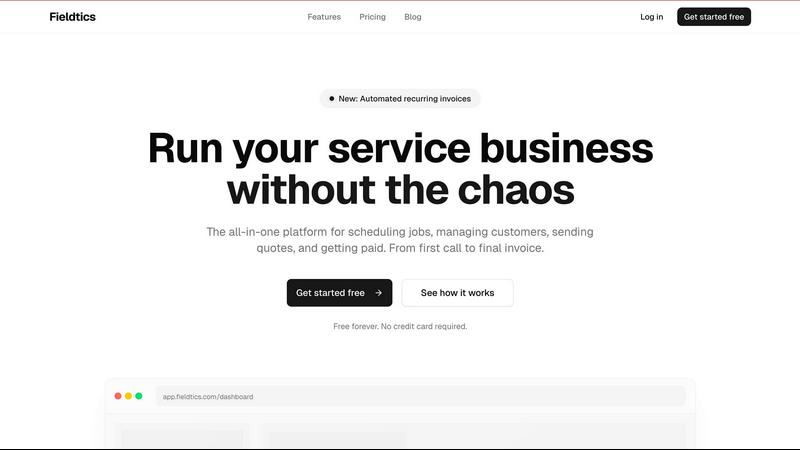
Fieldtics is your elite all-in-one platform for effortlessly managing scheduling, customer relations, invoicing, and.
Last updated: February 28, 2026
Visual Comparison
Dokta

Fieldtics
Feature Comparison
Dokta
Automated Invoice Management
Dokta revolutionizes how freelancers and SMBs handle invoicing. Users can create professional invoices and quotes within a few clicks, ensuring that billing is both swift and efficient. With automated tracking of payments and reminders for overdue invoices, the platform reduces the manual workload and enhances cash flow management.
Real-Time Financial Overview
With a clear visualization of cash flow, Dokta provides users with insights into their financial health. Users can monitor billed and received revenue, outstanding payments, and VAT obligations through a comprehensive, user-friendly dashboard. This feature enables informed decision-making and financial planning.
Document Lifecycle Automation
Dokta manages the entire document lifecycle by automatically reading, classifying, and extracting key data from any document in less than a minute. This not only saves time but also ensures accuracy, making it easy for users to validate tasks such as payments and archiving with just one click.
Anomaly Detection and Data Security
Dokta prioritizes user security by implementing advanced anomaly detection. It identifies issues such as modified IBANs, duplicate entries, and inconsistent VAT rates, safeguarding users against potential fraud and errors. With data hosted securely in Europe and compliant with GDPR regulations, users can trust that their information is protected.
Fieldtics
Smart Job Scheduling
Fieldtics offers intelligent job scheduling capabilities that enable businesses to assign jobs efficiently, ensuring optimal resource allocation. With real-time updates, teams can adapt quickly to changing circumstances, enhancing productivity and customer satisfaction.
Seamless Customer Relationship Management
The platform's robust CRM tools empower businesses to manage customer interactions effortlessly. Users can track leads, manage customer details, and maintain a comprehensive communication history, fostering stronger relationships and improving service delivery.
Effortless Invoicing and Payment Processing
Fieldtics simplifies the invoicing process by allowing users to generate and send invoices with just a few clicks. The integrated payment processing feature enables quick and secure transactions, ensuring that businesses get paid promptly without hassle.
Advanced Project Management
Manage every aspect of your projects from a single dashboard. Fieldtics allows teams to track deadlines, assign tasks, and monitor real-time progress, ensuring that all jobs are moving forward efficiently and effectively.
Use Cases
Dokta
Freelance Consultant
A freelance consultant can utilize Dokta to automate their invoicing process. By setting up recurring contracts with automatic monthly billing, they can focus on delivering value to their clients rather than managing paperwork.
Creative Projects
For creative freelancers, Dokta simplifies the workflow by allowing them to send quotes with acceptance links. The seamless transition from quote to invoice in just one click enhances efficiency and ensures timely payments.
Auto-Entrepreneurs
Auto-entrepreneurs benefit from Dokta’s automated reminders for URSSAF deadlines and payment tracking. This feature allows them to maintain compliance and manage their finances without the stress of manual tracking.
Small Business Management
Small businesses can use Dokta to build an extensive client database from their documents. This not only helps in managing client relationships but also provides insights into cash flow, enabling better financial forecasting and planning.
Fieldtics
Home Cleaning Services
For home cleaning businesses, Fieldtics streamlines job scheduling and customer management. Teams can easily assign cleaners to jobs, track customer preferences, and manage invoicing, resulting in enhanced client satisfaction and operational efficiency.
Landscaping Companies
Landscaping firms can leverage Fieldtics to manage project timelines, track expenses, and communicate with clients seamlessly. The platform's flexibility allows for quick adjustments based on weather conditions or client requests, ensuring timely project completion.
Electrical Contractors
Fieldtics is ideal for electrical contractors who need to manage multiple jobs simultaneously. With its advanced scheduling features and CRM tools, contractors can prioritize tasks, track job progress, and maintain clear communication with clients, leading to improved service delivery.
Plumbing Services
Plumbing businesses can benefit from Fieldtics by managing service calls, tracking time spent on jobs, and automating invoicing processes. This allows for better time management and ensures that clients receive accurate billing for services rendered.
Overview
About Dokta
Dokta is an advanced AI-powered document management platform tailored for freelancers, solo entrepreneurs, auto-entrepreneurs, and small to medium-sized businesses (SMBs). Its primary function is to streamline the often cumbersome document lifecycle, allowing users to effortlessly manage invoices, quotes, and contracts. By simply dropping any document into the platform—be it a photo, scan, or PDF—Dokta's sophisticated AI engine takes over, reading, classifying, and extracting essential data in under 60 seconds. This efficiency not only eliminates the risk of lost files and missed deadlines but also liberates users from spending their weekends on tedious administrative tasks. With Dokta, businesses can create professional invoices and quotes, track payments in real time, and automate reminders for unpaid invoices. It builds a client database from user documents, thus enhancing cash flow management. Whether you are a freelance developer, a consultant, or a trades contractor, Dokta places your documents at the center of your operations, managed seamlessly by AI.
About Fieldtics
Fieldtics is a premier all-in-one platform meticulously crafted for service-oriented businesses seeking to streamline their operations and enhance efficiency. Designed for a diverse range of service professionals, Fieldtics centralizes essential tools into a single, user-friendly interface. It excels in job scheduling, customer relationship management, invoicing, and payment processing, ensuring that every aspect of your workflow is seamlessly integrated. The platform is tailored for teams operating both in-office and in the field, offering robust web and mobile applications that guarantee real-time connectivity and collaboration. Fieldtics sets itself apart with customizable dashboards, branding, and menus, allowing businesses to maintain their unique identity while benefiting from a cohesive operational framework. Moreover, its ability to integrate with existing tools automates workflows and centralizes data, empowering businesses to manage leads, track time, handle expenses, and create recurring invoices with clarity and control. This holistic approach positions Fieldtics as an indispensable asset for any service-driven enterprise striving for growth and operational excellence.
Frequently Asked Questions
Dokta FAQ
How does Dokta ensure the security of my documents?
Dokta ensures document security through AES-256 encryption, with all data hosted in Europe and compliant with GDPR regulations. This guarantees that your sensitive information is protected from unauthorized access.
Can I try Dokta without a credit card?
Yes, Dokta offers a free tier that allows you to manage 15 documents per month without the need for a credit card, making it easy to explore the platform’s features without any financial commitment.
What types of documents can I upload to Dokta?
Dokta supports various document types, including photos, scans, and PDFs. This flexibility allows users to integrate their existing documents into the platform with ease.
How quickly can I expect my documents to be processed?
Dokta’s AI engine analyzes and extracts key data from documents in under 60 seconds, ensuring that you can manage your administrative tasks efficiently and without delay.
Fieldtics FAQ
What types of businesses can benefit from Fieldtics?
Fieldtics is designed for service-oriented businesses across various industries, including cleaning, landscaping, plumbing, and electrical services, among others. Its features cater to the unique needs of these sectors.
Is Fieldtics easy to integrate with existing tools?
Yes, Fieldtics integrates seamlessly with a wide range of existing applications. This capability allows businesses to sync data, automate workflows, and maintain a centralized operational system without disruption.
Can I customize the Fieldtics dashboard?
Absolutely. Fieldtics offers extensive customization options, allowing users to tailor their dashboards, branding, and menus to reflect their business identity and enhance user experience.
What support options are available for Fieldtics users?
Fieldtics provides various support options, including priority support for professional users and dedicated account management for businesses on custom plans. Users can access resources and assistance to ensure they maximize the platform's potential.
Alternatives
Dokta Alternatives
Dokta is an advanced AI-driven document management platform tailored for freelancers, solo entrepreneurs, auto-entrepreneurs, and small to medium-sized businesses (SMBs). It excels in automating the document lifecycle, allowing users to effortlessly manage invoices, quotes, contracts, and more. With its cutting-edge AI technology, Dokta classifies and extracts critical data from documents in under 60 seconds, significantly enhancing productivity and organization. Users often seek alternatives to Dokta for various reasons, including pricing structures, feature sets, and specific platform needs. As businesses evolve and grow, their requirements may change, prompting the search for solutions that better align with their operational goals. When selecting an alternative, consider factors such as ease of use, scalability, integration capabilities, and the specific features that cater to your unique business processes.
Fieldtics Alternatives
Fieldtics is an all-in-one platform designed specifically for service businesses, streamlining essential operations such as scheduling, customer management, invoicing, and payment processing. By integrating various tools into a cohesive system, Fieldtics helps businesses navigate the complexities of daily operations with ease and efficiency. However, users often seek alternatives to Fieldtics due to various reasons, including pricing structures, specific feature sets, and unique platform needs that may not be fully addressed by Fieldtics. When exploring alternatives, it is important to consider factors such as user experience, integration capabilities with existing tools, scalability, and customization options that align with the distinct identity of your business.