
Blur Image Online vs vaethat
Side-by-side comparison to help you choose the right tool.

Blur Image Online
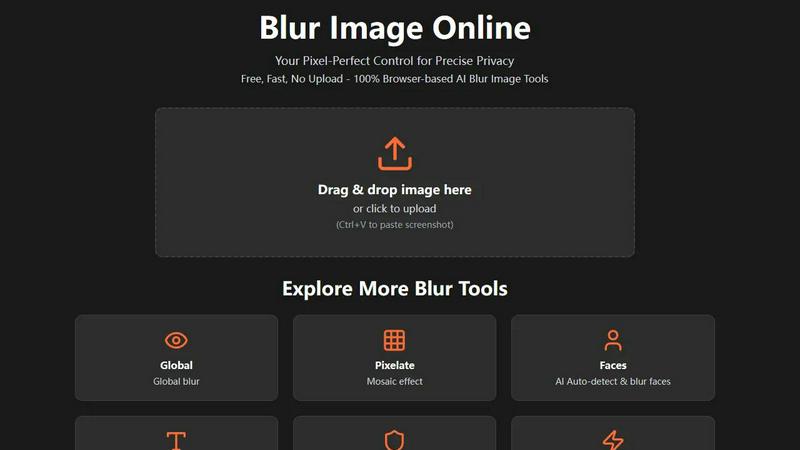
Blur Image Online provides effortless, precise tools to expertly blur faces, text, and sensitive details with total.
Last updated: February 28, 2026

vaethat
Vaethat is an AI tool that effortlessly enhances architectural renders, preserving design integrity and elevating.
Last updated: February 28, 2026
Visual Comparison
Blur Image Online
vaethat

Feature Comparison
Blur Image Online
Selective Blur
The Selective Blur feature offers unparalleled control, allowing users to determine which sections of their images remain sharp and which are obscured. This tool is ideal for hiding sensitive details, focusing attention on a particular subject, or creating a refined depth-of-field effect with professional precision.
Global Blur
The Global Blur tool provides a seamless way to apply a uniform blur across an entire image with a single click. Users can then utilize the innovative Eraser and Blur modes to selectively restore clarity or add additional blur to specific areas, perfect for achieving personalized visual effects and sustaining artistic flexibility.
Pixelate
With the Pixelate feature, users can transform selected areas into uniform blocks, effectively obscuring details while maintaining an aesthetically pleasing appearance. This tool allows for full customization, enabling users to apply pixelation to the entire image or specific selections, complemented by dedicated restore tools for precise editing control.
Blur Faces
The Blur Faces tool employs advanced AI to automatically detect and blur faces in images, ensuring privacy with just one click. For users who desire further precision, Manual Drawing Mode allows for additional blur application or precise erasure, combining automation with hands-on editing capabilities.
vaethat
AI Render Upscaling
Vaethat employs sophisticated AI algorithms to upscale 3D architectural renders, increasing both resolution and sharpness while ensuring that the geometry remains clean and consistent. This capability allows users to present their designs with breathtaking clarity, making every detail stand out.
Detail Refinement
The tool excels in enhancing fine textures, edges, and small architectural elements, resulting in a crisper and more polished look. This feature is particularly beneficial when it comes to showcasing intricate designs where every detail is crucial for achieving a realistic representation.
Material and Lighting Enhancement
Vaethat improves the perceived realism of architectural renders by boosting material definition, contrast, and lighting balance. This feature ensures that materials appear authentic and lighting conditions are rendered accurately, enhancing the overall impact of the visualization.
Noise and Artifact Cleanup
One of the standout features of Vaethat is its ability to reduce noise and common rendering artifacts. This results in cleaner, presentation-ready images that are free from distractions, allowing the focus to remain on the architectural design itself.
Use Cases
Blur Image Online
Protecting Personal Information
When sharing images on social media or public platforms, individuals can use Blur Image Online to obscure sensitive information like addresses or credit card details. This ensures that personal data is shielded from prying eyes while allowing the rest of the image to be shared freely.
Emphasizing Subjects in Photography
Photographers can utilize the Selective Blur feature to highlight their subjects by blurring distracting backgrounds or foreground elements. This technique not only enhances the visual appeal but also directs focus where it is most needed, creating striking, professional-quality images.
Editing for Marketing and Branding
Graphic designers can leverage the various blur tools to create compelling marketing materials. By selectively blurring text or logos, they can maintain brand integrity while ensuring that sensitive information stays confidential, thus enhancing the overall effectiveness of their promotional content.
Creating Artistic Motion Effects
Artists and designers can use the Motion Blur tool to impart a sense of movement to static images, adding dynamic energy to their work. Whether for digital art or enhancing action shots, this feature allows for creative expression through the simulation of motion, enhancing visual storytelling.
vaethat
Architectural Presentations
Vaethat is ideal for architectural professionals preparing presentations for clients or stakeholders. By enhancing the quality of renders, users can effectively communicate their design vision and secure approvals with compelling visual materials.
Portfolio Development
Architects and visualizers can utilize Vaethat to create stunning visuals for their portfolios. The enhanced clarity and detail provided by the tool help to showcase their best work, making it more likely to attract potential clients and employers.
Marketing and Promotional Materials
For marketing teams within architectural firms, Vaethat serves as a powerful tool to produce high-quality images for brochures, websites, and social media. The enhanced renders contribute to more effective promotional strategies, elevating the firm's brand image.
Collaborative Projects
Vaethat facilitates collaboration among design teams by allowing multiple images to be uploaded and enhanced simultaneously. This feature streamlines workflows and ensures that all team members have access to high-quality visuals that maintain design consistency.
Overview
About Blur Image Online
Blur Image Online is a state-of-the-art, browser-based tool crafted for both individuals and professionals who prioritize image enhancement while safeguarding their privacy. This sophisticated platform empowers users to blur specific areas of their images with pinpoint accuracy, ensuring that sensitive details remain confidential. Ideal for photographers, graphic designers, and anyone looking to protect personal information in their visuals, Blur Image Online boasts a suite of specialized tools designed to cater to a variety of needs. Its main value proposition lies in delivering professional-quality edits swiftly and effortlessly, all without compromising user privacy. With the assurance of secure processing and no file uploads, users can achieve remarkable results in just a few clicks, retaining full control over their images at all times.
About vaethat
Vaethat is an advanced AI-powered tool meticulously designed for the architectural visualization industry, specifically tailored to elevate the quality of 3D renders. By leveraging cutting-edge AI technology, Vaethat significantly enhances the clarity, sharpness, and overall realism of architectural images, making it an indispensable asset for architects and visualizers. The primary value proposition of Vaethat lies in its ability to streamline the rendering process, allowing professionals to achieve presentation-ready images with minimal effort. With a focus on preserving the design intent, Vaethat empowers users to transform their architectural projects into striking visual representations that captivate clients and stakeholders. Whether you are looking to refine textures, improve lighting, or enhance material definition, Vaethat is your go-to solution for achieving unparalleled results in architectural imagery.
Frequently Asked Questions
Blur Image Online FAQ
Is my image secure when using Blur Image Online?
Yes, your image is secure. Our platform does not store any uploaded images, and we guarantee that our AI cannot reverse the blur applied to your images.
How do I access the tools on Blur Image Online?
To access the tools, simply visit blur-image.org in any modern browser. From there, you can upload your image and choose from our seven specialized blur options for editing.
Can I undo changes made during editing?
Yes, our platform supports non-destructive editing, allowing you to make adjustments and revert changes easily without losing your original image quality.
What types of blur effects can I apply?
Blur Image Online offers a variety of blur effects, including selective blur, global blur, pixelation, face blurring, text blurring, sensitive information blurring, and motion blur, catering to diverse editing needs.
vaethat FAQ
How does the AI render enhancer calculate credits?
Vaethat calculates credits based on the number of images processed and the complexity of the enhancements applied. Users can easily monitor their credit usage through the platform.
Can I use the archviz AI upscaler with V-Ray, Lumion, Enscape, 3ds Max, and SketchUp?
Yes, Vaethat is compatible with major architectural software including V-Ray, Lumion, Enscape, 3ds Max, and SketchUp, making it a versatile tool for professionals across various platforms.
What makes this AI post-production tool different from manual editing?
Unlike manual editing, which can be time-consuming and requires extensive skill, Vaethat automates the enhancement process with advanced AI, delivering consistent and high-quality results in a fraction of the time.
Can I cancel my subscription anytime?
Yes, Vaethat offers flexible subscription options, allowing users to cancel their plans at any time without penalties, ensuring that you have control over your usage and expenses.
Alternatives
Blur Image Online Alternatives
Blur Image Online is an advanced, browser-based tool that falls within the category of design and image editing tools. It serves as a solution for individuals and professionals alike who require precise blurring capabilities to protect sensitive information in their images. Users often seek alternatives to such tools due to various factors, including pricing, the need for additional features, compatibility with different platforms, or personal preferences for user interface and experience. When choosing an alternative, it is essential to consider key aspects such as the quality of edits, ease of use, privacy policies, and whether the tool offers the specific functionalities required for your projects. Additionally, evaluating customer support and user feedback can provide insight into the reliability and performance of the tool you are considering.
vaethat Alternatives
Vaethat is an advanced AI tool specifically designed for architectural visualization professionals, enabling them to upscale 3D renders, enhance details, and improve clarity while preserving the integrity of their designs. As a premium solution in the design tools category, it addresses the unique needs of archviz experts who seek to elevate their visual presentations and showcase their projects with greater realism and precision. Users often pursue alternatives to Vaethat due to various factors such as pricing, the breadth of features, or specific platform compatibility. As professionals assess their options, it is crucial to consider aspects like ease of use, the quality of enhancements, and the overall value offered by competing tools. The right alternative should not only meet functional requirements but also align with the user’s workflow and creative vision.