
Gleem.AI Studio vs SimpleDraw
Side-by-side comparison to help you choose the right tool.

Gleem.AI Studio
Gleem.AI Studio empowers you to effortlessly create, edit, and personalize stunning visuals in one intuitive workspace.
Last updated: February 28, 2026

SimpleDraw
Create precise scale drawings and floor plans effortlessly online with SimpleDraw's intuitive and powerful tools.
Last updated: March 1, 2026
Visual Comparison
Gleem.AI Studio

SimpleDraw
Feature Comparison
Gleem.AI Studio
Text-to-Image Generator
Transform your ideas into stunning visuals effortlessly with the text-to-image generator. Users can specify their desired size and style, while the Prompt Enhance feature refines their input to ensure optimal results, making it accessible for anyone, regardless of technical skill.
AI Image Editing
The AI-driven image editing tool allows for comprehensive modifications within a single platform. Users can add or remove elements, adjust poses, apply filters, and even restore older images, all through a user-friendly interface that prioritizes creative expression.
AI Avatars
Gleem.AI Studio offers the capability to generate and personalize AI avatars that can be integrated into any scene. This feature enables users to appear in various images, adjust their avatar's poses, or explore different outfits without the need for a traditional photoshoot, enhancing versatility in visual content.
Project Organization
Each project in Gleem.AI Studio is housed in its own dedicated space, preserving all prompts, edits, and versions for easy access. This organization fosters a streamlined approach to creative workflows, allowing for simple reuse and iteration of ideas while maintaining a clear version history.
SimpleDraw
Accurate Measurements & Scale Drawing
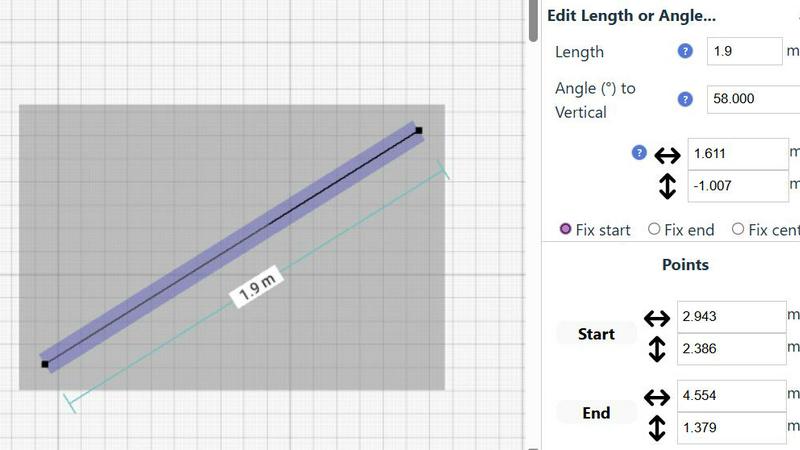
SimpleDraw provides the precision of professional CAD software while maintaining simplicity. Users benefit from accurate measurements and smart alignment features that ensure every drawing is to scale, facilitating a seamless design experience.
Specialized Floor Plan Creator
The dedicated Floor Plan Mode allows users to create detailed and accurate floor plans effortlessly. With simple tools to add walls, windows, doors, and furniture, users can visualize their spaces effectively, making it perfect for home renovations and interior designs.
Smart Alignment System
This feature assists in placing points and lines with pinpoint accuracy. The smart alignment system provides visual indications, guiding users to position elements precisely where they intend, making the drawing process intuitive and efficient.
Non-Destructive Editing
SimpleDraw offers complete control over every element of your drawing with 100% non-destructive editing. Users can modify any aspect of their designs at any time, with easy undo and redo options, allowing for a flexible and iterative design process.
Use Cases
Gleem.AI Studio
Marketing Asset Creation
Gleem.AI Studio is ideal for marketers seeking to produce engaging visuals for campaigns. The streamlined workflow allows for quick iterations on graphics, ensuring that marketing assets are both appealing and aligned with strategic objectives without the need for extensive design skills.
Social Media Visuals
Content creators can effortlessly generate and edit eye-catching visuals for social media platforms. With the integrated tools, users can create tailored images that resonate with their audience, enhancing their online presence and engagement.
Product Image Generation
E-commerce businesses can utilize Gleem.AI Studio to create high-quality product images that stand out. The platform's AI capabilities facilitate the enhancement of visuals, making it easier to showcase products attractively and effectively to potential customers.
Creative Experimentation
For designers and artists, Gleem.AI Studio provides a space for experimentation with visuals. The ability to generate images from text prompts and edit them in real-time allows creators to explore new ideas and concepts without the constraints of traditional design software.
SimpleDraw
Kitchen & Bathroom Renovations
Homeowners can utilize SimpleDraw to plan their kitchen and bathroom renovations with precision. By visualizing layouts and accurate measurements, users can ensure their design choices fit perfectly before committing to any changes.
Room Layouts & Furniture Planning
Interior designers and DIY enthusiasts can design room layouts for bedrooms, living rooms, or offices. SimpleDraw allows users to see how furniture will fit in their space, ensuring that every piece complements the overall aesthetic.
Complete House & Apartment Plans
For real estate professionals or property owners, SimpleDraw enables the creation of comprehensive floor plans for homes and apartments. This is ideal for rental listings or detailed space planning, showcasing properties with clarity.
Community-Driven Design Improvements
Users can actively participate in the development of SimpleDraw by providing feedback and suggestions. Joining the community fosters a collaborative environment where users can influence future features and enhancements.
Overview
About Gleem.AI Studio
Gleem.AI Studio is a sophisticated, unified AI image workspace designed for creators who prioritize simplicity and creativity over technical complexity. This platform streamlines the processes of image generation, editing, and revision into one cohesive environment, allowing users to evolve their ideas step by step without the hassle of switching between multiple tools. Tailored for marketers, content creators, and small teams, Gleem.AI Studio empowers users to produce consistent, high-quality visuals rapidly. The intuitive design ensures that users can focus on their creative flow without getting bogged down by advanced settings or fragmented workflows. Whether you are crafting marketing materials, social media graphics, or product imagery, Gleem.AI Studio provides a seamless, efficient experience, enabling you to bring your visual concepts to life with ease.
About SimpleDraw
SimpleDraw is an innovative, browser-based scale drawing solution that reimagines the world of design by making professional-grade drafting accessible to everyone. This elite tool is engineered for homeowners, DIY enthusiasts, interior designers, and project planners who crave precision without the complexities and costs associated with traditional CAD software. SimpleDraw empowers users to create impeccably accurate floor plans, elevations, and technical drawings through a user-friendly interface that requires no prior expertise. With its seamless online platform, users can dive straight into their design projects without the need for downloads, installations, or mandatory registrations. SimpleDraw's core value proposition lies in delivering elite design capabilities directly at your fingertips, ensuring that anyone can visualize and execute their spatial ideas with grace and accuracy from the moment they open their browser.
Frequently Asked Questions
Gleem.AI Studio FAQ
What types of images can I create with Gleem.AI Studio?
Gleem.AI Studio offers versatile capabilities for creating a wide range of images, including marketing assets, social media graphics, product images, and personal avatars, all tailored to your specific needs.
How does the Prompt Enhance feature work?
The Prompt Enhance feature refines user input by optimizing text prompts for better image generation results. This means you can write naturally, and the platform will adjust your prompts to achieve professional-quality outcomes.
Is it necessary to have design experience to use Gleem.AI Studio?
No, Gleem.AI Studio is designed for users of all skill levels. Its intuitive interface and AI-driven tools allow anyone to create and edit stunning visuals without needing extensive design experience.
How does the project organization feature help users?
The project organization feature allows users to maintain dedicated spaces for each project, preserving all relevant prompts, edits, and version histories. This fosters efficient workflow management and simplifies the creative process, making it easy to revisit and iterate on past work.
SimpleDraw FAQ
How does SimpleDraw ensure accurate measurements?
SimpleDraw employs a sophisticated measurement system that provides real-time, dynamic contextual measurements as you draw. This guarantees that all elements are accurately represented and to scale.
Is there a need to download or install SimpleDraw?
No, SimpleDraw operates entirely within your web browser. Users can start drawing immediately without the hassle of software installations or account creations, ensuring a frictionless experience.
What skills do I need to use SimpleDraw?
SimpleDraw is designed to be intuitive and user-friendly, requiring no prior CAD experience. Whether you are a beginner or an experienced designer, its features are accessible to all skill levels.
Can I collaborate with others using SimpleDraw?
While SimpleDraw focuses on individual user experiences, joining the SimpleDraw community via Discord allows users to share insights, seek feedback, and collaborate on design ideas with others.
Alternatives
Gleem.AI Studio Alternatives
Gleem.AI Studio is an all-encompassing AI image workspace tailored for those who prioritize creativity over technical hurdles. Positioned within the marketing category, it simplifies the process of generating and editing visuals, ensuring a seamless experience without the need for extensive setup or tool switching. Users often seek alternatives due to various reasons, including pricing, feature sets, or specific platform requirements that may not align with their unique needs. When considering an alternative to Gleem.AI Studio, it's crucial to evaluate aspects such as ease of use, integration capabilities, the breadth of features, and how well the platform supports your creative workflow. The ideal alternative should enhance your creative process while maintaining simplicity and efficiency, ensuring that you remain focused on delivering compelling visual content.
SimpleDraw Alternatives
SimpleDraw is a premier web-based tool that empowers users to create precision scale drawings and floor plans with ease. As a cutting-edge solution in the design tools category, it caters to various users, including homeowners, DIY enthusiasts, and professional designers, who seek high-quality drafting without the complexities of traditional CAD software. Users often explore alternatives to SimpleDraw due to factors such as pricing, specific feature sets, or the need for compatibility with different platforms. When selecting an alternative, it's essential to consider the usability, feature richness, and overall performance, ensuring that the tool meets your design requirements while maintaining a user-friendly experience.