
Cosy
Elevate your Slack community with Cosy, automating onboarding and member connections for effortless engagement.
VisitPublished on:
November 13, 2025
Pricing:
About Cosy
Cosy is an innovative tool engineered to transform Slack into a dynamic community hub, designed specifically for community leaders, managers, and organizations seeking to cultivate vibrant and interactive environments. By streamlining essential workflows through automation, Cosy enhances member engagement while significantly reducing the manual effort typically required in community management. With features such as automated onboarding, member introductions, and a fully searchable directory, it empowers community managers to focus on fostering relationships and connections. Each new member receives a warm welcome, and existing members remain engaged and informed, creating a thriving online community. By leveraging the power of automation, Cosy minimizes the workload, allowing community managers to concentrate on building strong ties and facilitating meaningful interactions among members. Its seamless integration with Slack makes it not only an essential tool but also a game changer for those looking to optimize their community management efforts effectively.
Features of Cosy
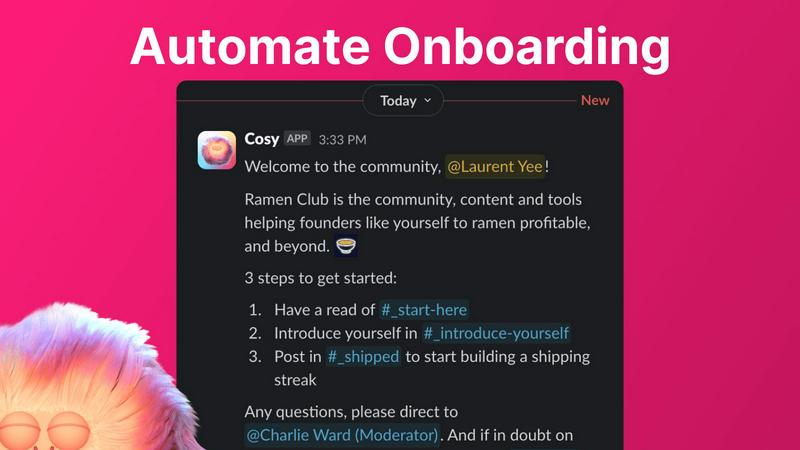
Automate Onboarding
Cosy allows community managers to create and automate up to 10 distinct onboarding welcome DM sequences. This feature ensures that every new member receives a personalized welcome message, either from the manager or the Cosy bot, either immediately upon joining or at a scheduled time. The messages are fully customizable, allowing for the inclusion of names, links, and emojis, thus providing a warm and tailored introduction to the community.
Connect Your Members
With the member introduction feature, Cosy enhances engagement by automatically introducing community members to one another via direct messages. This feature operates on a customizable cadence, ensuring that opted-in members are regularly introduced. The introduction occurs in a three-person DM including the Cosy bot, allowing members to easily initiate conversations, thereby fostering a more connected and engaged community.
Member Directory
Cosy's searchable member directory is created within Slack, enabling community members to easily find and connect with each other. Members can customize their profiles and fill in specific fields, making it effortless for others to search for keywords and filter profiles. This feature empowers members to network effectively and promotes a more engaged community atmosphere without leaving the Slack platform.
Content Highlights
This feature allows community managers to quickly surface the top 10 most engaging posts within a specific channel or across all public channels. Using simple commands like /most-engaged-messages or /unreplied-messages, managers can identify key content and enhance community interaction, ensuring that valuable discussions are not overlooked and that conversations remain vibrant.
Use Cases of Cosy
Efficient Community Onboarding
In a fast-paced environment, community managers can utilize Cosy's automated onboarding feature to ensure that every new member feels welcomed. By setting up automated DMs, managers can save hours of manual effort while guaranteeing that new members receive essential information and resources promptly.
Enhanced Member Networking
Cosy's member introduction feature fosters a culture of connection within the community. By automatically introducing members based on predefined settings, community managers can ensure that members are consistently engaging with one another, leading to stronger relationships and a more dynamic community.
Simplified Member Discovery
With the member directory, community members can easily discover and connect with others who share similar interests or expertise. This feature empowers members to network effectively, facilitating collaboration and enhancing the overall community experience.
Spotlighting Valuable Content
Community managers can leverage Cosy's content highlights feature to keep discussions lively and relevant. By identifying and promoting the most engaging posts or unanswered queries, managers can encourage participation and ensure that the community remains active and thriving.
Frequently Asked Questions
What types of communities can benefit from using Cosy?
Cosy is ideal for various types of communities, including professional networks, interest-based groups, and organizational teams. Its features cater to any group looking to enhance engagement and streamline management within Slack.
How does the onboarding automation work?
The onboarding automation feature allows community managers to create tailored DM sequences that welcome new members upon joining the Slack workspace. These messages can be customized and scheduled based on the manager's preferences, ensuring a personalized experience.
Can I customize the member directory fields?
Yes, Cosy allows community managers to create a customizable member directory with up to 10 fields. Managers can choose the type of information members need to fill in, tailoring the directory to fit the community's specific needs.
Is there a limit on the number of members I can onboard?
Cosy offers a free plan for up to 250 members, and a 30-day trial for unlimited members, allowing community managers to explore all features without limitations during the trial period.
Explore more in this category:
Similar to Cosy
DebutPin
Indie product playground — ship, and collect pins


Egmatic
No-code 2D game editor: visual node logic, drag-and-drop scenes, live preview. Exports to Windows, macOS, Linux, Android, iOS, Web.
Kody Tools
Free collection of online developer utilities, code formatters, and digital converters designed to streamline your daily workflow.
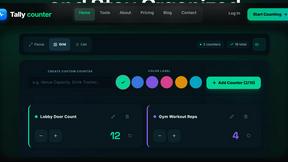
Tally Counter
Online tally counter for tracking attendance, workouts, inventory, visitors, sports scores, habits, and everyday counting tasks.
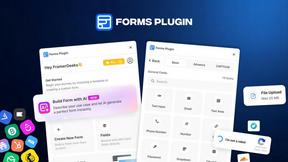
Forms Plugin
The #1 Native Form Builder Plugin for Framer - No Code, No Embeds, No External Platforms.

Product Launch Checklist
A free launch checklist for SaaS, apps, AI tools and more. Every step says why it matters and when you can skip it.