
3D AI Maker
Effortlessly create stunning 3D models from text or images in seconds with 3D AI Maker, completely free forever.
Visit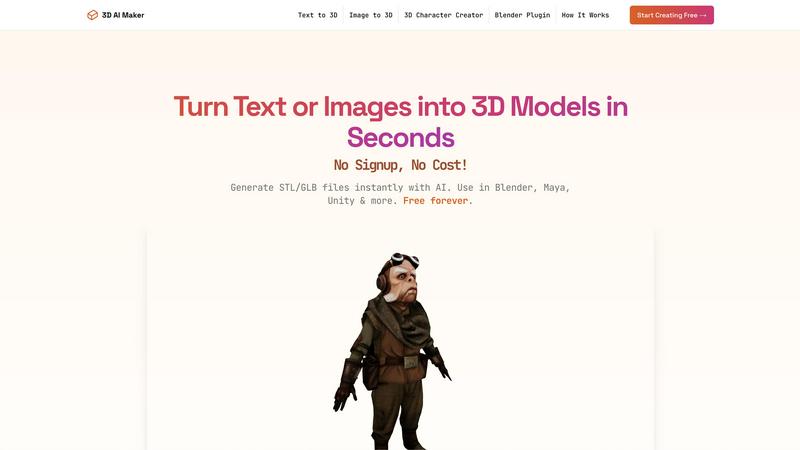
About 3D AI Maker
3D AI Maker is a groundbreaking, free AI-powered platform that fundamentally transforms the landscape of 3D model creation. With its sophisticated technology, users can effortlessly generate fully textured 3D models from simple text prompts or 2D images in a matter of seconds—approximately 20 seconds to be precise. The platform is designed with an intuitive interface, allowing individuals with no prior 3D modeling experience to bring their creative visions to life. It caters to a diverse audience, including game developers, 3D artists focused on rapid prototyping, hobbyists passionate about 3D printing, and VR/AR creators in need of quick asset generation. Notably, 3D AI Maker integrates seamlessly with Blender and supports various file formats, positioning itself as a premier choice for anyone eager to explore the fascinating realm of 3D modeling without incurring financial burdens. With over 2 million models generated, 3D AI Maker is set to unleash creativity and streamline workflows, making professional-grade 3D design accessible to all.
Features of 3D AI Maker
AI-Powered 3D Generation
Leverage cutting-edge AI technology to transform your text prompts or 2D images into fully textured 3D models. This feature enhances creativity and expedites the modeling process, allowing users to iterate rapidly.
Direct Blender Integration
The 3D AI Maker plugin enables users to generate models directly within Blender. This seamless integration is particularly beneficial for those seeking a free alternative to other paid modeling tools, streamlining the workflow significantly.
Export GLB & STL Files
Easily download your generated models in GLB format for animations or STL format for 3D printing. This versatility ensures compatibility with popular software like Maya, ZBrush, and other leading 3D applications.
No Signup, No Costs
Experience the freedom of creating without financial constraints. 3D AI Maker offers 100% free access with no hidden fees or subscriptions, allowing users to start creating professional 3D characters and assets without barriers.
Use Cases of 3D AI Maker
Custom 3D Character Creation
Develop unique 3D characters tailored for video games, virtual reality experiences, or animated projects. This capability empowers creators to visualize their concepts instantly, enhancing storytelling and immersion.
3D Printing Projects
Transform your 2D images into STL files specifically designed for 3D printing. This feature is ideal for hobbyists and professionals looking to bring their designs into the physical world, making personalized keepsakes or prototypes.
Rapid Prototyping for Game Development
Game developers can utilize 3D AI Maker to create and iterate on assets quickly. The platform's speed and efficiency allow for rapid prototyping, helping teams bring their gaming concepts to life faster than ever before.
Asset Generation for VR/AR Applications
VR and AR creators can generate high-quality 3D assets in seconds, enabling them to focus on the immersive experience rather than getting bogged down in lengthy modeling processes. This enhances the quality and richness of virtual environments.
Frequently Asked Questions
Is 3D AI Maker really free?
Yes, 3D AI Maker is completely free to use. There is no signup required, and users can access all features without hidden costs or subscriptions.
How does this compare to Meshy or other tools?
3D AI Maker offers unlimited free exports and a user-friendly interface, making it an attractive alternative to Meshy and other paid modeling tools. The integration with Blender further enhances its value.
Can I use models commercially?
Yes, the models generated by 3D AI Maker can be used for commercial purposes. Users are encouraged to create and monetize their 3D assets without restrictions.
How do I install the Blender plugin?
Installing the Blender plugin is straightforward. Simply download the plugin from the 3D AI Maker website, follow the installation instructions provided, and start generating models directly within Blender.
Explore more in this category:
Similar to 3D AI Maker
GetYouTubeTranscript
Free YouTube transcripts on the web, a Chrome extension, and an API + MCP server so AI assistants can read YouTube.
layahost
Moderation, routing, intent and scoring for any text over one Jev-compatible API, hosted in the EU.



AudioVideo
Turn podcasts, narration, voice recordings, or music into visual content with an audio-aware AI video generator.

Motion Control AI
Create motion-controlled character videos by transferring dance, gestures, timing, and camera movement from a reference video.

Piggipi
Launch Telegram ads without searching, negotiating, or messaging channel owners